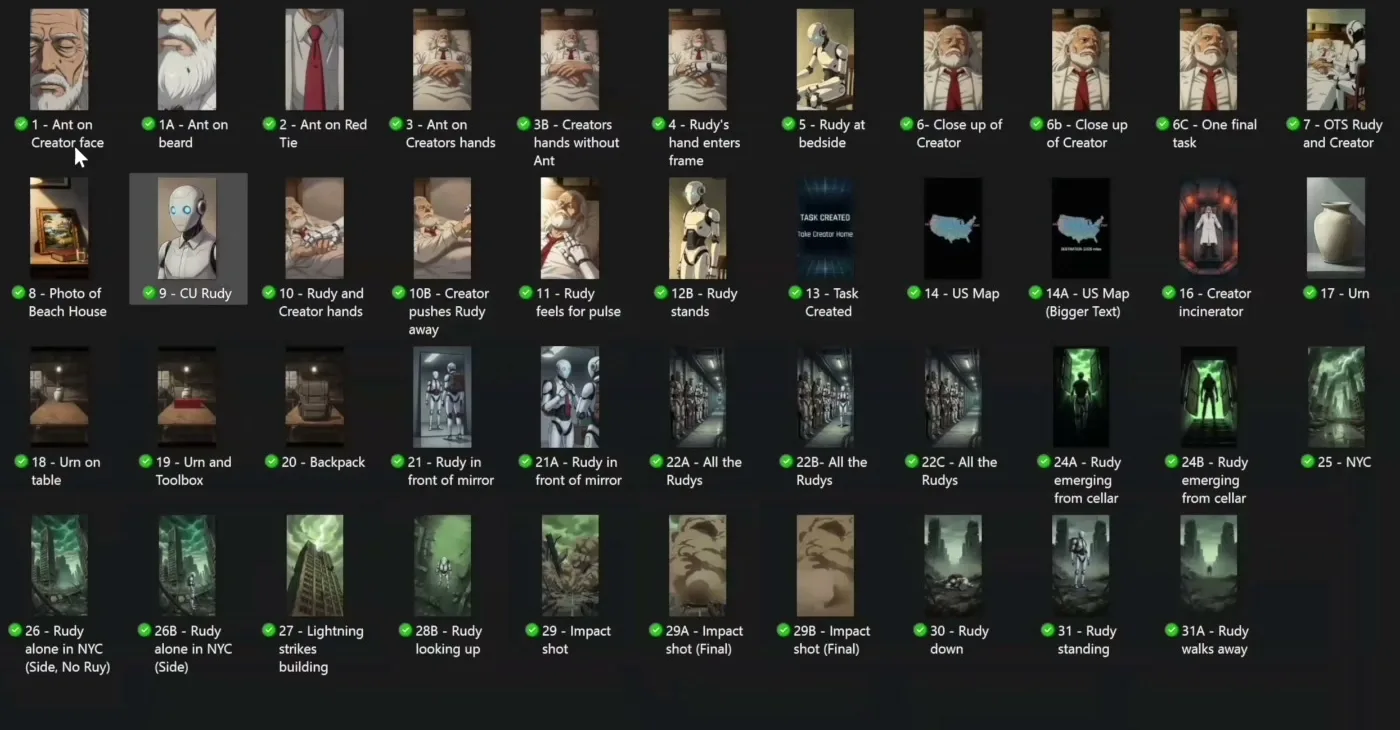
When utilizing AI tools generating storyboards scripts, the process involves converting written text into a structured shot list and then generating sequential images to visualize the narrative. Traditional storyboarding requires manual sketching or expensive pre-visualization software. AI storyboarding replaces this manual labor with automated text parsing and text-to-image generation.
Austin Zartman, AI filmmaker and creator of the short-film series ASHES on Leyline, utilizes a specific workflow that moves from automated script breakdowns to targeted image generation. This process relies on tools like Leyline, Magnific, and Nano Banana to create consistent visual references before moving into video production. Because generating still images costs significantly less than generating video, locking in a complete storyboard first is a necessary step for budget management in AI filmmaking.
How AI tools generating storyboards scripts handle text breakdowns
Leyline features a built-in tool specifically designed for automated script breakdowns. When the creator uploads a written script and moves it to the editing stage, the platform automatically converts every line into an individual shot. The system categorizes these lines into specific types, such as wide shots, mediums, and close-ups.
The immediate goal of this step is to organize the narrative so the creator can tell the story visually from beginning to end. Zartman notes that this automated breakdown creates the foundational blueprint for the entire project. Instead of a director manually parsing text to decide coverage, the AI provides a structured list with detailed descriptions for each shot. This list includes exactly which characters are present in the frame. This automated process removes the guesswork from the initial planning phase.
This automated categorization directly informs the prompting strategy for the storyboard. A line of dialogue or action is no longer unstructured text. It becomes a distinct visual requirement. The script breakdown tool isolates the variables needed for the next phase of production. By defining the shot size and the subject matter upfront, the creator establishes a clear set of instructions for the image generators. Working through every one of these AI-generated shots until reaching the end of the script ensures that no narrative beat is missed. This shot list becomes the direct input for the image generation phase. This phase ultimately forms the complete storyboard.
Selecting image generators for storyboard creation
Leyline, Magnific, and Nano Banana are effective AI image generators for creating storyboard panels from a shot list. Creators generate individual images for every line in the script by entering specific prompts and defining a visual style. This establishes a visual sequence before video generation begins.
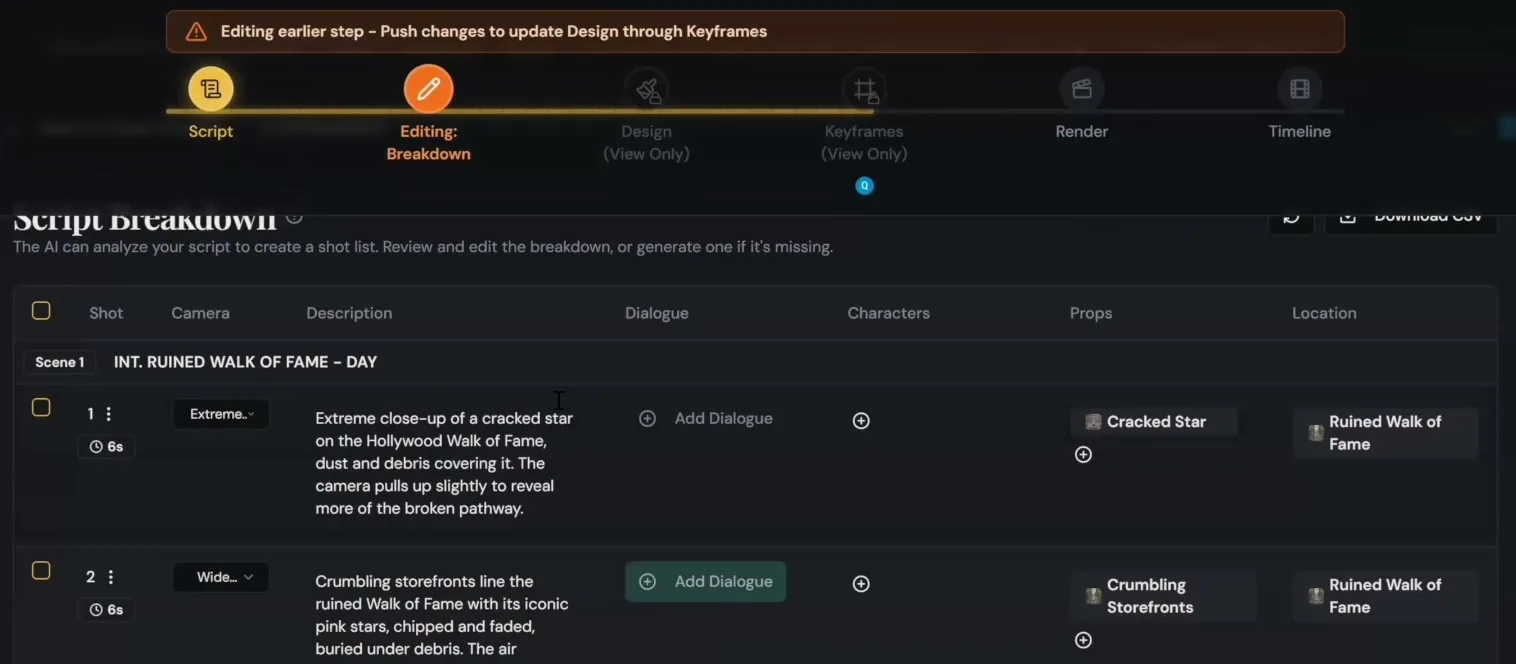
Leyline's Script Breakdown turns each line of the script into a shot with camera, props and location.
Zartman used this exact method to create the first episode of his series ASHES. The process requires moving line by line through the generated shot list and feeding specific prompts into the chosen image generator. For example, a creator might use Nano Banana to enter a specific, concrete prompt. A prompt asking for "an ant crawling down an old man's face" requires exact details. The precision of the prompt dictates the usability of the storyboard panel.
To maintain visual consistency across the entire storyboard, the creator must specify the exact aesthetic in the text prompt. Zartman achieved the look for his series by explicitly requesting a "1980s anime style" for his generated images. The creator repeats this prompting process for every single line in the script. This repetition ensures that everything needed to communicate the story is rendered visually.
Generating these still images serves as a low-cost testing ground. If the "1980s anime style" prompt fails to produce the desired look for the ant on the old man's face, the creator can adjust the text prompt. The creator then regenerates the image for a fraction of the cost of generating a video clip.
Routing shots to specific AI models based on complexity
The choice of AI model depends on the complexity of the shot and the associated credit costs. Seed Dance 2.0 is currently one of the most capable models for handling multiple elements. Older models like WN 2.5 are more cost-effective for simpler, isolated subjects.
Because AI platforms charge a specific cost for each generation, optimizing model usage is necessary for budget management. Newer models are significantly better at handling complex scenes. These scenes include moments where multiple characters interact or where the background requires intricate detailing. However, using top-tier models for every single storyboard panel results in wasted credits and inflated production budgets.
Zartman explains his routing strategy for different shot types:
- Basic close-ups: For a shot of a car tire spinning, Zartman uses WN 2.5. This older model is perfectly capable of rendering a single, isolated object accurately.
- Complex scenes: For moments requiring intricate backgrounds or multiple characters, Zartman reserves newer, more expensive models like Seed Dance 2.0.
By routing simpler shots to WN 2.5, creators save their premium generation credits for the moments that actually require advanced AI comprehension. This ensures that the AI can accurately render multiple characters or intricate backgrounds without wasting resources on straightforward inserts.
Configuring aspect ratios and platform presets in the workflow
Setting the correct aspect ratio and utilizing platform presets forces the AI models to generate images that match the final project's format. For vertical micro-dramas, creators must specify a 9:16 aspect ratio during the image generation phase. This ensures the storyboard accurately reflects the framing.
Platforms like Leyline offer specific presets that help push AI models toward a desired visual style. These presets reduce the need for complex prompting. They act as guardrails, ensuring that the model does not deviate from the established aesthetic even if the text prompt is brief. By relying on platform presets, creators can maintain a unified look across hundreds of individual storyboard panels.
Additionally, creators use this stage to define technical parameters that will carry over into the video generation phase. Zartman points out that creators can specify camera behavior directly in the prompt. For example, a creator can explicitly state that they do not want the camera to move.
Locking in the 9:16 vertical framing during the storyboard phase guarantees that the composition works for mobile viewing. If a wide shot does not read well in a 9:16 aspect ratio, the creator can catch the framing issue early. Catching this during the cheaper image generation phase allows the creator to adjust the shot list to a medium or close-up before moving into final production.
Frequently asked questions
What is the end goal of AI image generation from a script?
The primary goal of generating images from a script is to create a complete storyboard. This allows the filmmaker to visually map out the story from beginning to end, shot by shot. This establishes the visual narrative before spending credits on more expensive video generation processes.
Does Leyline automatically categorize shot sizes?
Yes, Leyline features a script breakdown tool that automatically assigns a specific shot type to every line of the text. It identifies whether a moment requires a wide shot, a medium shot, or a close-up. It also provides descriptions detailing which characters are in the frame.
Why should creators use older AI models like WN 2.5?
Older models like WN 2.5 are effective and cheaper for generating basic, single-subject shots. Austin Zartman uses this specific model for straightforward close-ups, such as a spinning car tire. He reserves newer, more expensive models like Seed Dance 2.0 for complex scenes that feature multiple intersecting elements.
How do you maintain a consistent style across an AI storyboard?
Creators maintain consistency by specifying the exact visual style in every prompt, such as requesting a 1980s anime style. Additionally, utilizing built-in platform presets on tools like Leyline helps guide the AI models toward a unified look across all generated images.
How do AI tools generating storyboards scripts handle aspect ratios?
AI platforms allow creators to set specific aspect ratios during the image generation phase. For vertical micro-dramas, specifying a 9:16 aspect ratio ensures the storyboard matches the final mobile format. This allows creators to catch framing issues before video production begins.
Comments
Sign in with your Leyline account to join the conversation.