
AI film production requires specialized external audio platforms. Filmmakers must maintain character identities across multiple scenes and episodes. When choosing AI voice generators consistent characters are a strict requirement for serialized narratives. Austin Zartman is the creator of the AI short-film series ASHES on Leyline. He identifies dedicated voice platforms as a strict requirement for his workflow. Relying on the native audio generated by video models results in mismatched dialogue. The same character will sound different in every shot. This forces creators to separate their audio and video workflows. To build a meaningful short drama, filmmakers must bypass basic built-in tools. They must create dedicated voice assets on paid platforms. Finally, they combine these assets with external sound effects during the final editing process.
Why AI voice generators consistent characters need are external
Video generation models fail at audio consistency because they treat every new clip as an isolated event. Some video generation models bake sound directly into the generated clip. This creates severe audio inconsistencies across different scenes. When a filmmaker feeds a video model two identical images of a character, the model generates two completely different voices for each line of dialogue.
According to Austin Zartman, a creator might use a visual seed to generate an image of an old man lying in bed. The creator then uses that same seed to generate an image of the same old man in a workshop. The visual output remains highly consistent across both environments. The audience recognizes the old man immediately.
However, prompting the video model to generate a line of dialogue in each separate clip yields mismatched vocal tones. The accents change. The pitches fluctuate. The video model treats each generation as an isolated event. It fails to reference the audio profile it created in the previous clip.
This technical limitation forces filmmakers to separate audio generation from video generation entirely. If they want the audience to recognize the character by sound, they must use external AI voice generators consistent characters can maintain across a whole series. Without this separation, a serialized narrative becomes impossible to follow.
Using 11 Labs for voice generation
11 Labs is a paid platform that serves as the primary tool for generating permanent voice assets in AI films. Filmmakers use it to ensure the audio remains identical across an entire production.
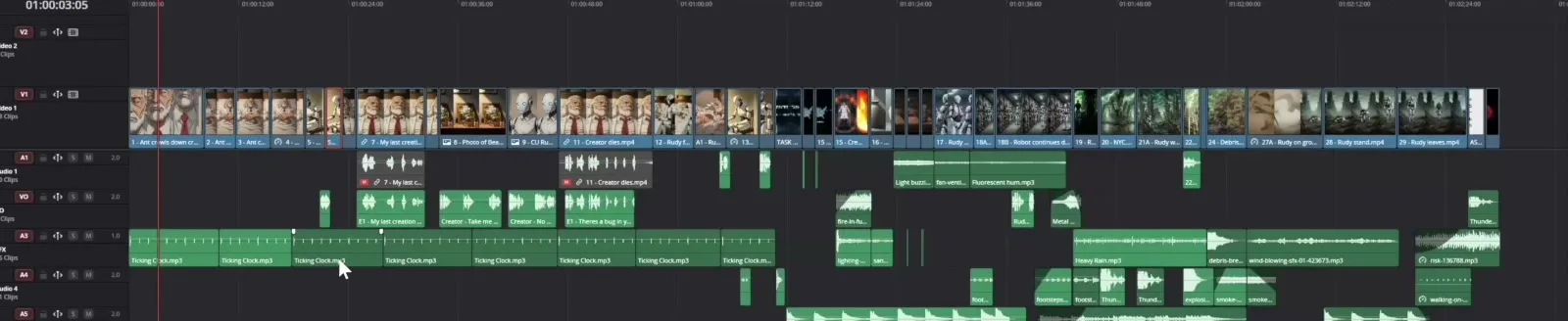
Dialogue, effects and music sit on separate tracks so each voice can be swapped or matched later.
In a serialized narrative, maintaining a character's identity requires exact audio consistency. Zartman notes that if a series follows a specific character named Tom in every episode, Tom needs to have the exact same voice asset applied to all his dialogue. 11 Labs allows creators to build, save, and repeatedly access this specific voice profile.
Instead of hoping a video model guesses the correct voice, the filmmaker types the dialogue into 11 Labs. They apply the saved character profile and generate the audio. This creates a permanent, reusable asset.
Filmmakers then export these isolated audio files. They sync them with the silent video clips during the final editing process. This workflow relies entirely on AI voice generators consistent characters can use to sound exactly the same in every single shot. By isolating the audio, the creator takes full control over the performance.
The step-by-step workflow for consistent character audio
To build a meaningful short drama, creators follow a strict sequence of events. They separate the visual generation from the audio generation.
- Generate the visual seed. The creator establishes the look of the character.
- Generate the silent video clips. The creator places the character in different environments, like an old man in a bed or a workshop.
- Write the dialogue. The creator finalizes the script for the scene.
- Use the AI voice generators consistent characters require. The creator inputs the text into 11 Labs using a saved voice profile.
- Export the audio. The creator downloads the isolated voice file.
- Sync the assets. The creator aligns the 11 Labs audio with the silent video model output in a standard editing program.
This process guarantees that the character sounds identical across multiple scenes and episodes.
The ASHES series and audio workflows
Austin Zartman developed the AI short-film series ASHES to test the limits of serialized narratives. During production, Zartman encountered the exact audio limitations described above. He realized that a series requires strict continuity. The audience must recognize the characters instantly.
When producing ASHES, Zartman could not rely on native video model audio. The characters would sound like completely different people in every single cut. To solve this, he built a workflow that separated the visual and audio pipelines.
He generated the visual assets on Leyline. He exported those visual assets to his editing software. Then, he used AI voice generators consistent characters could rely on for the dialogue. He generated the dialogue in 11 Labs. He downloaded the sound effects from Pixabay. Finally, he synced all these elements together. This exact workflow allowed ASHES to maintain a professional standard across multiple episodes.
Why Leyline requires external AI voice generators consistent characters can use
Leyline provides basic voice generation capabilities designed primarily for simple social media videos. These tools work well for short clips of cats. However, the platform does not currently support the advanced voice consistency required to produce a meaningful short drama.
During a technical discussion regarding the ASHES series, a participant asked a specific question. They asked if Leyline could change a user's voice to match different characters. They also asked if the platform could generate voices natively for complex scenes.
A platform representative confirmed that while Leyline can generate voices, the feature remains intentionally limited. The developers focus their product development on the steps before exporting to editing software. They operate under the principle that the final edit is where the project comes together.
Because Leyline's built-in audio tools are basic, the team recommends 11 Labs as an alternative for serious narrative work. For complex projects requiring emotional range and character continuity, creators must export their visual assets. They must rely on external audio software. Leyline handles the visual organization, while external platforms handle the audio.
Mixing voice generation with free sound effects
Pixabay provides free downloadable music and sound effects for filmmakers to mix with their AI-generated voices. While character dialogue requires paid platforms, environmental audio does not.
Zartman highlights that creators can offset the costs of paid voice generation platforms by sourcing their background audio from free libraries. A paid platform like 11 Labs handles the dialogue. A free platform like Pixabay handles the environment.
The workflow involves combining three distinct elements:
- The silent video from the video model.
- The consistent dialogue from the 11 Labs voice asset.
- The free environmental sound effects and background scores from Pixabay.
All these separate elements are combined in standard video editing software. The silent video, the consistent 11 Labs voice asset, and the Pixabay sound effects merge into a final product. This workflow allows creators to build a full, professional soundscape without paying for every individual audio element. Finding the right AI voice generators consistent characters can use is only the first half of the audio process. The second half is building the environment around that voice.
Frequently asked questions
How do you maintain voice consistency in an AI series?
Filmmakers maintain voice consistency by using external paid platforms like 11 Labs. They create a dedicated voice asset for each character. This ensures a character sounds identical in every episode. Creators cannot rely on the inconsistent audio baked into video generation models. They need AI voice generators consistent characters can use across multiple episodes.
Why shouldn't I use the audio generated by AI video models?
AI video models that bake sound into the clip generate completely different voices for the same character when the scene changes. An old man in a bed and the same old man in a workshop will have mismatched voices if generated natively. The pitch, tone, and accent will change.
Is Leyline capable of generating consistent character dialogue?
No. Leyline's voice generation features are basic and limited. The platform is suitable for simple social media videos like cat clips. Creators making meaningful short dramas must export their projects and use external audio platforms.
Where can I find free audio to mix with AI character voices?
Pixabay offers a large library of free music and sound effects. Filmmakers download these free assets to build out the environmental sound design. They place these sound effects around the paid AI character dialogue generated in 11 Labs.
Comments
Sign in with your Leyline account to join the conversation.