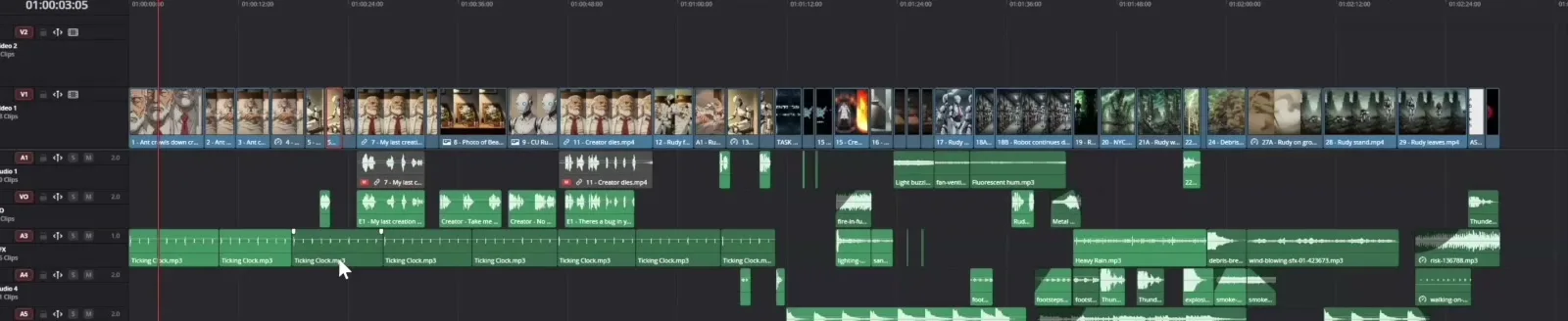
Sound design ai generated videos require a structured post-production workflow. AI filmmaker Austin Zartman created the AI short-film series ASHES on Leyline. He uses external dialogue, sound effects, and music instead of built-in audio. While some video models attempt to generate native audio, they struggle with complex tasks. A participant familiar with this workflow notes that manual sound design is essential. It creates serialized narratives and emotional depth. The process relies on exporting silent or raw video files. Creators move these files into traditional editing software. Here, they layer specialized audio tracks. This builds tension, establishes character continuity, and drives the narrative forward. Producing high-quality sound design ai generated videos means treating audio as a distinct, critical phase.
Why external sound design ai generated videos need manual editing
External sound design is necessary because AI video generation models fail to produce consistent character voices and cohesive emotional audio cues across multiple clips. Some video models bake sound directly into the generated clip. Relying on this feature causes severe continuity errors during playback. Maintaining consistency is the primary challenge for creators.
A creator might give a video model two different image seeds of the same character. For example, an old man lying in bed and that same old man in a workshop. The visual output may look identical. However, providing a line of dialogue for each clip directly within the video model yields poor results. It will likely result in two completely different voices. This inconsistency breaks viewer immersion. A participant emphasizes the importance of consistency in a serialized narrative. If the audience follows a specific character like Tom in every episode, Tom must have the exact same voice every time he speaks.
Furthermore, video models cannot reliably generate nuanced emotional sound design. A participant explains that watching a favorite movie while only paying attention to the sound reveals specific audio cues. You hear a string of tension added to make the audience feel anxious or hopeful. Complex audio elements like tension risers and cohesive episode music are highly difficult for video models to bake in. The models already work hard to get the visual generation right. Because models struggle with these emotional layers, creators must treat sound design as a completely separate part of the production process. Mastering sound design ai generated videos means separating the audio entirely from the visual generation.
What tools are used for sound design ai generated videos?
Creators build audio landscapes for AI videos using dedicated voice generation platforms for dialogue and external libraries for music and sound effects. Specifically, 11 Labs is a paid platform used for consistent character voices. Pixabay provides free music and sound effects for the edit.
By utilizing these platforms, creators populate their editing timelines with specific audio elements. The green clips visible in a standard editing timeline represent these imported sound effects, pieces of dialogue, and music tracks. Separating the visual generation from the audio generation allows creators to bypass the limitations of all-in-one AI platforms.
A participant notes that Leyline currently offers basic music, voice, and editing capabilities. The platform focuses its product development on the visual generation phase before export. It leaves the detailed audio work to dedicated external software. The participant states that the magic happens in the editing phase. This justifies the use of specialized external platforms to build out the final soundscape for ai projects. Using dedicated tools is the standard for professional sound design ai generated videos.
When to use built-in audio for AI video models
Built-in audio tools on platforms like Leyline are sufficient for basic social media content, but complex narratives require external editing software. The basic functions available on generation platforms work well for simple projects. If a creator is only making simple social videos featuring cats or similar casual content, built-in tools suffice.
However, if the goal is to make a more meaningful short drama, creators must export their visual files. They must utilize external software to handle sound design ai generated videos. The built-in tools are intentionally limited. The platform developers recognize that creators spend a significant amount of time in external editing software anyway. Therefore, they do not invest heavily in advanced internal audio features.
For serious narrative work, creators must rely on external tools. They use 11 Labs for paid voice generation and Pixabay for free sound assets to achieve professional results. Relying on external software ensures that the final product meets audience expectations for quality.
Workflows for sound design ai generated videos
Creators use two primary workflows for integrating sound into AI videos: applying audio after the visual story is locked, or editing video clips to match the exact beats of a pre-selected song. Both methods require moving the generated video files into a separate editing environment.
In the first approach, a creator generates all the necessary video clips. They finalize the visual sequence before addressing the sound. A participant notes that in their own workflow, sound design came at the end of the process. Once the visual clips were generated and the visual story was complete, they began layering the audio. They added dialogue, sound effects, and music to match the locked picture. This sequential method ensures the visual narrative dictates the audio requirements.
Alternatively, a creator can start the process by selecting a song. They then edit their generated video clips to cut exactly on the beats of that specific track. A participant highlights this music-first approach as a highly effective way to dictate the rhythm and tell a story. This method is particularly useful for sequences that rely heavily on pacing and musical cues rather than dialogue. Both workflows demonstrate that sound design ai generated videos require deliberate, manual alignment.
Comparing AI sound design to traditional filmmaking
The sound design process for AI videos closely mirrors traditional filmmaking once the visual clips are generated and exported. The workflow begins with an editor assembling the clips. They add basic sound to ensure dialogue timing is correct. This is followed by picture lock and dedicated audio mixing.
This assembly phase verifies that a character is speaking the correct line in the correct location. Once the picture is locked, the project moves to a dedicated sound designer. This professional handles Foley work. Foley involves adding specific environmental sound effects. A participant gives examples of this detailed work. It includes adding a bing-bong sound or an explosion to match the on-screen action.
During this final phase, creators often need to re-record dialogue to match a specific emotional tone. For example, a line initially generated for the assembly edit might need adjustments. It might need to be regenerated to sound slightly more aggressive or a little more tender depending on the finalized visual context.
Because editing and sound design are highly specialized fields, a participant recommends that new creators hire professional sound designers. These professionals help navigate the complex post-production process. They understand the specific limitations of what platforms like Leyline can and cannot do. Treating sound design ai generated videos with this level of professional care yields the best results.
Frequently asked questions
Can AI video models generate their own sound?
Some AI video generation models bake sound directly into the generated clip. However, relying on this built-in audio often results in inconsistent character voices across different scenes. It also lacks the nuanced emotional cues, like tension risers, required for professional storytelling and serialized narratives. Manual sound design ai generated videos offer far better quality.
How do you keep an AI character's voice consistent?
To maintain voice consistency, creators disable the baked-in audio from the video model. They use dedicated voice generation platforms instead. A paid tool like 11 Labs allows creators to generate consistent dialogue for recurring characters. This ensures a character like Tom sounds identical in every episode.
Where can creators find sound effects for AI videos?
Creators frequently use external libraries to source audio elements for their projects. A participant recommends Pixabay as a reliable website for downloading free music and sound effects. These downloaded assets are then imported into an editing timeline to build the final audio landscape.
Do all-in-one AI platforms offer advanced sound design tools?
Platforms like Leyline offer basic music, voice, and editing capabilities. These are suitable for simple social media videos featuring cats. For complex short dramas, creators must export their visual clips. They use specialized external editing software to handle detailed Foley and dialogue replacement for sound design ai generated videos.
Comments
Sign in with your Leyline account to join the conversation.