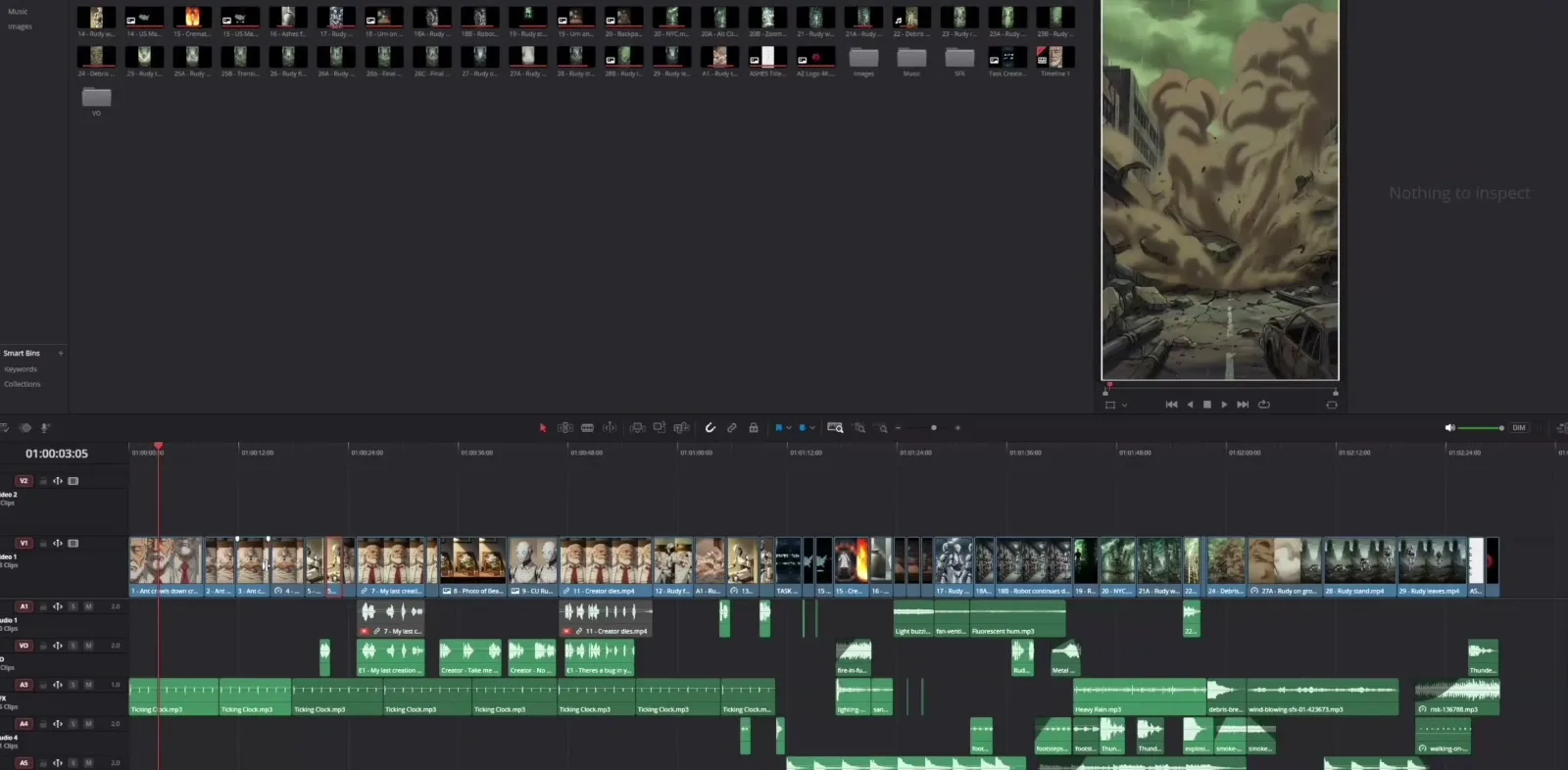
The best video editing software ai films use serves as the digital assembly environment for creators. Here, short, disparate synthetic video clips are organized, trimmed, and sequenced into a cohesive narrative. In the practical workflow of the ai filmmakers, including methods shared by participants working alongside Austin Zartman, creator of the AI short-film series ASHES on Leyline, the editing timeline is where raw generations become usable scenes.
AI video generators often produce unpredictable motion. Non-linear editing (NLE) software forces consistency. Editors achieve this through speed manipulation, reversing footage, and strict file organization. Choosing the correct software depends on local hardware capabilities, budget constraints, and the specific need to manipulate clips to stretch generation credits.
What is the best free video editing software ai films use?
DaVinci Resolve is widely considered the best free video editing software ai films rely on. It provides a comprehensive and professional-grade toolset. A participant in Austin Zartman's filmmaking network noted that the free version contains many utility tools. They never considered upgrading to the paid tier.
When assembling an AI film, the timeline in DaVinci Resolve provides a clear visual map of the project. A participant described looking at their first episode inside Resolve. They noted that the entire timeline was built from individual AI-generated video clips stacked and sequenced together.
The free version of Resolve, developed by Blackmagic Design, handles high-resolution files and complex timelines. It does this without requiring a monthly subscription. This is advantageous for independent AI filmmakers. These creators are already spending their budget on generation credits for tools like Midjourney or Runway.
The interface allows creators to manage hundreds of short clips efficiently. AI films are built shot-by-shot. An editor might deal with 50 to 100 individual video files. This massive file count is required for just a single minute of screen time.
Resolve provides robust media bins and labeling systems. These features keep files organized before they are dragged onto the timeline for assembly. A paid Studio version exists for professional colorists and editors. However, the free tier of DaVinci Resolve covers all the fundamental cutting, timing, and organizational requirements needed to assemble an AI-generated series.
How does video editing software reduce AI generation costs?
Video editing software reduces AI generation costs by allowing creators to manipulate existing footage. This prevents them from paying credits to prompt new video generations. By reversing, slowing down, or reusing specific shots, filmmakers bypass the unpredictable AI generation process.
A participant in Zartman's circle shared a specific example involving a robot character. The creator needed a shot of the robot turning its head back to face a certain direction. The AI video generator repeatedly failed to produce the correct motion. The creator avoided burning more generation credits and money trying to force the AI to generate the exact movement.
Instead, they took an existing shot of the robot turning its head to the right. They reversed the clip in the editing software. This basic editing function solved a complex generation problem and saved money.
AI video generators often produce clips in set durations, such as 10-second blocks. The usable portion of the ai generation might be much shorter. A creator might generate a 10-second video clip but only need three seconds of it for the actual scene.
The editing software allows the filmmaker to cut away the unusable seven seconds. During those seven seconds, the AI might have introduced warping, morphing, or unwanted artifacts. The editor keeps only the pristine three seconds. Editors can also speed up or slow down these usable segments to fit the pacing of the scene. This maximizes the utility of every generated clip.
Reusing shots is another critical cost-saving technique managed within the editing software. A creator might generate an establishing wide shot of a futuristic city. This shot costs several credits to produce. They can reuse that exact same file multiple times across different episodes.
The editing software allows them to duplicate the clip. They might apply a slight zoom or a color tint to make it look like a different time of day. This technique extracts multiple uses out of a single AI generation.
Why is CapCut recommended for editing AI video?
CapCut is recommended for editing AI video because it is less intensive on computer hardware than traditional desktop editors. It also includes its own built-in generative AI tools. This makes the assembly process more efficient for creators working on standard laptops or lower-end desktop computers.
Many AI filmmakers generate their footage using cloud-based AI tools. They do not necessarily own high-end computers with discrete graphics cards. When it comes time to edit those downloaded video files, heavy professional software like DaVinci Resolve or Adobe Premiere Pro can cause standard computers to lag or crash.
A participant noted that CapCut, spelled C-A-P-C-U-T, is a program they see many people using. It requires fewer system resources to run smoothly.
CapCut integrates proprietary generative AI features directly into the editing interface. These built-in tools assist with tasks like background removal, auto-captioning, and basic visual effects. This streamlines the post-production workflow.
For a solo creator assembling an AI film, having these AI-assisted editing tools natively inside a lightweight program reduces friction. It prevents the need to move files between multiple different software applications.
Are Premiere Pro, Final Cut, and iMovie viable for AI films?
Adobe Premiere Pro, Final Cut Pro, and iMovie are all fully viable options for editing AI-generated films. A participant in Zartman's network emphasized that any of these standard programs work fine. The core requirement is placing clips on a timeline.
The choice between these programs often comes down to what software the creator already owns or knows how to use.
- If a filmmaker already has an Adobe Creative Cloud subscription, Premiere Pro is a great option.
- If they operate on a Mac ecosystem, Final Cut Pro is suitable.
- The free iMovie software is also an effective choice for Mac users.
The fundamental mechanics of the editing process are universal across all of these non-linear editing platforms. These mechanics include cutting clips, adjusting speed, reversing footage, and layering audio.
The heavy lifting of creating the visuals is done by the AI video generation models. The editing software acts primarily as an assembly board. There is no strict requirement to learn a new, complex editing program if a creator is already comfortable with iMovie. The success of the final AI film depends on the quality of the generated clips and the editor's organizational discipline. It does not depend on the specific brand of editing software used.
What is the standard workflow for video editing software ai films?
The standard workflow for video editing software ai films requires numbering every generated video file before importing them. Once numbered and uploaded, the editor places the clips sequentially on a timeline to build the scene shot by shot.
An AI film is constructed from dozens or hundreds of individual, disconnected video generations. File management is the most critical step in the editing process. A participant described their exact workflow for the first episode of their series:
- They generated the video clips.
- They numbered all of the clips so they were easy to manage.
- They uploaded them into the editing program.
- They started to assemble them on the timeline.
Without a strict numbering system, an editor will quickly become lost in a folder full of files. These files often have random alphanumeric names generated by the AI platform.
By renaming the files sequentially, such as Scene1_Shot1 and Scene1_Shot2, the editor can drag the entire batch into DaVinci Resolve, CapCut, or Premiere. The clips will automatically sort in the correct chronological order in the media bin.
From there, the editor drops them onto the timeline. They trim the 10-second clips down to the best three seconds. They apply any necessary speed or reverse effects. Finally, they review the assembled sequence.
Frequently asked questions
Do I need a paid video editor to make AI films?
No, a paid video editor is not required to make AI films. DaVinci Resolve offers a highly capable free version. It includes all the necessary tools for cutting, reversing, and assembling AI clips. Many creators use this exclusively without needing the paid professional tier.
How long are typical AI video generations before editing?
AI video generations often run up to 10-second blocks out of the generator. Creators typically trim these down to use only the best three seconds. The editing software is used to cut away the unusable portions where the AI introduces unwanted warping or artifacts.
What is the easiest way to fix a missing directional shot in AI?
If an AI generator fails to produce a character turning in a specific direction, the easiest fix is to take an existing clip of them turning the opposite way. You then apply a reverse speed effect in your video editing software. This saves generation credits and time.
Is CapCut good for AI video editing?
Yes, CapCut is highly effective for AI video editing. It requires less processing power than heavier desktop programs like Premiere Pro. This makes it ideal for standard laptops. It also includes built-in generative AI tools that assist and streamline the post-production workflow.
Comments
Sign in with your Leyline account to join the conversation.