How to Write a Synopsis AI Filmmaking Can Understand
To successfully write a synopsis AI filmmaking tools can use, you must create a central document that guides the AI's understanding of your project. This document, often called a 'series bible,' acts as the single source of truth for core information. It includes plot summaries, character details, and world-building rules. For AI tools that generate visual media, a synopsis is the foundational blueprint. Properly creating this document is a critical step. It directly influences character consistency and the quality of the final pitch deck. AI filmmaker Austin Zartman, creator of the AI short-film series ASHES, outlines a specific process to write a foundational document for AI.
How to Write a Synopsis AI Filmmaking Tools Can Process
You can write a synopsis for AI filmmaking projects in two ways: upload a prepared PDF document or have the AI generate a summary directly from your script. Both methods provide the system with the core components of your project before any visual generation begins. The goal is to feed the AI a structured narrative framework.
According to Austin Zartman, the most reliable method is uploading your existing series bible. This gives you maximum control over the source material.
Here is the step-by-step process:
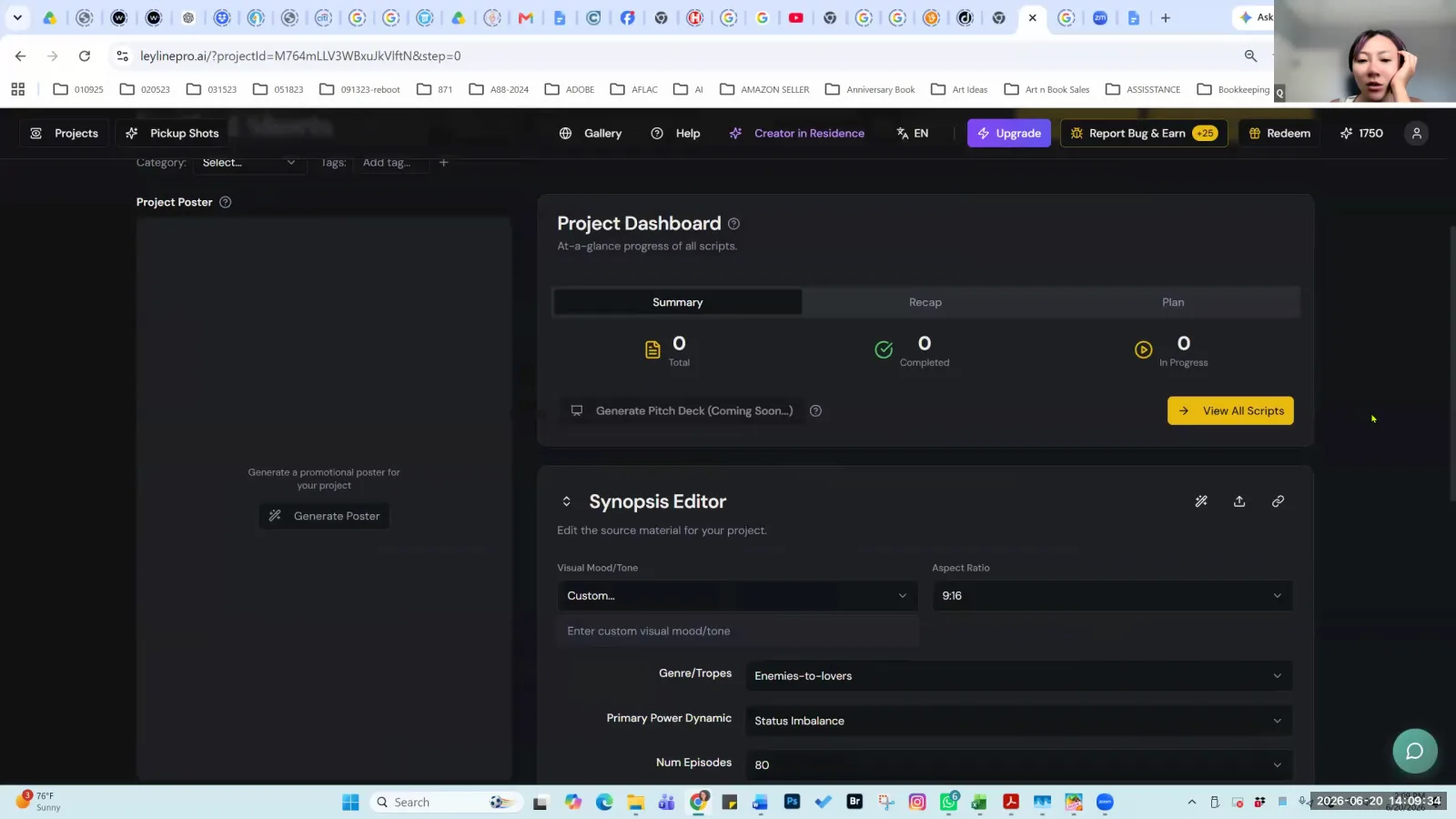
- Upload Your Document: In the Leyline platform's synopsis editor, you can use the upload function. Zartman points to the interface, noting you can "click that little arrow icon and upload the PDF for your Bible."
- Use the Correct Format: The system requires a PDF file. This is a technical constraint for the AI parser to read the document correctly. Other formats will not work.
- Prepare the File: Before uploading, it is critical to "remove all the images from your PDF." Images can interfere with the text-parsing algorithm. This interference can cause the AI to misinterpret or ignore important text, leading to an inaccurate analysis of your story. A text-only PDF ensures the AI focuses exclusively on the narrative content.
If you do not have a formal bible, you can use the AI to create one. The platform includes a feature for this purpose. Zartman explains, "If you didn't do anything for the Bible, you can pull the information from all your script and then the project can do like a summary." The AI will read your entire script. It then extracts key details about characters, plot points, and settings to build a synopsis automatically. This provides a solid starting point that you can then edit and refine to match your vision. This process is an effective way to begin if you need to write a synopsis AI filmmaking software can use quickly.
What Happens After You Provide the Synopsis?
After you provide a synopsis, the AI performs a technical analysis to extract the core information of your project. This is a purely analytical stage where the AI builds a structured understanding of your story. This internal framework is then used for all subsequent tasks, from scriptwriting assistance to visual generation.
This is not a creative step where the AI invents new ideas. As Zartman clarifies, "This is not actually generating it... It's just extracting the information needed for further writing the script from this." The AI's job is to parse your document to identify and organize key story elements. These elements typically include:
- Characters: Who they are, their motivations, and their key traits.
- Relationships: How characters interact with one another.
- Plot Events: The main sequence of events that make up the story.
- Story Structure: The overall narrative arc, including acts and turning points.
- World-Building: The rules, logic, and important settings of your story's universe.
The result of this stage is a structured outline. This outline represents your project's components as understood by the AI. It becomes the definitive reference for all future AI-assisted actions, ensuring that any generated content remains consistent with the established narrative.
Can You Edit an AI-Generated Synopsis?
Yes, you can edit an AI-generated synopsis. The platform is designed for you to refine the initial outline. You can edit the text directly or use an integrated AI chat feature to request specific changes.
Once the AI completes its initial analysis and presents the outline, that output is not final. You have full control to make manual adjustments. You can change character descriptions, clarify plot points, or adjust thematic summaries to better align with your creative intent. For more collaborative changes, the platform provides an option to "edit with AI at the bottom to refine this." This feature lets you use prompts to direct the AI. For example, you can ask it to rewrite sections, expand on certain ideas, or alter the tone of the description.
Austin Zartman emphasizes that the AI's role is to provide suggestions, not commands. "It's just a suggestion. So you take it from here," he advises. The filmmaker guides, corrects, and shapes the AI's output. Your job is to ensure the final synopsis perfectly matches your creative vision before moving on to visual generation.
Why Is a Detailed Synopsis Critical for AI Filmmaking?
A detailed synopsis is critical because it is the primary source material the AI uses to generate a professional pitch deck. The quality and completeness of your input directly determine the quality of the formal documents the system produces for you.
While you can manually prompt for specific visual styles or character actions during shot generation, the synopsis serves a larger, strategic purpose. Zartman notes that certain details like genre are "not that important to generate what you need visually because you can manually override everything." However, he immediately follows up, "It will be useful when you finally want to do like a formalized pitch... we will allow everybody to generate a professional looking pitch directly from your project overview page, then everything you input here is quite important because that is literally where the AI will be pulling on your pitch." The effort you put in to write a synopsis AI filmmaking systems can parse pays off when generating these formal documents. A well-crafted synopsis ensures that automatically generated pitch materials are coherent, accurate, and compelling.
What Should You Avoid When Working with the Synopsis Editor?
When working with the synopsis editor, you must avoid repeatedly clicking the "generate Bible" button after the initial version is created. Every time you trigger the generation process, the AI re-reads its own previous output and creates a new version. This can introduce unwanted changes and cause the story to deviate from your original script.
The system is designed to auto-save your manual edits, so there is no need to regenerate to save your work. Zartman warns that "Every time you hit generation, it changes things." This is especially problematic after the first time. On the initial generation from a script, the AI performs a direct extraction. On subsequent generations, "the program used the information that was generated the first time to recreate. So there's more liberty that it has taken." This "liberty" can result in AI hallucination, where the system invents details or alters the story in ways you did not intend. It is best to treat the generation button as a one-time tool for initial setup, not as a method for making incremental changes.
Frequently asked questions
What is the correct file format for a synopsis upload?
The required file format for uploading a synopsis or series bible is PDF. For the best processing results, AI filmmaker Austin Zartman advises that you should remove all images from the PDF document before uploading it to the platform's synopsis editor.
Can the AI write a synopsis for me?
Yes, if you do not provide your own synopsis document, the AI can generate one for you. It does this by analyzing your uploaded script, extracting all the relevant information about plot, characters, and setting, and compiling it into a summary.
Does the synopsis editor auto-save my work?
Yes, the platform automatically saves the changes you make while editing your synopsis. You do not need to take any extra steps to save. You should avoid hitting the "generate Bible" button again, as this will overwrite your work with a completely new version.
Are the AI's suggestions for the synopsis final?
No, the AI's suggestions are not final. They are intended to be a starting point for the creator. You have the ability to edit the text directly or use an AI chat feature to refine the generated content until it aligns perfectly with your creative vision.
Keep learning
This guide is part of the Technical Troubleshooting for AI Filmmaking masterclass lesson.
Related guides:
Comments
Sign in with your Leyline account to join the conversation.