Unseen Work AI Filmmaking: A Practitioner's Guide
The process of AI filmmaking is often shown as a simple prompt-to-film pipeline. However, the reality involves significant manual effort. This guide explores the unseen work AI filmmaking requires, from technical troubleshooting and creative problem-solving to the manual fixes that happen off-screen. This 'fixing it in post' is a core part of the workflow, covering everything from correcting visual errors and syncing audio to navigating software bugs and limitations. The work of AI filmmakers involves being editors, sound designers, and technical directors, not only prompters, solving problems once handled by large VFX teams.
Why is getting consistent results in AI video so difficult?
Getting consistent results is difficult because current AI image models are designed for creativity, not accuracy. According to AI filmmaker Austin Zartman, creator of the AI series ASHES, this is a fundamental limitation of the technology today. These models struggle to maintain continuity from shot to shot. A filmmaker might provide a detailed style sheet, but the AI can still move elements around, making much of the generated content unusable. This often means the '80/20 rule' fails, and filmmakers get closer to 10% usable footage.
This struggle with accuracy manifests in several key areas:
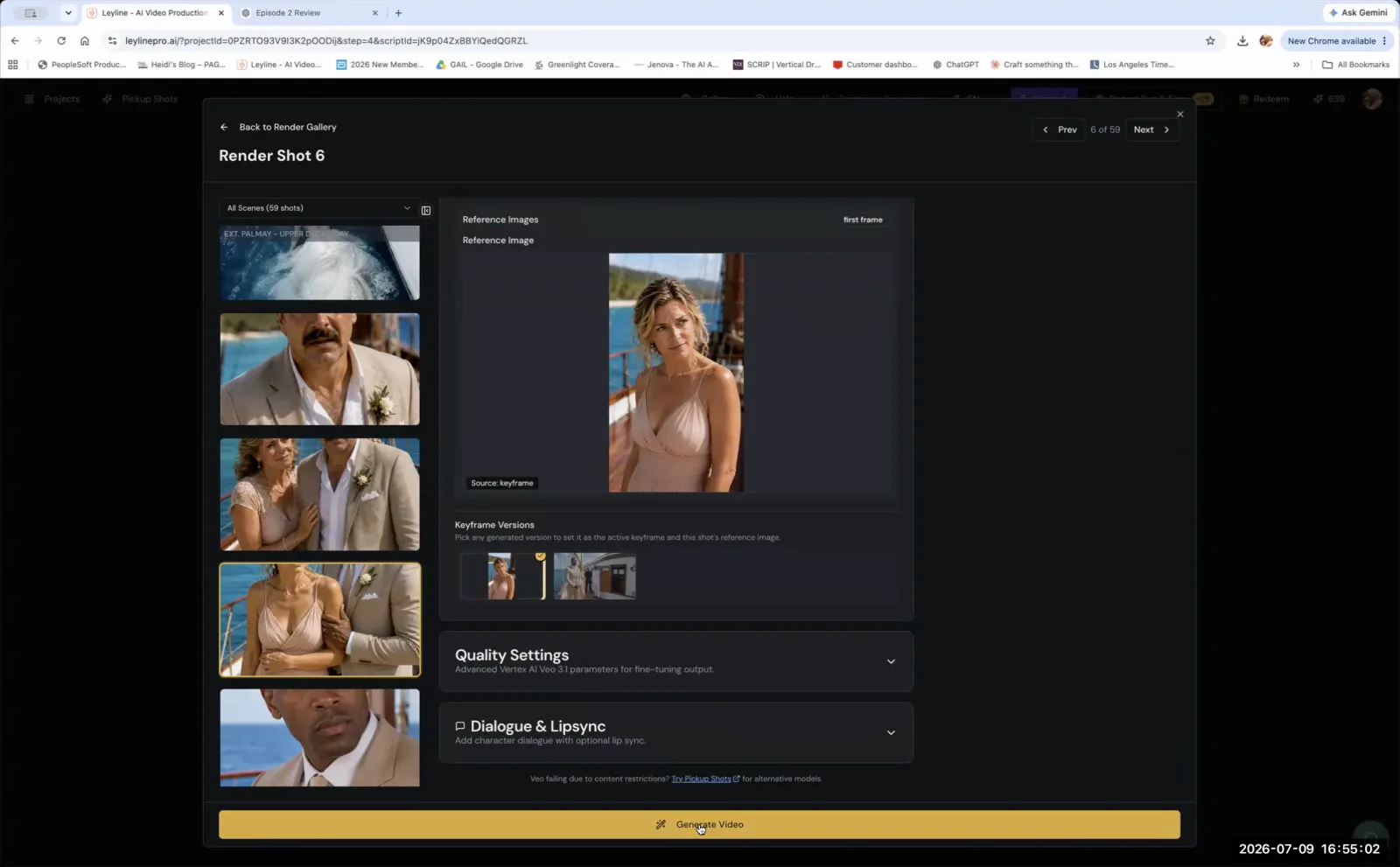
- Character Consistency: A character's face, hair, or clothing may change subtly or drastically between shots. Even with consistent prompting and character sheets, the AI can alter key features, forcing a filmmaker to regenerate dozens of takes or manually edit frames. This is a fundamental part of the unseen work AI filmmaking entails.
- Object Consistency: The AI may misinterpret or alter objects. A creator shared an experience where, despite repeated negative prompts and reference photos, an AI model insisted on rendering a regular train car as an engine car. Zartman explains this is a common issue across models, including those used by Layline and Chat GPT. The AI's internal data can override specific instructions, leading to frustrating and time-consuming errors.
- Location Continuity: Background elements in a scene can shift, disappear, or be replaced between shots. This breaks the illusion of a stable environment and requires filmmakers to either crop the shot aggressively or use other editing tricks to hide the discontinuity.
- Style Adherence: While the AI can mimic a specified artistic style, it may apply it inconsistently. One clip might have heavy grain and a specific color palette, while the next is cleaner and slightly off-palette, creating a jarring visual experience that must be corrected in post-production.
The AI's tendency to creatively interpret rather than precisely replicate instructions forces filmmakers to spend significant time regenerating shots or finding manual workarounds. This is a core challenge in modern AI filmmaking.
How do you handle custom audio and voiceovers?
You must handle custom audio and voiceovers manually in a separate editing program. AI generation tools do not automatically sync external audio files with the video they create. As Austin Zartman clarifies, "that's got to be done in editing. So you separate the voice from the video clip in your editing software and then you replace that voice." This manual audio syncing is a crucial, yet often overlooked, part of the unseen work AI filmmaking entails.
The need for manual audio work is often driven by the AI's own limitations in voice generation. For instance, one filmmaker found that the AI could not consistently produce a specific accent for a character. To solve this, the filmmaker had to record the voice themselves. The process for integrating custom audio typically involves these steps:
- Generate Video: Create your visual sequence using the AI tool. This version may have a temporary or AI-generated voice track that serves as a placeholder.
- Export and Import: Export the video clip and import it into a non-linear editing (NLE) software like Adobe Premiere Pro or DaVinci Resolve. This is where the manual work begins.
- Record New Audio: Record your custom voiceover or dialogue separately using proper microphone techniques to ensure high-quality sound.
- Replace and Sync: In your NLE, detach or mute the original audio track from the video. Place your new audio recording on the timeline and manually sync it frame-by-frame to the character's lip movements or on-screen actions.
What are common workarounds for AI's limitations?
Common workarounds involve using traditional filmmaking and 3D modeling techniques to guide the AI or fix its mistakes in post-production. Instead of fighting the AI to generate a perfect shot, filmmakers often 'edit their way around' the problem. These practical approaches acknowledge the AI's flaws and use established skills to salvage otherwise unusable footage, which is central to the problem-solving in unseen work AI filmmaking.
Effective workarounds fall into two main categories:
- Post-Production Fixes: These are techniques applied in editing software after the footage is generated.
- Aggressive Cropping: Tightly frame a shot to remove an inconsistent background element, a flawed part of a character's anatomy, or an object that the AI rendered incorrectly. This can change your intended composition but saves the shot.
- Mirroring Footage: Flip a shot horizontally. This simple technique can correct a compositional issue, improve the direction of a character's gaze to follow the 180-degree rule, or make a shot fit better with an adjacent one.
- Creative Cutting: Use quick cuts, J-cuts, or L-cuts to hide continuity errors between two clips. An insert shot of a detail can effectively mask a major visual inconsistency between two wider shots.
- Pre-Production Guidance: This involves providing the AI with stronger visual references than text prompts alone.
- 3D Scene Mockups: For precise locations or complex camera angles, filmmakers can build a simple version of the scene in a program like Blender or SketchUp. As Austin Zartman suggests, you can then take a snapshot of your 3D model and use that image as a direct reference for the AI. This method gives the AI a much stronger visual guide than text alone, reducing inconsistencies and saving hours of regeneration.
Bugs and Limitations: A Core Part of Unseen Work AI Filmmaking
Yes, technical bugs and software limitations are a significant and constant problem in AI filmmaking. These tools are new and often have glitches that disrupt the creative process. This hands-on troubleshooting is a core part of the job.
Filmmakers regularly encounter issues such as:
- File Size Management: Upscaled images can balloon past common upload limits, so an enhanced file may be too large to re-use in the next step. Creators keep an eye on output size and compress or resize when needed to stay under the cap.
- Interface Glitches: The user interface of the AI tools can be unstable, leading to lost work or frustrating workflow interruptions.
- Inconsistent Feature Performance: A feature that works one day might behave differently the next, requiring constant adaptation.
As Austin Zartman puts it, the mantra is often "fix it in post." He provides a crucial perspective: "all the tech issues you're running into right now is generally going to happen to any professional animation or VFX... It's just somebody else was handling these issues, not you." This reveals the scale of the hidden labor. The unseen work AI filmmaking demands means that solo creators are now facing the technical challenges that were traditionally handled by specialized teams of up to 200 people.
Frequently asked questions
Why does my AI character look different in every shot?
Your AI character looks different because current image generation models prioritize creativity over strict accuracy. This is a core technological limitation. According to Austin Zartman, these models are not good at being accurate, which causes inconsistencies in character appearance, clothing, and location between shots, requiring manual fixes.
Can I use my own voiceover in an AI film?
Yes, you can use your own voiceover, but you must add it manually in a separate video editing program. AI video tools generate visuals and often a temporary voice track, but to use a custom voice, you need to detach the original audio and sync your new recording in post-production.
What is the best way to get a specific location in an AI video?
To get a specific location, create a reference image in a 3D program like Blender or SketchUp. Using a direct image reference instead of a text prompt gives the AI a much more accurate guide to follow, helping to maintain consistency in your environment across multiple shots.
Is AI filmmaking just about writing good prompts?
No, AI filmmaking involves much more than writing prompts. A significant portion of the unseen work AI filmmaking requires is 'fixing it in post,' which includes editing visuals, correcting inconsistencies, syncing audio, and troubleshooting technical bugs and limitations. It combines prompting with traditional post-production skills.
What does 'fix it in post' mean for AI filmmakers?
For AI filmmakers, 'fix it in post' describes the unseen work AI filmmaking required after generating footage. This includes editing around AI errors, syncing custom voiceovers, using 3D software for references, and dealing with software bugs and limitations that were once the job of large VFX teams.
Keep learning
This guide is part of the Troubleshooting and Monetizing Your First AI-Generated Episode masterclass lesson.
Related guides:
Comments
Sign in with your Leyline account to join the conversation.