AI Character Creation and the Future of Vertical Dramas
Cohort 10, Session 1 — taught by Alexander Vail, AI filmmaker and Leyline creator-in-residence, creator of the noir proof-of-concept Night Never Ending.
You make a film with AI by using specialized tools to generate visual concepts, refine scripts, and assist with production tasks. This approach empowers a creator to act as a one-person studio, handling character design, world-building, and storyboarding with AI assistance. The process still requires significant human skill, storytelling ability, and a structured workflow to guide the technology and create a compelling final product.
What you will learn
- Understand the market size and format of vertical micro-dramas.
- Learn how AI is being used in both AI-native and traditional filmmaking workflows.
- Discover how to use a production pipeline like Leyline to maintain narrative and character consistency.
- Follow a step-by-step process for ideating and generating original characters using AI.
- Recognize the importance of human creativity, storytelling craft, and intentionality in AI-assisted production.
Create an Original Character with AI in Leyline
This workflow demonstrates how to develop a unique character from scratch by using a structured prompting process within Leyline to ideate and generate visual concepts.
Step 1. Brainstorm the core attributes of your character: a name, their essence, greatest flaw, greatest desire, a defining contradiction, and a recognizable visual feature.
The instructor uses the example of 'Fuddruckers', who tries to hide a lisp, smells, wants to be president of California, loves flowers, and has a monocle and a mohawk.
Step 2. Navigate to the Image Generator within the Leyline platform.
This is found under the 'pickup shots' section.
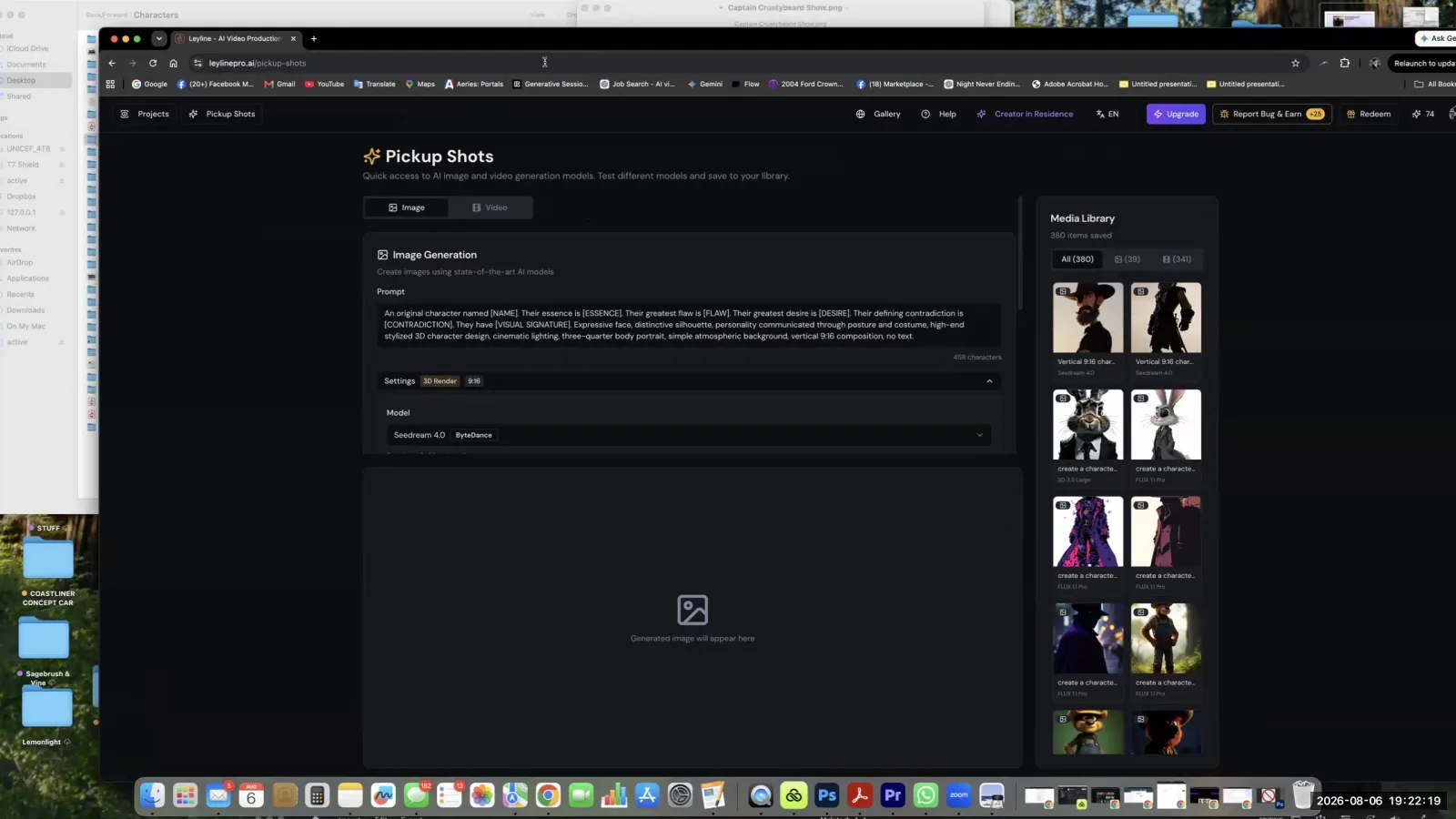
Navigate to the 'Pickup Shots' section to find the Image Generation tool.
Step 3. Combine your brainstormed character attributes into a descriptive prompt in the text field.
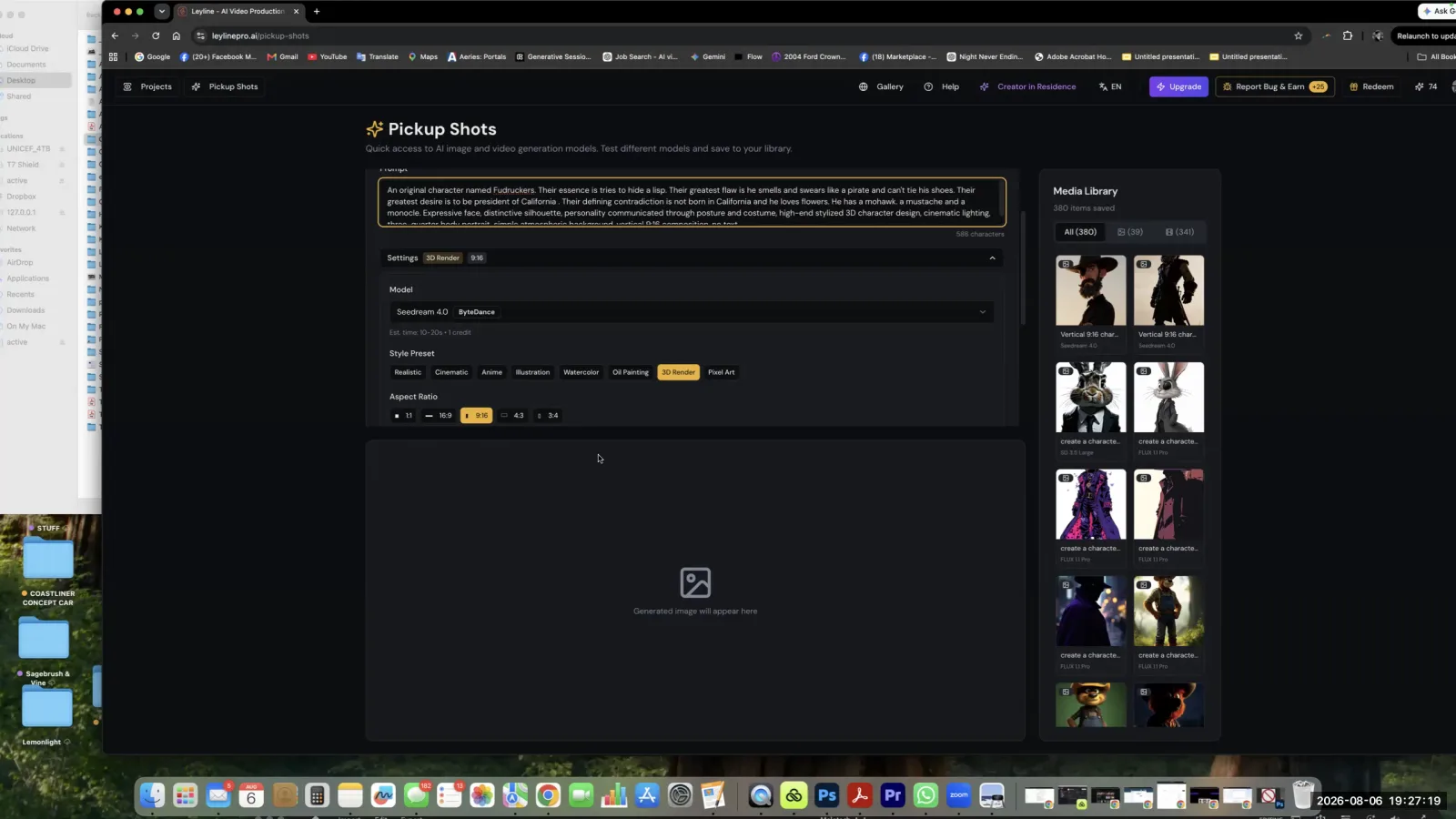
Combine your character's attributes into a detailed text prompt for the AI image generator.
Step 4. Select an AI image generation model from the available options, such as Seedream, GPT Image 2, or Imagen 4.
Step 5. Click 'Generate' to create the first batch of character images.
Step 6. Review the generated images, noting any unexpected but interesting results, which the instructor calls 'happy mistakes'.
For example, the AI might generate an eyepatch instead of a monocle, which could be a useful creative pivot.
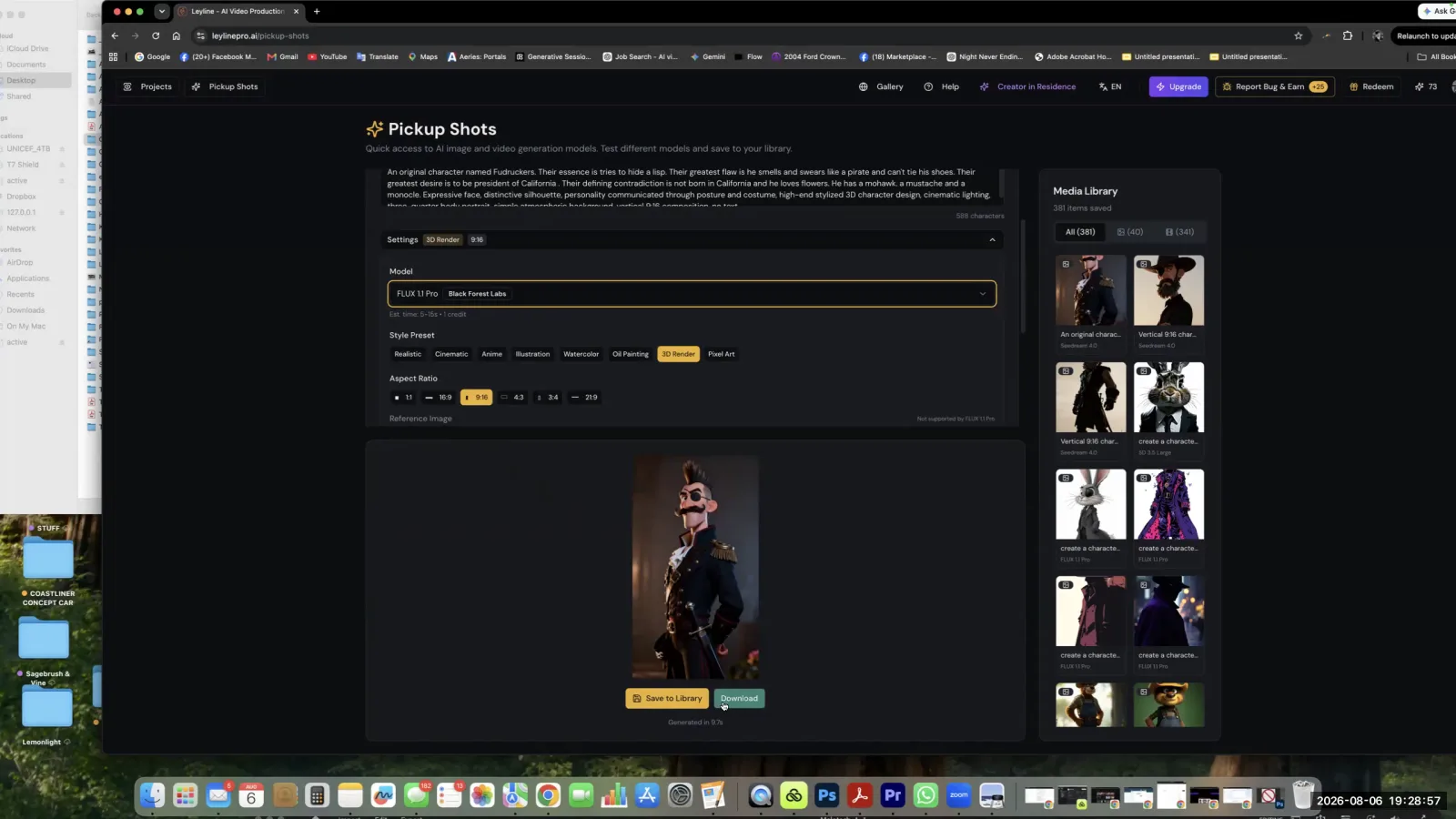
Review the generated image, comparing it to the original prompt to identify interesting deviations or "happy mistakes."
Step 7. Iterate on the character by generating again with different AI models available within Leyline to explore different visual styles and interpretations.
This allows you to compare results from various generators without leaving the platform.
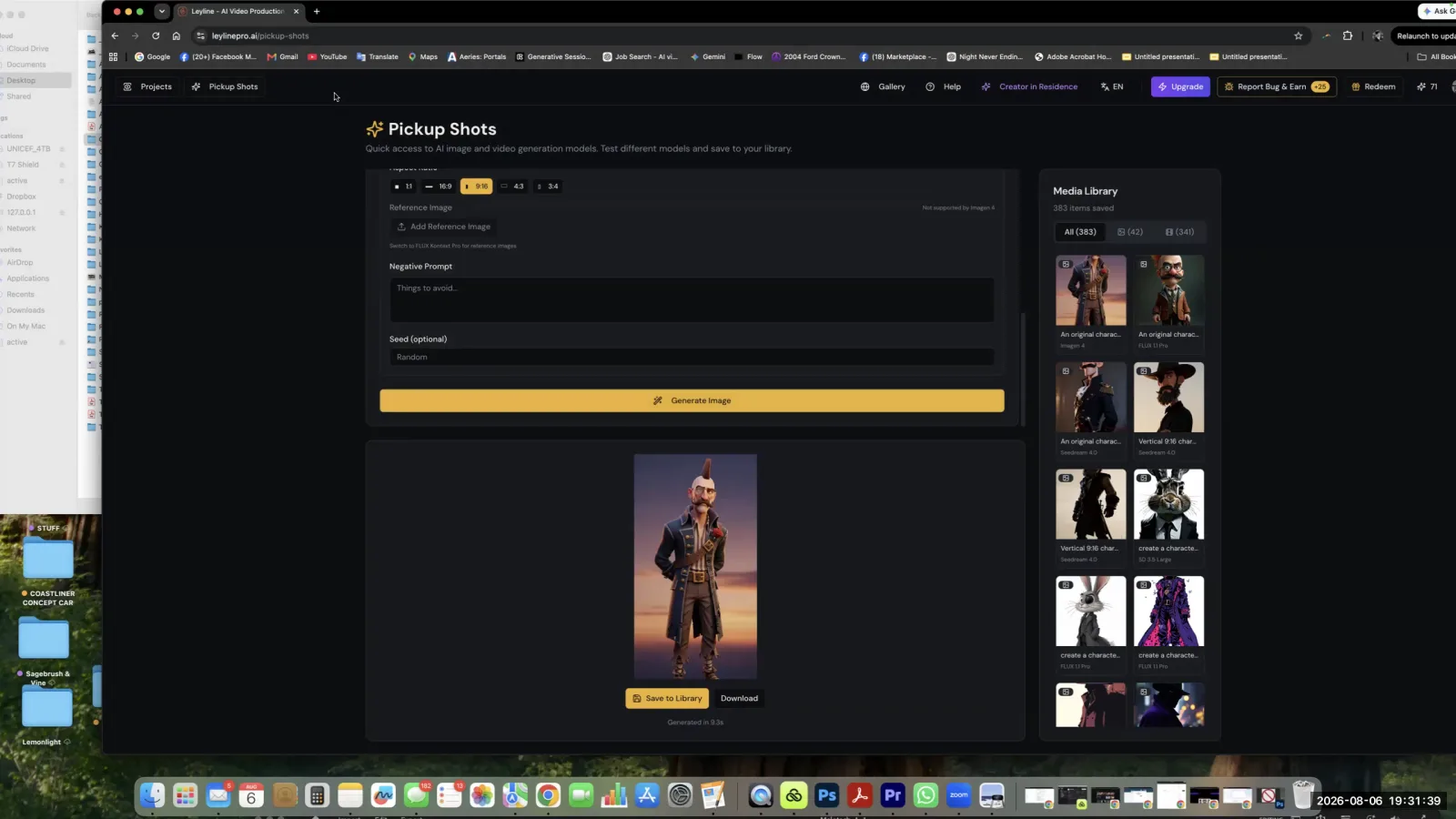
Compare the results from different AI models in your Media Library to see various stylistic interpretations of your character.
Use AI for Script Feedback and World-Building
Here, you will use an AI chatbot as a creative partner to get feedback on your script, helping to refine the story and deepen the world-building details.
Step 1. Write your script using your preferred method, such as pen and paper.
Step 2. Input your script into an AI chatbot like ChatGPT.
You can take pictures of handwritten pages and have the AI transcribe them.
Step 3. Prompt the AI to analyze the script and ask you clarifying questions instead of rewriting it for you. Use specific instructions like 'Do not write for me' and 'Ask me questions'.
Step 4. Use a specialized prompt, like a 'hook analyzer', to have the AI identify parts of the script that lack engagement or need to be 'punched up'.
Step 5. Answer the AI's questions to flesh out details of your world that you may have overlooked, such as the name of a school.
Step 6. Incorporate the new details and backstory generated from the AI's questions into your story's world bible.
For example, the question 'Why is it called Popcorn Elementary?' led to the creation of a town backstory involving a popcorn factory.
Integrate AI into a Traditional Film Production
This section shows how to apply AI tools within a traditional live-action production to increase efficiency and expand creative options for the human crew.
Step 1. Use AI to assist with pre-production tasks like script breakdowns to quickly identify all necessary production elements.
Step 2. Utilize an AI chatbot to generate and verify information for daily call sheets and draft accompanying emails for the cast and crew.
Step 3. During post-production, use AI tools to visually enhance locations, making simple sets look more cinematic or fitting for the story without a large budget for set dressing.
Step 4. Employ AI voice technology for ADR (Automated Dialogue Replacement) or to fix audio issues, such as when an actor is sick and loses their voice during a shoot.
Key terms
Verticals / Micro-dramas. Mobile-native, vertically-shot short-form dramatic content designed for consumption on phones. The market for this content is larger than the Hollywood film market.
Leyline. A professional AI production pipeline tool designed to be a suite of services for creators, functioning as a 'studio system for the one-person indie creator'.
AI Drift. The tendency for AI image and video generators to create inconsistencies in a character's appearance or environment across multiple generations, which requires significant effort to correct.
Key Frame. A starting or ending image in an animation or video sequence that defines the principal points of motion. In AI video generation, redoing the key frame can help control the output and reduce drift.
IP Show Bible. A central document in a production pipeline that contains all the core information about a story's world, characters, and rules to ensure narrative and visual consistency.
Script Breakdown. The pre-production process of analyzing a script to identify all the elements needed for production, such as props, cast, locations, and special effects. This process can be assisted by AI.
Call Sheet. A daily filmmaking document that outlines the schedule, locations, and required cast and crew for a day of shooting. AI can be used to verify information and generate emails based on the call sheet.
Movie Magic. A legacy industry-standard software for script breakdown and scheduling, described by panelist Marina as being outdated and a prime candidate for replacement by more efficient AI-powered tools.
Archetype. A universally understood symbol, character, or pattern of behavior that serves as a model. Memorable characters like Yoda are often based on strong archetypes (e.g., the wise old mentor).
Character Contradiction. A core principle of creating memorable characters, where a character possesses conflicting traits (e.g., Homer Simpson is lazy but loves his family), which makes them more surprising and complex.
Hook Analyzer. A detailed, multi-paragraph prompt used with an AI model to analyze a script and identify where the story is not 'hooky' enough, where it falls flat, and where it needs to be punched up to maintain audience engagement.
One-Person Studio. The concept of an individual creator having the tools and capabilities to handle all aspects of production, from writing to final distribution, effectively becoming their own media empire.
Common mistakes to avoid
- Thinking AI is a magic button that requires no work or skill.
- Believing AI can write a good script for you without significant human guidance and input.
- Using vague terms like 'cinematic' instead of being intentional with specific choices for composition, lighting, and texture.
- Neglecting the importance of a solid story bible and world-building before starting generation.
- Trying to generate final video clips without a strong, detailed storyboard pass first.
- Fearing mistakes instead of embracing 'happy accidents' as part of the creative process of discovery.
Frequently asked questions
How to become a one-person film studio using AI tools?
You can become a one-person studio by using AI tools like Leyline to manage multiple production roles. This involves using AI for character ideation, script refinement, and visual generation. The creator provides the core story and direction, while the AI assists in executing tasks that would typically require a larger team.
Is AI filmmaking easier than traditional filmmaking?
AI filmmaking is not inherently easier, as it still requires significant skill and human guidance. A common mistake is viewing AI as a magic button. The tools assist with specific tasks like character design and feedback, but the creative work of building a compelling story remains a human-led effort.
How to create a memorable character for an animated story using AI?
Create a memorable character by using AI tools to ideate visual concepts based on a strong foundation. Start by defining a clear archetype and a core character contradiction. Then, use a structured prompting process to generate visuals that reflect these specific traits, rather than relying on vague descriptions.
What are the most common mistakes to avoid in AI filmmaking?
Common mistakes include treating AI as a replacement for skill, using vague prompts like 'cinematic,' and generating video without a detailed storyboard. Effective AI filmmaking requires specific human input, a solid story bible before starting, and embracing the process of discovery rather than expecting a perfect final product immediately.
From the session
“We believe it is way easier to teach a creative person how to use AI tools than it is to teach an AI person how to be creative. That is a one-year learning proposition versus a 20-year learning proposition.”
— Brian
“With Leyline, our vision is that if you have a story to tell and if you have the tenacity to follow through and do it, you will become your own studio. And we are here to support everybody to become their own media empires.”
— Q
“Never waste a good crisis.”
— Q
This tutorial was produced from the Leyline Masterclass recording (Cohort 10, Session 1, 2026-08-06). Screenshots are captured directly from the session.