A Practitioner's Guide to AI Video Generator Consistency
An AI video generator creates video from text, images, or other clips. While these tools are powerful, the primary challenge for creators is achieving AI video generator consistency. Without specific controls, the AI may alter characters, settings, and styles from one shot to the next, making narrative work difficult. Solving this core challenge of AI video generator consistency requires a structured approach that guides the AI model. AI filmmaker Austin Zartman, creator of the short-film series ASHES, demonstrates that creators can direct the AI using techniques like asset referencing and mood boards to produce the coherent assets needed for any ai video project.
How to Achieve AI Video Generator Consistency with Tagged References
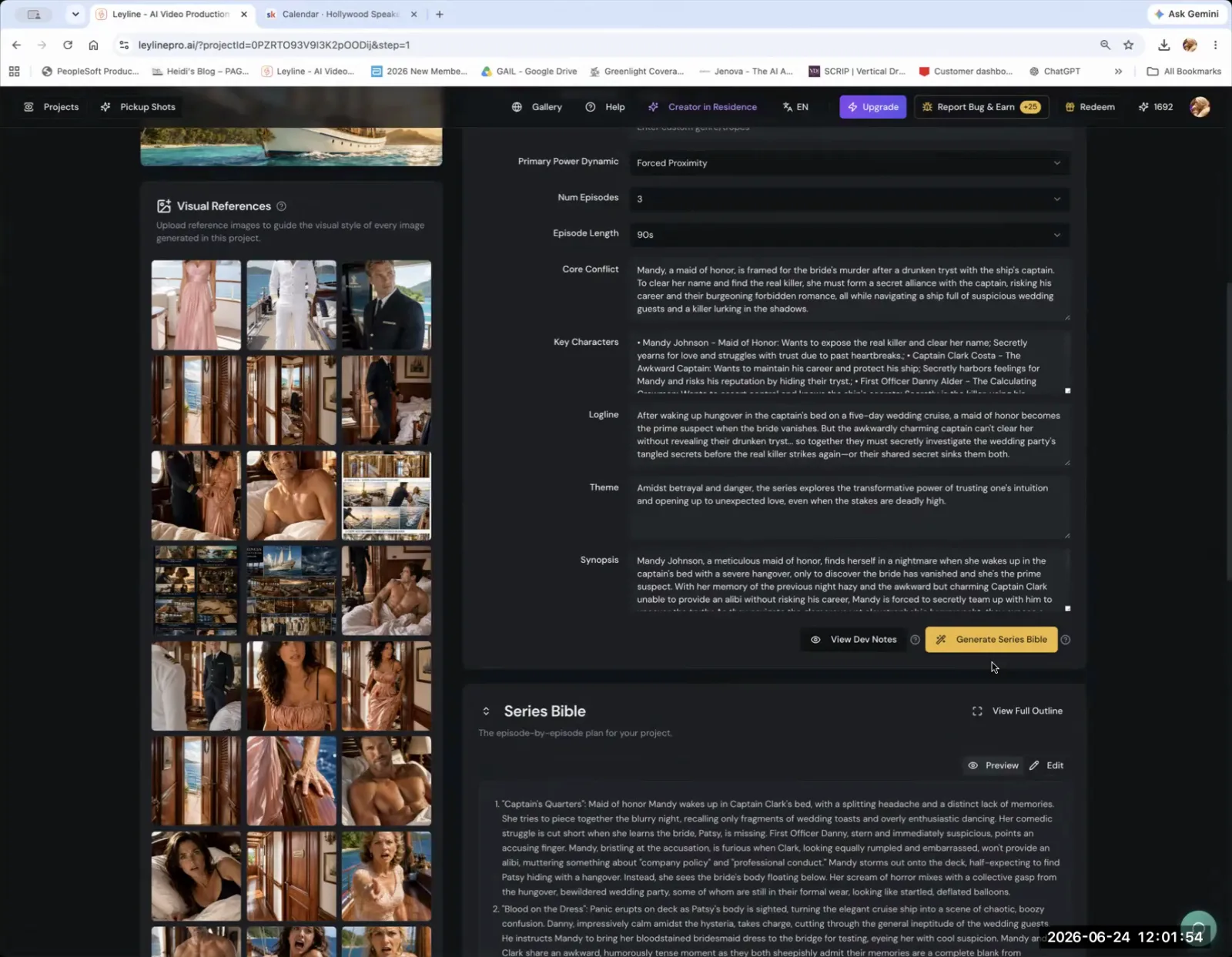
To achieve AI video generator consistency, you must use tagged references for your characters and key assets. This technique provides the AI with a persistent source of truth, ensuring an element's appearance remains the same across different scenes. According to AI filmmaker Austin Zartman, "how these image models keep consistent is to have references." A tagged reference is a specific image of a character or object that you upload and formally identify for the AI model. The model can then refer back to this tagged asset for every new generation.
Without this direct reference, AI generators often fail to maintain continuity. Zartman highlights a common issue where, even with reference photos, the AI changes a character's outfit or other key details between shots. He notes, "I don't really like the way it generates because there's no consistency in the generation." This breaks the visual narrative. Without this control, achieving reliable AI video generator consistency is nearly impossible.
The process of using a tagged reference involves a few simple steps:
- Upload a Source Image: Select a clear image of the character or object you want to keep consistent. This will be your master reference.
- Tag the Asset: Formally add the asset to your project's library within the AI tool. This creates a specific, identifiable reference for the AI.
- Use the Tag in Prompts: When generating new scenes, you can now call on this asset by its tag, instructing the AI to include the exact character in the new composition.
This method is fundamental for reliable AI video generator consistency, transforming the AI from an unpredictable creator into a dependable production assistant.
How do you direct an AI image model for video scenes?
You direct an AI image model for video scenes by using specific commands to place your referenced assets within the frame. Once you have a tagged asset, you can give the model explicit compositional instructions. For example, you can tell the AI to place your character in the "center, left, right" of the image. This control allows you to direct each shot with intention, which is essential for visual storytelling and maintaining narrative flow.
A video is a sequence of deliberately composed shots, not only a random series of images. By specifying the position of your characters and objects, you can build scenes using established cinematic language. This includes creating:
- Establishing Shots: Wide shots that show the environment and the character's place within it.
- Medium Shots: Shots that frame the character from the waist up, common for dialogue scenes.
- Close-Ups: Tight shots that focus on a character's face to convey emotion.
- Over-the-Shoulder Shots: Shots that look from behind one character at another, useful for conversations.
This directorial capability is a key component of achieving AI video generator consistency. Each composed shot builds upon the last, reinforcing the visual language and contributing to the overall AI video generator consistency of the final sequence. This process improve the AI from a simple image generator to a tool for executing a specific creative vision, shot by shot.
What is the role of mood boards in AI generation?
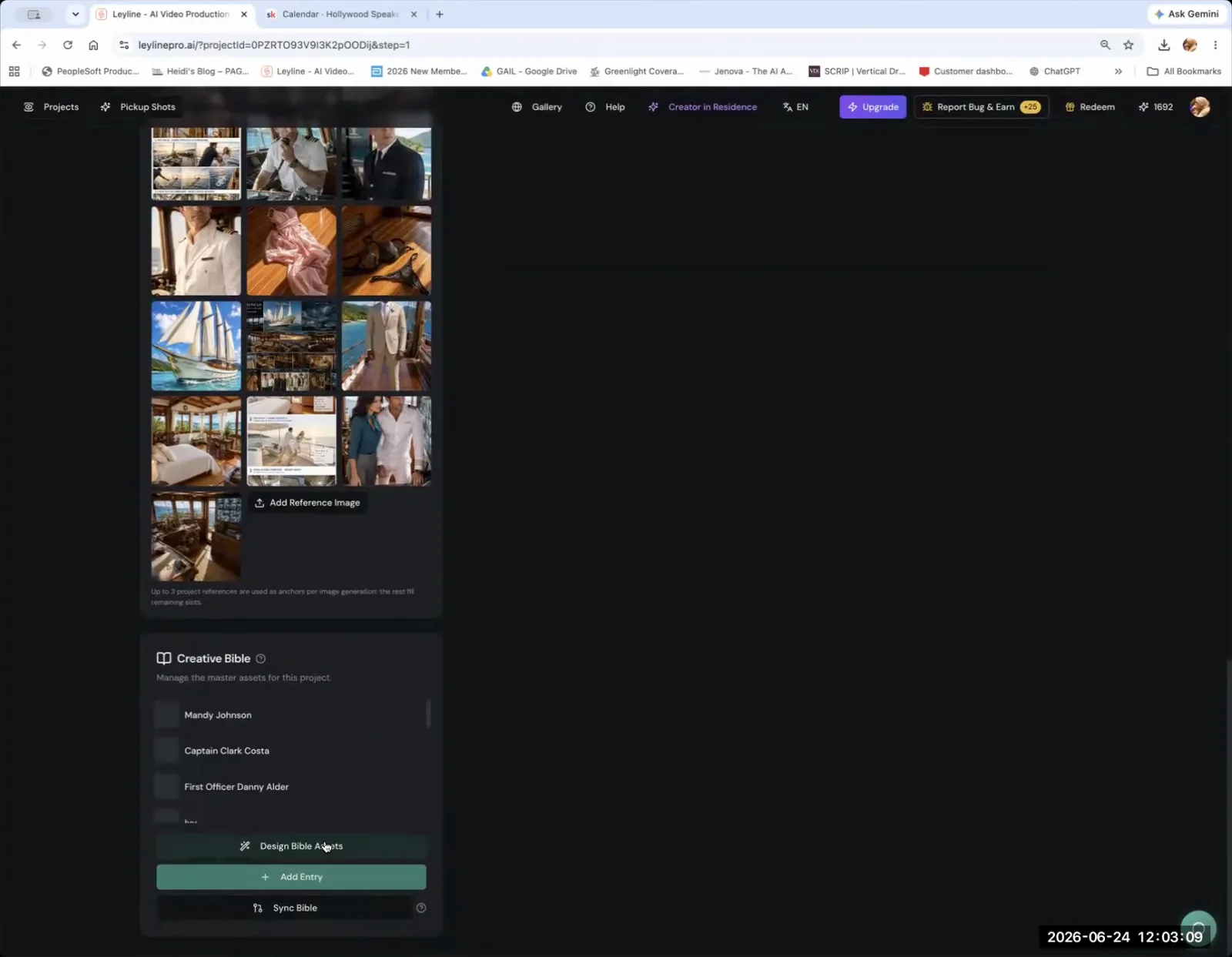
A mood board's role in AI generation is to establish a consistent art style and color palette for the entire project. Creators can upload between one and three images that define the desired mood and visual theme. These images act as a general stylistic guide for the AI, influencing its choices on lighting, texture, and color for every generated frame. This ensures that all the individual shots feel like they belong in the same world.
Austin Zartman explains that the goal is so "when they do the final generations, there's like a general art style and color palette to refer to." This function is distinct from a tagged asset reference.
- A Tagged Reference: Ensures a specific character or object remains identical.
- A Mood Board: Ensures the overall look and feel of the video remains unified.
By providing a broader stylistic direction, a mood board helps maintain a professional and cohesive aesthetic. This stylistic unity is another critical layer of AI video generator consistency, working alongside asset referencing to create a polished final product. The mood board acts as a silent director for the aesthetic, ensuring every frame aligns with the project's visual identity and supports the goal of AI video generator consistency.
Why is a structured workflow important for AI generation?
A structured workflow is important for AI generation because it organizes the creative process, ensuring all assets and stylistic choices are managed properly. This systematic approach is essential for achieving AI video generator consistency, especially in complex projects. Using a dedicated process, like the "layline process" Zartman mentions, helps creators avoid the chaotic and inconsistent results that come from generating images in an ad-hoc way.
A structured workflow for AI video typically includes these core stages:
- Asset Management: Uploading and tagging all key characters, props, and locations. This creates a library of consistent elements to use throughout the project.
- Stylistic Direction: Establishing the overall look and feel using a mood board. This sets the color palette, lighting style, and general aesthetic.
- Scene Composition: Directing the placement of tagged assets within each shot to build a narrative sequence, moving from one shot to the next with clear intention.
This workflow is the backbone of successful AI video production, as it provides the necessary structure for maintaining AI video generator consistency from the first frame to the last. This methodical process also makes powerful creative tools accessible to individuals who are not professional designers or directors. The system provides clear steps to guide users. Zartman notes that with these tools, "they can be chatting with the AI to help them like to generate stuff... there are steps in the way to help you do that with AI." This guided process lowers the technical barrier, allowing creators to focus on storytelling.
Frequently asked questions
What is the biggest challenge when using an AI video generator?
The biggest challenge is maintaining consistency in characters, objects, and style across multiple shots. AI filmmaker Austin Zartman notes that without proper referencing, AI models may change character outfits or appearances from one frame to the next, breaking the narrative's continuity.
How many images should you use for an AI mood board?
For establishing a general art style and color palette, you should typically upload one to three reference images for a mood board. This provides the AI model with enough information to maintain a consistent visual theme throughout the project without being overly restrictive.
What is a tagged reference in AI generation?
A tagged reference is an image of a character or asset that you upload and formally identify for the AI. This gives the model a specific, persistent source to refer to in all future generations, ensuring that the asset's appearance remains consistent.
Can non-professionals use AI video generators?
Yes, non-professionals can use AI video generators effectively. Many platforms provide a structured, step-by-step process that guides users through asset creation and scene composition, making advanced filmmaking techniques more accessible to those without a background in design or directing.
How do you control shot composition with an AI generator?
You control shot composition by giving the AI specific positional commands for your tagged assets. For example, after selecting your character, you can instruct the model to place them in the center, left, or right of the frame to create a well-composed shot.
Keep learning
This guide is part of the AI Filmmaking Workflow & Asset Management masterclass lesson.
Related guides:
Comments
Sign in with your Leyline account to join the conversation.