The Ultimate AI Video Prompt Guide for Filmmakers
AI video prompting is the process of giving text instructions and an initial image to an artificial intelligence model to generate a video sequence. This step is a critical part of the AI filmmaking workflow, translating static keyframes into animated shots. This ai video prompt guide provides a technical, practitioner-focused approach to mastering this skill. According to AI filmmaker Austin Zartman, creator of the AI short-film series ASHES, mastering the prompt is less about creative writing and more about precise, technical instruction. The quality of the final video depends heavily on the clarity of the prompt, the quality of the starting image, and the filmmaker's iterative refinement process. This is why a detailed ai video prompt guide is so valuable for creators.
An AI Video Prompt Guide to the Core Components

The three core components used to generate an AI video are the text prompt, the chosen AI model, and the initial image. These three elements work together to create the final animated shot. Austin Zartman explains, "Whatever you say in the video prompt and the model you choose and there's the initial image you start with. That's what you use to generate the video." Understanding how to control each component is essential for predictable results and is the main purpose of this ai video prompt guide.
- The Text Prompt: This is the direct instruction that describes the animation. It dictates the motion, action, and any changes that should occur from the starting frame. A good text prompt is focused exclusively on movement.
- The Initial Image (Keyframe): This is the visual foundation of your shot. It provides the AI with all the necessary visual information, including characters, lighting, composition, and style. The AI uses this image as the starting point for a video.
- The AI Model: The model is the engine that interprets your text prompt and initial image to render the final video. Different models may interpret the same inputs in slightly different ways, so model selection is a part of the creative process.
Changing any one of these components will result in a different output. Effective AI filmmaking requires deliberate control over all three. A strong keyframe with a weak prompt will produce poor results, just as a great prompt with a flawed keyframe will amplify existing errors. This is a central lesson of any effective ai video prompt guide.
How to Structure Your Text Prompt for Motion
You should structure your text prompt to describe exactly what is happening with the animation and nothing else. The goal is to be as direct and precise as possible, focusing exclusively on the motion you want to see. Vague or overly descriptive language can confuse the AI model. Zartman's instruction is to "describe exactly what's supposed to be happening with the animation." This means focusing on verbs and direct actions.
For example, instead of a flowery description of a character's emotional state, a better prompt would be "character slowly turns their head to the left, eyes widen slightly." This level of exactness gives the AI clear, unambiguous instructions to execute. This leads to more controlled and intentional animation in the final video. This approach to direct instruction is a core tenet of this ai video prompt guide.
Best Practices for Text Prompts:
- Be Literal: Describe only what you see. If a character is sad, describe the physical expression: "character's lower lip trembles, a single tear falls from their left eye."
- Use Active Verbs: Focus on action words that define movement. "Walks," "runs," "turns," "blinks," "drifts."
- Avoid Redundancy: If your keyframe already shows a character with red hair, do not mention "red hair" in the video prompt unless you want the AI to change it. The AI already has that visual data from the image.
- Keep it Concise: Long, complex sentences can introduce variables that lead to unpredictable results. Short, clear phrases are better.
Following these principles is fundamental to using an ai video prompt guide effectively.
How Much Information Should a Prompt Contain?
You should provide the AI model with as little information as possible, but as much as is needed to achieve the desired result. Overloading the prompt with excessive detail can confuse the AI and lead to inconsistencies, especially with character or object details. Zartman offers a key rule of thumb: "give it the kind of information, um, as little as possible, but as much as needed is the best way to be working with these kind of stuff."
If your character sheet and keyframe already establish a character's appearance, you do not need to repeat those details in the video prompt. The AI infers from all available inputs. Keeping the video prompt focused purely on the change or motion from the keyframe is the most effective strategy. Too much information can cause the AI to re-render details, leading to flickering or a loss of character consistency between frames of the video. The art of the prompt is in its economy, a skill this ai video prompt guide aims to teach.
The Golden Rule: Perfect Your Keyframe Before Prompting
You should perfect your keyframe image before you even begin writing the video prompt. The keyframe is the foundation of your shot, and any errors in it will be amplified during video generation. AI filmmaker Austin Zartman states, "Until you got everything right in the keyframe step. Go, don't go into the video, I would say. Like, this is where you spend most of your time."
This means ensuring every visual element is correct in the static image first. Trying to fix fundamental image problems with a video prompt is an inefficient workflow that produces poor results. Before you move to animation, your keyframe should have:
- Correct Character Consistency: The character should match your series bible and other shots.
- Finalized Lighting: The direction, color, and intensity of light should be exactly as intended.
- Locked Composition: The framing and placement of every element in the scene should be set.
- Accurate Backgrounds and Props: All supporting visual details should be present and correct.
Only when this visual base is 100% correct should you proceed to prompting for video. This discipline saves significant time and frustration in the long run, and is perhaps the most important tip in this ai video prompt guide.
Using Prompts to Fix and Adjust Images
To fix an image, you use different tools and prompting techniques depending on the scale of the error. A good ai video prompt guide must cover both minor tweaks and major revisions.
For Minor Fixes
If an image is about 80% correct, use a tool like "Edit with AI" to refine small details. This is useful for correcting minor artifacts, adjusting textures, or making subtle changes to a character's expression without regenerating the entire image.
For Major Fixes
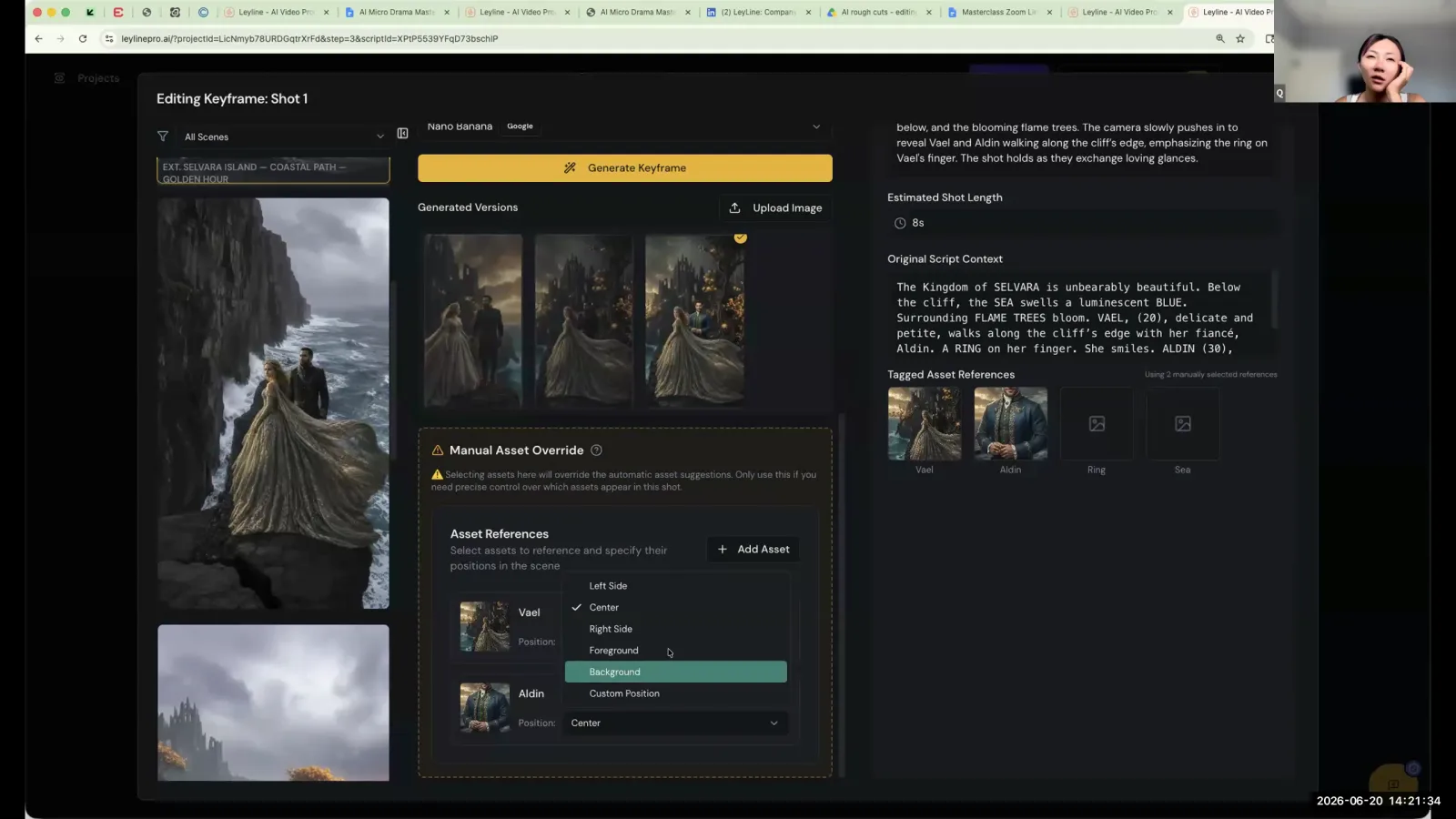
For major compositional errors, use a "manual asset override" to reposition elements. After manually correcting the placement, you must write a new prompt that describes the corrected scene. For instance, after using the override to move two characters closer, Zartman advises you "redo the prompt of, uh, she's looking at him intensely." This two-tiered approach ensures you use the right tool for the job.
Adding Specific Elements
For adding specific new elements like an article of clothing, you need a highly specific prompt combined with a reference image. For example, provide a reference photo of a costume and use a prompt like, "make him wear this costume." It is critical to also instruct the AI to preserve the rest of the image: "keep everything else in this picture, especially the lighting exactly the same."
Why Human Oversight Is Crucial in AI Prompting
Human oversight is crucial because AI models take creative liberties that can deviate from the filmmaker's intent. Without constant correction and guidance, the final product might only be 20% like what you originally wanted. This iterative process is the core of the AI filmmaking workflow and a key takeaway from this ai video prompt guide.
Zartman emphasizes this point: "The AI will take liberties. Like if you fix it every step, you get like 90% close to what you need. If you just let AI do your thing, in the end, you get like probably something that's like 20% like what you wanted. That's why the human needs to be there to check."
The filmmaker's role is to act as a director, constantly guiding and correcting the AI. This involves a continuous loop:
- Prompt: Write a clear, concise prompt for the desired change or motion.
- Generate: Let the AI produce a result.
- Review: Carefully analyze the output against your intention.
- Refine: Adjust the prompt, the keyframe, or other inputs based on the review.
- Repeat: Generate again and continue the cycle until the shot is correct.
This process is applied at every stage, from concept to keyframe to the final video. The human filmmaker steers the AI toward the intended vision. Mastering it is the final step in this ai video prompt guide.
Frequently asked questions
What is the overall production order for AI filmmaking?
According to Austin Zartman, the correct production order is to first establish the series Bible, then write the script. From there, you create designs, break down the script into shots, generate keyframes for those shots, and only then do you use video prompts to render the final animation.
What AI model is recommended for generating keyframes?
For generating the initial static keyframe images that serve as the foundation for a video prompt, Austin Zartman mentions that a model called 'Nano' is likely the best option available within the platform discussed. A strong keyframe is essential before moving to video.
How do you prompt the AI to add a specific costume?
To add a specific costume, you must be very exact. Provide a reference image of the costume itself and use a precise prompt like, "make him wear this costume." Crucially, you must also instruct the AI to "keep everything else in this picture, especially the lighting exactly the same."
What is the most important rule for writing an image prompt?
The single most important rule is to describe exactly what is in the image and nothing else. This direct, literal approach prevents the AI from making incorrect inferences or introducing unwanted elements, leading to cleaner and more consistent outputs for your keyframes.
Can I fix a bad keyframe with a good video prompt?
No, you should not try to fix a bad keyframe with a video prompt. The keyframe is the foundation of the shot. Austin Zartman advises spending the majority of your time getting the keyframe perfect before you even attempt to generate video from it.
Keep learning
This guide is part of the Technical Troubleshooting for AI Filmmaking masterclass lesson.
Related guides:
Comments
Sign in with your Leyline account to join the conversation.