
Taking an AI video series script to finished episode requires a linear, structured pipeline. This pipeline translates written concepts into consistent moving images. Austin Zartman is an AI filmmaker. He is the creator of the series ASHES on Leyline. Zartman utilizes a specific step-by-step process. This process moves a project from an AI video series script to finished episode. The workflow relies on separating visual development phases. It isolates prompting for image generation from prompting for video generation. Treating each phase as a distinct technical hurdle gives the creator control. You maintain control over character consistency. You also control environmental continuity and narrative pacing.
What is the process for an AI video series script to finished episode?
The process for an AI video series script to finished episode moves sequentially through script breakdown, base image generation, video motion generation, and final editorial assembly.
Austin Zartman developed this exact workflow for his series ASHES. This ensures visual consistency across multiple episodes. It also creates predictable production timelines. Taking an AI video series script to finished episode requires strict adherence to a production pipeline. Zartman wants to show creators exact step-by-step what happens during this process.
Without a rigid structure, AI video suffers from errors. These errors include:
- Continuity mistakes.
- Shifting aspect ratios.
- Mismatched lighting.
The process begins with the written script. The script is the foundational blueprint. A traditional script cannot go directly into an AI engine. It must become discrete, machine-readable prompts. This translation starts the production cycle. The creator moves from text to static images. This locks in the visual aesthetic at a standard 16:9 aspect ratio.
The creator approves the static images. Then, the process moves to video generation. Motion is applied to create short 3-second to 4-second video clips. Finally, the creator assembles the disparate video clips in a non-linear editor. The clips conform to a standard 24 frames per second timeline. Following this exact step-by-step sequence minimizes wasted generation credits. It maintains strict control over the final output of the AI video series script to finished episode.
How do you prepare a script for AI video generation?
Preparing a script for AI video generation requires breaking traditional scene descriptions down into literal, machine-readable visual prompts.
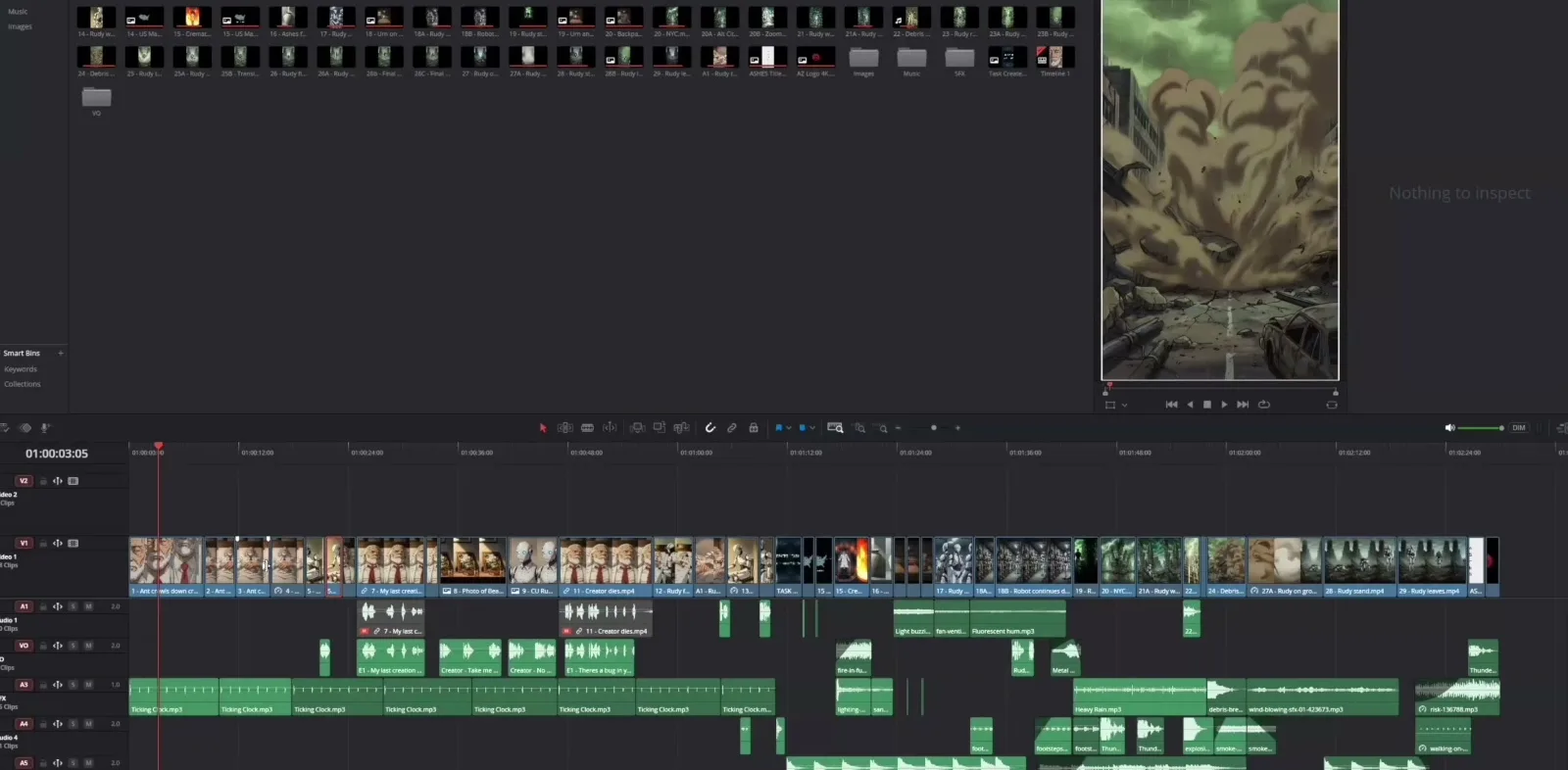
Austin Zartman's episode timeline for ASHES in DaVinci Resolve.
Each shot must be isolated. The creator defines the exact subject, lighting, and camera angle. This happens before moving into the image generation phase. Traditional filmmaking leaves room for interpretation. The director of photography and actors make choices. In an AI video series, the script must be ruthlessly specific. Every noun and adjective directly influences the generation engine.
Creators must strip away dialogue and emotional subtext. You must focus entirely on the physical reality of the frame. This breakdown process yields a shot list. This list functions as a database of text prompts.
If a scene requires a character to walk down a dimly lit hallway, the breakdown must specify:
- The character's exact clothing.
- The specific type of lighting fixtures.
- The color temperature of the light measured in Kelvin.
- The focal length of the virtual camera, such as a 35mm or 50mm lens.
This meticulous preparation ensures a standardized set of instructions. When the creator begins prompting for image and video generation, they reduce variance between generated outputs. Documenting exact seed numbers for character consistency is also handled during this phase. This preparation is critical to take an AI video series script to finished episode.
How does prompting for image generation work?
Prompting for image generation establishes the core aesthetic, character design, and environmental details of the episode.
Zartman identifies this as a distinct technical phase. Creators lock in the static visual assets here. This happens before introducing the complexities of motion and physics. During the production of ASHES, Zartman isolated the image generation phase. It is a critical component of the workflow. He notes that creators must focus specifically on prompting for image and video generation as separate disciplines.
Image generation is the foundation. The creator defines the aspect ratio, the color grading, and the precise look of the characters. This requires using specific weightings in the text prompt. Generating static images first establishes a visual baseline.
AI image engines excel at creating high-resolution, highly detailed static compositions. The creator iterates on these text prompts. You do this until the generated image perfectly matches the intention of the script. These approved images act as the anchor points for the rest of the episode. If the image generation phase is rushed, problems occur. The subsequent video generation will inherit and magnify any visual errors. It will also magnify inconsistencies. A standard practice is to generate 10 to 15 image variations for every one approved master shot. This volume is necessary when taking an AI video series script to finished episode.
What are the mechanics of prompting for video generation?
Prompting for video generation involves taking the locked static images and applying specific text prompts to direct movement, camera dynamics, and temporal changes.
This step transforms the static aesthetic into a finished, moving shot. The shot is then ready for the editing timeline. Once the static images are finalized, the process transitions. As Zartman points out, prompting for image and video generation require different skill sets. Image prompting focuses on composition and lighting. Video prompting focuses on physics, motion vectors, and time.
The creator feeds the approved static image into a video generation engine. You then apply a new text prompt. This prompt is designed specifically to dictate movement. This might involve instructing the camera to pan slowly to the right at a specific speed parameter. It might involve instructing a character to turn their head.
The static image provides the visual baseline. Therefore, the video engine only needs to calculate the motion. This results in a more stable and consistent output. The creator must carefully manage the duration of these generated clips. You often work in short bursts of 3 to 5 seconds. This maintains temporal consistency. It prevents the AI from introducing unwanted artifacts or morphing. Managing these mechanics is essential to move an AI video series script to finished episode.
How do you assemble the final episode?
Assembling the final episode requires importing the generated video clips into a non-linear editing system to add pacing, sound design, and dialogue.
This final step unifies the disparate AI-generated assets. It creates a cohesive narrative structure that matches the original script. The final phase of taking an AI video series script to finished episode occurs in the edit bay. The creator imports the generated video clips. You organize them according to the original script breakdown.
This is where the pacing of the episode is established. AI video generation often produces clips with varying frame rates. The editing phase is crucial for conforming all media. Everything must match a unified 24 frames per second timeline. This smooths out transitions. It allows cutting around generation artifacts.
Sound design and dialogue are added during this assembly phase. AI-generated video is inherently silent. Audio is a vital component for selling the reality of the scene.
Audio layering includes:
- Ambient noise.
- Foley.
- Voiceover recorded at a standard 48kHz sample rate.
The creator grounds the AI-generated visuals in a believable soundscape. An edit might reveal a missing shot. If so, the creator must loop back through the exact step-by-step process. You generate a new base image before generating the required video clip. Once the audio mix is complete and the color grading is finalized, the episode is rendered. The project has successfully moved from an AI video series script to finished episode. It is ready for distribution.
Frequently asked questions
What is the first step in producing an AI video episode?
The first step is locking the script and breaking it down into individual visual prompts. This allows the creator to plan the exact image and video generation requirements. You do this before opening any software. This ensures visual consistency across the entire episode. It is the starting point for taking an AI video series script to finished episode.
Do image and video generation use the same prompts?
No, prompting for image and video generation are treated as distinct steps. Image prompts focus on composition, lighting, and character design. Video prompts dictate movement, physics, and camera dynamics. These are based on the established static image.
Who created the AI series ASHES?
ASHES is an AI-generated short-film series created by AI filmmaker Austin Zartman. He developed a step-by-step production pipeline. This takes the project from an AI video series script to finished episode on the Leyline platform.
Why generate images before video?
Generating still images first allows creators to lock in character consistency, lighting, and composition. These stills act as strict visual references for the video generation models to follow. This prevents the AI from hallucinating unwanted details during motion generation.
Can traditional scripts be used directly in AI video generation?
Traditional scripts cannot be used directly. They must be translated into literal, machine-readable visual prompts. These prompts isolate specific variables. You must define character appearance, lighting, and camera angle. This allows the AI engines to process the information accurately.
Comments
Sign in with your Leyline account to join the conversation.