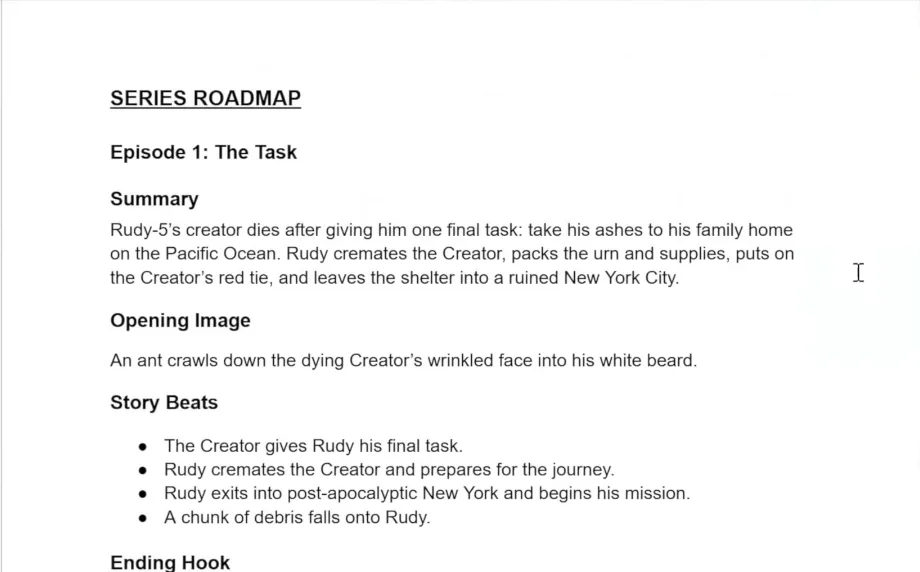
To create a vertical AI series, establish a platform-agnostic six-step workflow starting with a comprehensive Series Bible. Successful vertical ai series pre production requires strict narrative efficiency. Austin Zartman, creator of the AI series ASHES, relies on clear loglines, character hero shots on blank backgrounds, and single-conflict episodes. Because vertical episodes run only 60 seconds to three minutes, creators must limit each episode to one location and maintain a consistent visual anchor. This guide outlines the exact steps to build your story world and prepare for ai video generation.
What You Will Learn in Vertical AI Series Pre Production
- Understand the six-step platform-agnostic workflow for ai filmmaking.
- Create a comprehensive Series Bible to anchor your project's narrative and visual style.
- Write effective loglines that concisely pitch your story's core conflict.
- Develop detailed character sheets and visual references for consistent image generation.
- Structure short vertical episodes with compelling hooks and cliffhangers.
The Six-Step Vertical AI Series Pre Production Workflow
Establish a platform-agnostic process to take your vertical series from the initial idea to a final edited video. This framework allows you to plug and play different AI tools based on the specific story you are telling. Mastering vertical ai series pre production ensures a smooth transition into the final editing phases.
Step 1. Concept Development. Define the high-level story, characters, and visual style in the concept development phase. This initial phase of vertical ai series pre production includes deciding on the episode length and overall arc. Vertical series typically run 60 to 90 minutes total. These are broken down into episodes lasting 60 seconds to three minutes. Establishing these constraints early ensures strict narrative efficiency.
Step 2. Screenplay Format. Write the story using standard screenplay format. This serves as the blueprint for your visuals. A standard script format ensures you have a clear shot list before moving into the next phases of vertical ai series pre production. Writing in standard format allows you to plan the exact pacing required for a 60-second to three-minute episode.
Step 3. Image Generation. Generate still images based on the screenplay to create a visual storyboard. This allows you to see the visual story from beginning to end. Using a consistent visual anchor prevents the AI from guessing the style during image generation. You compile references from existing series to create a framework for these images.
Step 4. Video Generation. Animate the still images into short clips using video generation tools. This brings the storyboard to life. A platform-agnostic workflow means you will swap in different AI tools based on your specific story needs. This flexibility is a core component of vertical ai series pre production.
Step 5. Timeline Editing. Place the generated video clips onto a timeline in an editing program to build the episode flow. This is where you establish scene transitions. Timeline editing organizes the output of your video generation phase into a cohesive 2-3 minute episode.
Step 6. Sound Design. Add voiceover, sound effects, and music during the sound design phase. This step is typically baked into the editing process. Sound design finalizes the episode arc, supporting the opening image, major beats, and ending hook.
Creating a Series Bible for Vertical AI Series Pre Production
Build a foundational document containing your logline, character breakdowns, and visual references. Generating a character hero shot on a blank background ensures AI models can easily insert them into new scenes later. A strong Series Bible is the core of vertical ai series pre production.
Step 1. Logline. Write a concise logline that pitches the core story and conflict in under a minute. If it takes longer than a minute, streamline your story. A short pitch quickly communicates the core plot. Vertical ai series pre production demands simplicity, as episodes run strictly between 60 seconds and three minutes.
Step 2. A-Story. Articulate the underlying themes and the main A-story plot. This bakes the core ideas into your mind for writing. The A-story is the main plot that drives the narrative forward. Focusing on a single A-story aligns with the one-thing principle required for short-form episodic content.
Step 3. Story World. Describe the story world and its visual contrasts to establish the setting. Ensure it is visually unique to catch attention. The environmental setting is crucial for catching attention in vertical formats. A well-defined story world provides a consistent visual anchor for the entire series.
Step 4. Character Breakdown. Break down each primary character's goals, conflicts, and physical appearance. Be as specific as possible to make characters stand out. This defines the character's ultimate journey to guide AI generation. Detailed breakdowns prevent inconsistencies when you swap in different AI tools.
Step 5. Character Hero Shots. Generate a character hero shot of each character on a blank background for ai reference. This helps AI models insert the character into other scenes easily. Image generation models use these isolated references to accurately insert characters into various new environments. Austin Zartman relies heavily on this technique for his series ASHES.
Step 6. Character Sheets. Create character sheets showing multiple angles and close-ups of key features. Include different movements and hand close-ups. A collection of images showing a character from multiple angles ensures consistency. These sheets are mandatory for successful vertical ai series pre production.
Step 7. Episode Arc. Outline the episode arc, focusing on one central conflict and location per episode. Start with the opening image, major beats, and ending hook. Applying the one-thing principle maximizes narrative efficiency. Including too many locations or conflicts destroys the pacing of a 2-minute episode.
Step 8. Visual References. Select existing visual references to anchor the specific art style for image generation. Use existing films or shows to prevent the AI from guessing the style. Compile references from existing series to create a framework. This guarantees all generated images fall within a specific aesthetic.
Key Terms in Vertical AI Series Pre Production
Platform-Agnostic Workflow. A general production process allows creators to swap in different AI tools based on their specific story needs. This flexibility is essential for vertical ai series pre production, as tools update frequently.
Concept Development. The high-level phase involves defining the story, characters, conflict, episode length, and visual style before production begins. This phase sets the foundation for the entire 60 to 90-minute series.
Screenplay Format. The standard scriptwriting format is used to write the series before moving into image generation. This format acts as a strict blueprint for the visual storyboard.
Image Generation. The process of turning a screenplay into a shot list and storyboard relies on generating still images. This step requires a clear visual anchor to maintain consistency.
Video Generation. The step of animating still storyboard images into short video clips brings the project to life. Creators use the character hero shots on blank backgrounds to maintain consistency during this phase.
Timeline Editing. Placing generated video clips into an editing program establishes scene transitions and episode flow. This step organizes the 60-second to three-minute episodes.
Sound Design. The audio phase is baked into editing, encompassing voiceover, sound effects, and music. This finalizes the emotional impact of the episode arc.
Series Bible. A foundational document defines the series' logline, themes, story world, characters, and visual references. Building a comprehensive Series Bible is the most critical step in vertical ai series pre production.
Vertical Series Format. Short-form episodic content typically runs 60 to 90 minutes total. This is broken into 2-3 minute episodes designed specifically for mobile platforms.
Compelling Hook. An engaging opening for a short episode is designed to immediately capture viewer attention. This is necessary because vertical formats require immediate engagement.
Cliffhanger. An unresolved ending to an episode compels the audience to watch the next installment. This structure keeps viewers engaged across the entire 60 to 90-minute series.
Logline. A short pitch or summary of the story is used to quickly communicate the core plot and conflict. If the logline takes more than 60 seconds to pitch, the story requires streamlining.
A-Story. The main plot drives the narrative forward in a series. Vertical ai series pre production requires focusing strictly on this single A-story to maintain narrative efficiency.
Story World. The visual and environmental setting of the series is crucial for catching attention in vertical formats. A unique story world serves as a consistent visual anchor.
Character Breakdown. Defining a character's appearance, goals, conflicts, and ultimate journey guides AI generation. This breakdown informs the creation of character sheets.
Character Hero Shot. A clear image of a character on a blank background is used as a reference for ai image generation models. This technique allows AI to insert characters into new scenes easily.
Character Sheet. A collection of images shows a character from multiple angles and in various movements to ensure consistency. This includes close-ups of key features and hands.
Episode Arc. The structural breakdown of an episode includes the opening image, major beats, and ending hook. This arc must fit within a strict 60-second to three-minute runtime.
One-Thing Principle. The strategy of focusing a vertical episode on a single location and central conflict maximizes efficiency. This principle is mandatory for short-form episodic content.
Visual References. Existing artworks, films, or shows are used as an anchor to guide the specific style of AI image generation. This prevents the AI from guessing the art style.
Common Mistakes in Vertical AI Series Pre Production
- Taking more than a minute to pitch the logline indicates the story is too complex and needs streamlining.
- Including too many locations or conflicts in a single 2-3 minute vertical episode loses narrative efficiency.
- Starting image generation without a clear visual anchor or reference results in inconsistent art styles.
- Failing to generate a character hero shot on blank backgrounds makes it harder for AI models to place characters into new scenes consistently.
Frequently asked questions
What is the best workflow for making vertical AI short films?
The most effective workflow is a platform-agnostic, six-step process that moves from concept development to a final edited video. This approach includes writing a screenplay, generating images to form a storyboard, creating video, timeline editing, and adding sound design. Proper vertical ai series pre production ensures the later steps run smoothly.
How to write a logline for a vertical short series?
Write a logline that you can pitch in under one minute. If it takes longer than 60 seconds to explain the core concept, the narrative is too complex for the vertical format and requires streamlining to ensure maximum efficiency.
How to maintain character consistency in AI video generation?
Maintain consistency by generating clear character hero shots on blank backgrounds during the Series Bible phase. Image generation models use these isolated references easily, allowing the AI to accurately insert your characters into various new scenes and environments throughout the episode.
How to structure a 2-minute vertical video episode?
Structure short vertical episodes by focusing on a single core conflict or event. Because episodes run strictly between 60 seconds and three minutes, including too many locations or conflicts destroys narrative efficiency. Simplicity is the best operating principle for this format.
How to choose a visual style for AI animation?
Choose a visual style by establishing a clear visual anchor before you begin generating images. Compile references from existing series into your Series Bible to create a framework. This ensures all generated images fall within a specific, attention-grabbing aesthetic.
Comments
Sign in with your Leyline account to join the conversation.