Creative Bible Filmmaking: AI Project Guide
A creative bible is a project's central library for core creative assets—characters, props, and locations—that must stay visually consistent across every scene and episode. In AI filmmaking, it is the single source of truth that prevents visual drift and keeps your world coherent from shot to shot. This guide explains creative bible filmmaking as practiced by working AI creators, and walks through how to build and use one in your own projects.
What is a Creative Bible in AI Filmmaking?
A creative bible in AI filmmaking is a centralized, project-level library for storing and managing key assets. It serves as the definitive source for an asset's appearance, ensuring it can be used consistently across multiple scripts and episodes.
According to AI filmmaker Austin Zartman, creator of the AI short-film series ASHES, the bible is where you assign specific reference images to named assets. Zartman explains, "You need to upload the image for Odin...in the specific asset cards or in the Bible."
This action distinguishes a specific asset from general project reference images, which only provide a broader stylistic tone. The creative bible holds the specific, approved design for individual, recurring elements—making it an indispensable tool for organized production.
Core Principles of Creative Bible Filmmaking
Effective creative bible filmmaking relies on a few core principles that ensure a smooth and consistent production process. These practices help manage the complexities of AI-generated content, especially in long-form or episodic storytelling.
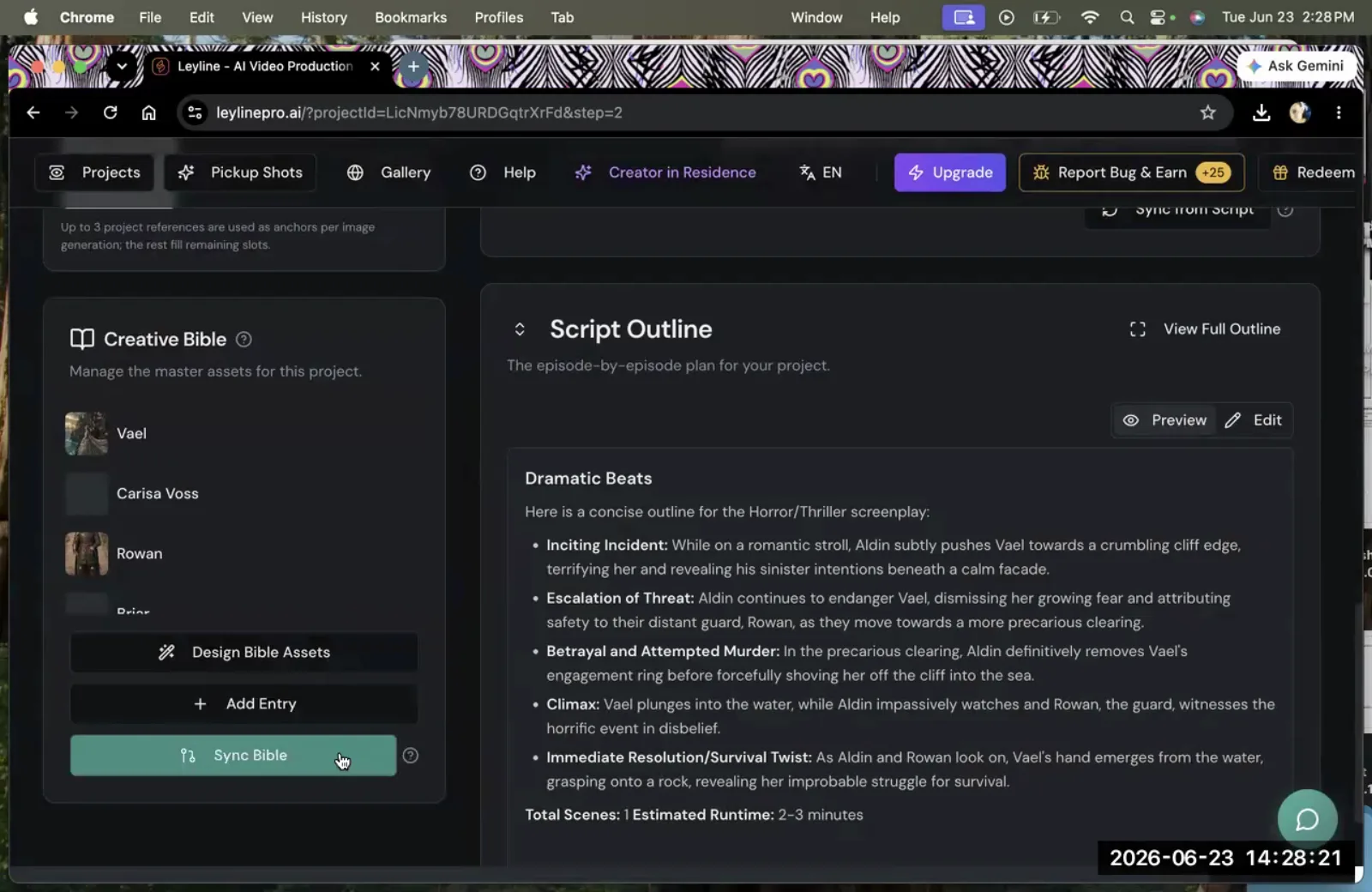
- Centralization: The primary function of the creative bible is to centralize assets. Instead of having character designs scattered across different files or prompts, every approved asset lives in one accessible location. This organization means that any element, from a main character to a minor prop, can be found and used immediately.
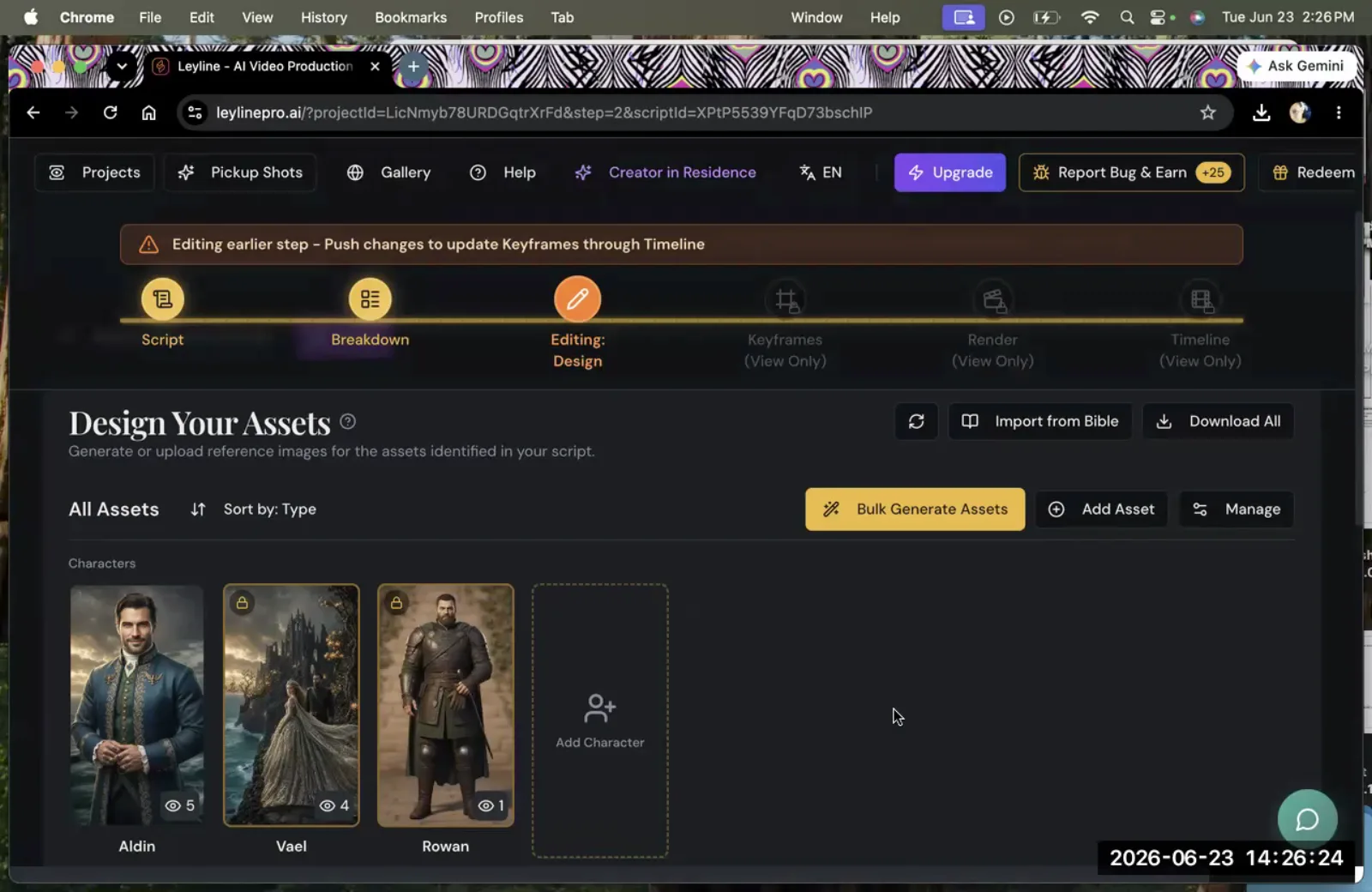
- Consistency: Visual consistency is the most significant benefit. The bible locks in the design of an asset, preventing the AI from generating variations in later scenes. As Austin Zartman's workflow shows with the character Rowan, once an asset is in the bible, its appearance is fixed. This prevents continuity errors that can distract an audience and undermine the story's credibility. For a deeper look at why this matters, see how to maintain character consistency in AI video.
- Efficiency: By establishing an asset's design once, you eliminate the need to redesign it for every new script or episode. Zartman emphasizes this directly: "If this character is going to be reappearing in multiple episodes, always promote it to Bible once you've designed it." This makes the asset available at the project level for all future work.
How to Build and Use Your Creative Bible: A Workflow
You build and use a creative bible by promoting generated assets to a project-level library, syncing the library, and then importing those assets into new scripts. This workflow turns a one-off design into a reusable component for your film.
Here is a step-by-step breakdown based on Austin Zartman's masterclass:
- Generate and Finalize Your Asset: First, create your character, prop, or location until you are satisfied with the visual result. This initial design phase is where you establish the definitive look you want to maintain.
- Promote the Asset to the Creative Bible: Once you have an approved design, you must add it to the bible. Zartman demonstrates this with the character Odin. He instructs, "Go to Odin. There's three dots on the upper right hand of that character. Promote to Creative Bible." This action improve the asset from being specific to one scene to being available across the entire project.
- Confirm the Asset is in the Bible: After promoting an asset, many platforms provide a visual indicator. Zartman points to another character, Rowan, and notes, "Rowan is already in the Bible. See the little like lock icon?" This confirmation shows the character's design is secured at the project level.
- Sync the Bible with Your Project: Adding an asset to the bible is not the final step. You must update the entire project to recognize the change. Zartman states the next step is to "sync the Bible." This command pushes the new asset information to the project, making it available for use elsewhere.
- Import the Asset into a Script: With the bible synced, you can now pull the asset into any script within the project. To do this, you typically use a function like "Import from Bible," which Zartman notes is often found in the upper right-hand corner. This opens a list of all available assets, allowing you to select the one you need, like Odin, and bring it into your current scene with its correct, consistent appearance.
Managing Different Asset Types in the Bible
While characters are a common use case, a creative bible is designed to manage any recurring asset. Its purpose is to make any key element available at the project level for consistent reuse. Applying the principles of creative bible filmmaking to different types of assets is crucial for building a cohesive world.
Characters
The most obvious use for a creative bible is managing characters. For a series like ASHES, ensuring that protagonists like Odin and Rowan look the same in every episode is fundamental to storytelling.
Without a bible, their features, clothing, and overall appearance could drift from one generation to the next, breaking the narrative illusion. This is especially important when working with AI video models like Kling or Veo 3, where the same prompt can produce slightly different results on each generation.
Props
Important objects that appear multiple times also benefit from being stored in the bible. Imagine a story centered around a unique sword, a futuristic device, or a specific vehicle. If this prop looks different in every scene, it loses its significance. By promoting the prop's design to the bible, you ensure it remains a consistent visual anchor throughout the film.
Locations
Key settings can also be managed as assets. If a large portion of your story takes place in a specific location—like a starship bridge or a castle's throne room—you can lock in its design. This ensures that the architecture, color palette, and overall mood of the environment are consistent each time the audience sees it, reinforcing the sense of a real, persistent place. Consistent locations also reduce the need for B-roll footage generation to paper over visual mismatches.
Creative Bible vs. Series Bible: What's the Difference?
A creative bible and a series bible are related but distinct documents. A series bible is a narrative planning document—it covers the show's premise, character arcs, episode outlines, and tone. It is primarily a writing and development tool.
A creative bible, by contrast, is a visual production asset. It holds approved reference images for characters, props, and locations that get imported directly into your generation workflow. In a well-organized AI film project, you will have both: the series bible guides the story, and the creative bible enforces how that story looks on screen.
Understanding both is part of a broader AI filmmaking workflow that separates development, pre-production, and production into distinct phases.
Frequently asked questions
What is the difference between a project reference image and a creative bible image?
A project reference image gives general stylistic guidance for an entire project, while a creative bible image is a specific reference assigned to a single, named asset. As AI filmmaker Austin Zartman explains, the bible image for a character like Odin defines that specific character's look for consistent use across every scene and episode.
How do I know if a character is already in the creative bible?
Many AI filmmaking platforms provide a visual cue to show an asset is part of the bible. Austin Zartman points to an example where a character named Rowan has a "little like lock icon" next to their name, indicating that the asset is already locked into the project's creative bible.
What happens if I don't sync the bible after adding a character?
If you fail to sync the bible after making changes, the new or updated assets will not be available for use across the rest of your project. According to Austin Zartman's workflow, the "Sync Bible" command is a required step to push your updates and make them accessible for import.
Is the creative bible only for characters?
No. While the examples from Austin Zartman's masterclass focus on characters like Odin and Rowan, the creative bible system is designed to manage any key recurring asset. Its fundamental purpose is to make any element—be it a character, prop, or location—available at the project level for consistent reuse.
Can I update an asset after it is in the creative bible?
Yes, assets in the creative bible can typically be updated. However, after modifying the asset's reference image or details, you must sync the bible again. This action ensures that the updated version of the asset is distributed across the project, so any future imports will use the new design.
Keep learning
This guide is part of the Troubleshooting Character and Asset Workflow masterclass lesson.
Related guides:
Comments
Sign in with your Leyline account to join the conversation.