Create Short Film with AI: A Step-by-Step Guide
To successfully create short film with AI, you need a structured workflow that moves from character setup and static image generation to iterative video rendering. This process relies on specific tools and techniques to manage assets, control shot composition, and overcome common challenges. According to AI filmmaker Austin Zartman, the creator of the AI short-film series ASHES, a methodical approach is key. This guide provides a practical process for anyone looking to create short film with AI, based on the methods Zartman teaches.
This guide breaks down the essential steps you can use to create a short film, based on Zartman's workflow. We will cover everything from preparing your characters for AI recognition to generating and fixing your final video shots. Following this process helps manage the complexities of the technology and ensures a more polished final product when you create a film with AI.
Setting Up Characters to Create a Short Film with AI
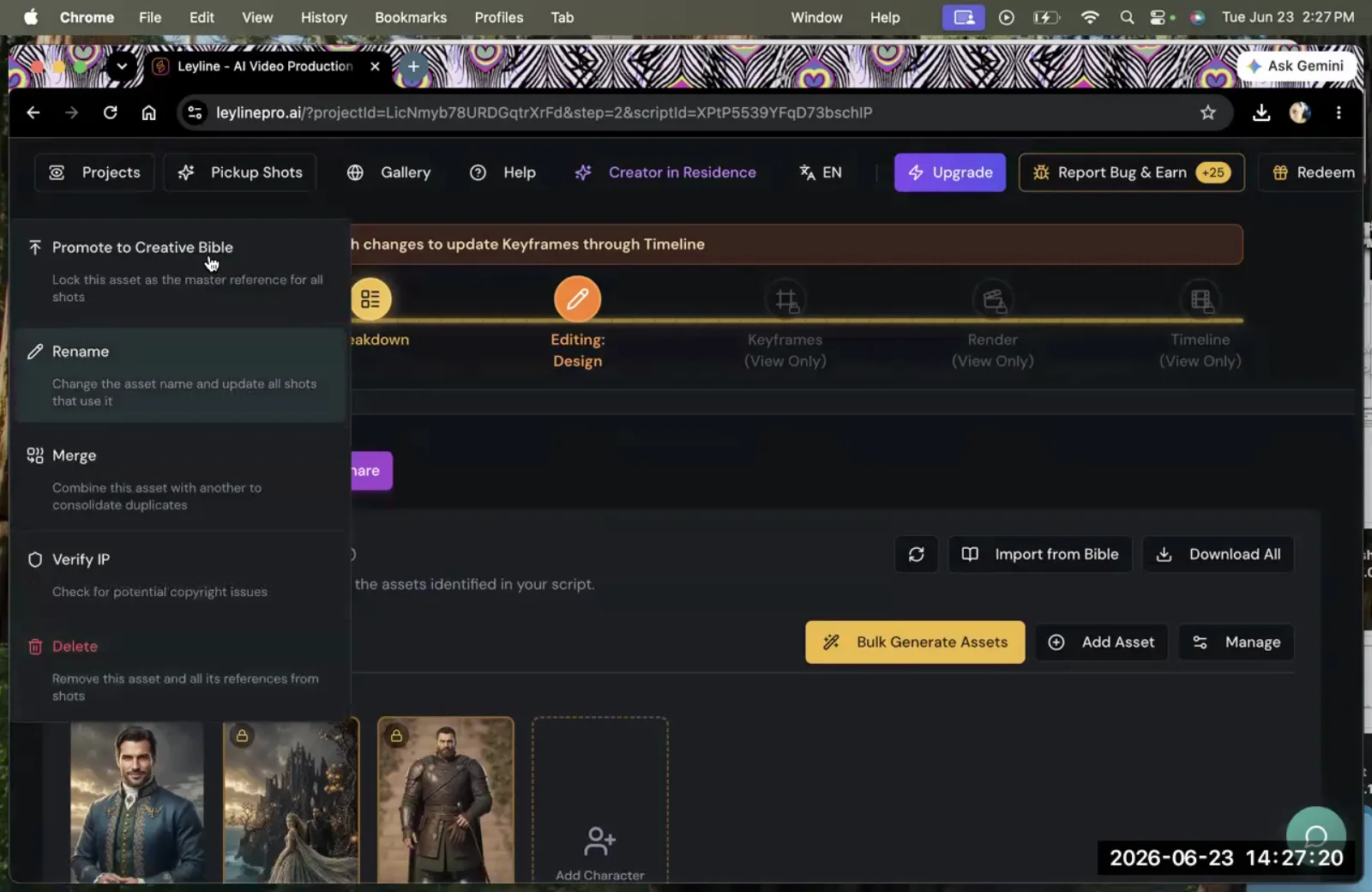
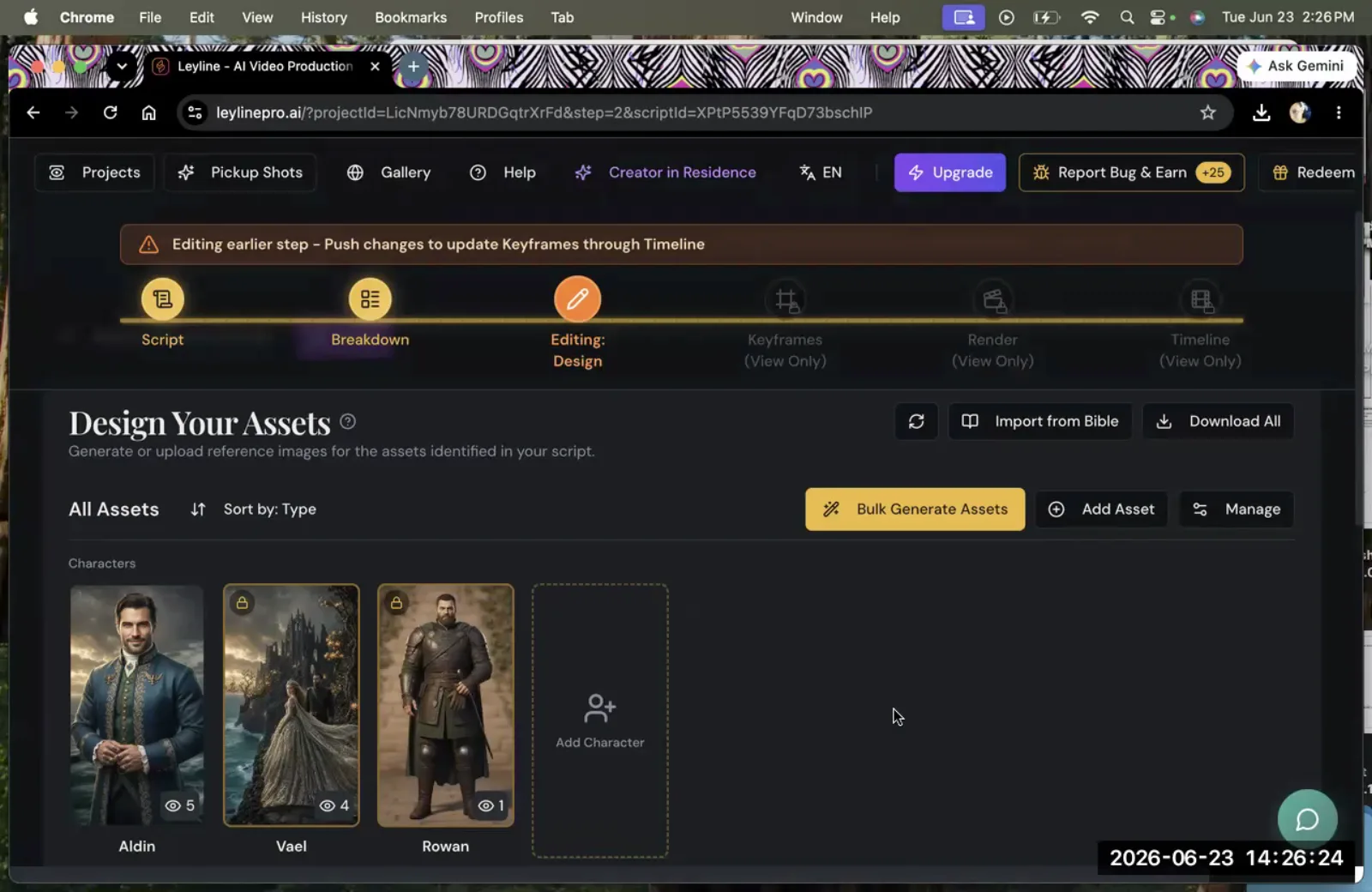
To set up characters for an AI film, you must assign specific reference images to each character profile within a project 'Bible' or at the script level. This foundational step ensures character consistency, a common challenge when you create short film with AI. After designing a character, you promote it to the Creative Bible and sync it to make the character accessible across the entire project.
Austin Zartman explains that simply uploading a folder of images into your project is not enough for the AI to automatically match them to characters in your script. A manual assignment is required. The process involves these key steps:
- Navigate to the character list: Zartman notes, "You see all these characters that are empty right now," pointing out profiles without assigned images.
- Assign reference images: "You need to assign specific images to these characters here or at the script script level, matched to their name for them to actually show up in the asset design."
- Promote to the Creative Bible: Once a character has a reference image, you must make it a project-wide asset. This is especially important for recurring characters. To do this, Zartman instructs to find the character's profile, click the three dots in the upper right-hand corner, and select "Promote to Creative Bible." He emphasizes, "If this character is going to be reappearing in multiple episodes, always promote it to Bible once you've designed it."
- Sync the Bible: The final step is to make this change active by clicking "Sync Bible." This action ensures the newly promoted character is recognized and available for use in all asset design modules. This organizational step is critical for a smooth production when you create short film with AI.
Generating Video Shots to Create a Short Film with AI
The process for generating AI video shots starts with creating static images inside empty shot cards, which serve as the keyframe. These images are often rendered first in low resolution to check for correct physicality and composition. This iterative approach is a core part of how you create a short film. Once approved, you can re-render them in higher resolution using tools like Seedance 2.5, with the ability to create and save multiple versions of each shot.
Your script appears as a series of empty shot cards, each representing a moment in the film. To begin generation, Zartman directs, "Click any, any, any, any card, click edit. So here is where you generate the images." These initial static pictures form the foundation of the animated shot. Generating these keyframes quickly and at a lower quality ensures the basic elements are correct before committing more resources. Zartman mentions his own process: "I rendered these in low resolution just to see them, just to make sure that the physicality was correct on some of them." This step saves time and credits, an efficient practice for anyone looking to create a short film.
Once you are satisfied with the static keyframe, you can proceed to video generation. A key feature of this workflow is its non-destructive, iterative nature. You are not limited to a single attempt. As Zartman confirms, you can render the same shot multiple times. "That's why there's a library for every step," he says. "You can keep all your versions." This flexibility is essential when you create short film with AI, as it allows for creative exploration without permanent commitment to a single render. This method of working is fundamental to achieving a specific vision.
Overcoming Common Hurdles When You Create a Short Film with AI
Filmmakers face predictable challenges with camera control and character consistency when they create a short film with AI. The solutions lie in fixing issues at the earliest possible stage—the keyframe—and relying on iterative rendering for more complex problems.
How to Fix Camera and Proportion Errors
You fix camera direction and proportionality errors at the keyframe stage of the AI filmmaking process. By adjusting the beginning frame of a shot within the keyframe editor, you can correct the directional properties of the camera and characters. This proactive step minimizes errors in the final video render and is a best practice when you create a short film with AI efficiently.
According to Austin Zartman, the keyframe is the place to solve foundational issues with a shot before it is animated. If a character's position or the camera's intended movement is incorrect in the initial static image, these problems will likely be amplified in the video generation step. "[That] you fix in keyframe, because you need to fix the beginning frame, so the direction [is] proportionally correct," Zartman states. He advises users to go directly to the keyframe editor to make these adjustments. "You fix everything in keyframe," he reiterates, explaining that this proactive step ensures there is "less room for errors" during the more resource-intensive video rendering phase.
How to Solve Character Consistency Problems
You solve character consistency problems primarily through iteration. Maintaining a character's face and wardrobe perfectly across shots is a known challenge when you create a short film with AI. In addition to iteration, using highly specific and well-engineered prompts can improve consistency, particularly for clothing and accessories.
Austin Zartman is direct about this challenge, stating, "Is anyone having trouble with consistency of the character's face or the wardrobe? Uh, that is the trouble with AI video itself at the moment. It can only be fixed by iterations." This means generating a shot multiple times, perhaps with slight tweaks to the prompt or seed, until an acceptable result is achieved. This iterative loop is a fundamental reality of the current technology used to create short film with AI.
However, the community of AI filmmakers is actively developing solutions. During the masterclass, an attendee shared that a specific prompt they developed was effective at solving wardrobe inconsistencies. Zartman encouraged this collaboration, suggesting the prompt be shared in a master document for everyone's benefit. This highlights a two-pronged approach: rely on repeated iteration while also leveraging community knowledge and advanced prompting techniques to guide the AI toward a more consistent output.
Which AI Models to Use When You Create Short Film with AI
While many models are effective for initial image generation, AI filmmaker Austin Zartman suggests that a model called "Nano Banana" is particularly strong for editing and changing existing images. When you create short film with AI, it is important to experiment with all available models to discover which ones work best for your specific style and needs.
When asked if one model, Nano, was the best for the keyframe generation step, Zartman replied, "Honestly, not really. I think the models that we have included are all effective, but Nano Banana is better at changing images and editing it." His core advice is to leverage the platform's resources to conduct personal tests. "Everybody has different preferences," he says. "I think what I advise you to do is to try, because there's many credits allocated for you. It's there for you to try. So try out a bunch, and figure it out for yourself." This experimentation is a key part of the learning process for any creator looking to create a short film with AI.
Frequently asked questions
What is the first step in creating an AI short film scene? The first step is to generate static images within the empty shot cards of your script. These images act as the foundational keyframes for each shot, establishing the composition, characters, and environment before you proceed to video generation. This is the starting point for any project where you create short film with AI.
How do you ensure a character can be used across multiple scenes or episodes? To ensure a character is available project-wide, you must use the "Promote to Creative Bible" function after designing them. AI filmmaker Austin Zartman also stresses the need to then click "Sync Bible" to make the promotion active and ensure consistency, a vital step to make your production workflow smoother when you create a short film with AI.
Can you re-render a shot if you're not happy with it? Yes, you can re-render the same shot as many times as you need. Platforms for AI filmmaking, such as the one using Seedance 2.5, typically include a library for each step that saves all your versions. This allows for extensive iteration and experimentation when you create short film with AI.
What is the best way to fix inconsistent wardrobe on a character? The primary method for fixing all consistency issues when you create a short film with AI is iteration. However, masterclass attendees have found that using highly specific and detailed prompts can be effective at correcting wardrobe inconsistencies in the AI-generated video.
Where do you correct camera movement and proportions? Corrections to camera direction and the proportions of objects or characters within a scene should be made in the keyframe editor. By adjusting the very first frame of a shot, you can fix these foundational issues before generating the full video clip. Fixing this early saves significant time, a crucial efficiency for any project aiming to create a short film with AI.
How important is managing credits when you create short film with AI? Managing credits is very important. Austin Zartman recommends rendering initial keyframes in low resolution to check composition and physicality before committing to a high-resolution video render. This saves credits and makes the entire process more efficient when you create short film with AI.
Keep learning
This guide is part of the Troubleshooting Character and Asset Workflow masterclass lesson.
Related guides:
Comments
Sign in with your Leyline account to join the conversation.