A Filmmaker's Guide to Text to Video AI
Text to video AI is a technology that generates video footage from written descriptions, also known as prompts. A user provides a text command, and an AI model interprets it to create a short video clip. While this tool offers a direct path from concept to moving image, its practical application in AI filmmaking requires an understanding of its capabilities and limitations. For creators seeking specific visual styles and narrative consistency, relying solely on a text prompt presents significant challenges. According to AI filmmaker Austin Zartman, creator of the AI short-film series ASHES, the process is resource-intensive and rewards a specific, simplified approach to prompting to achieve usable results with any text to video AI tool.
This article explores the core functions, best practices, and technical considerations of text to video AI, drawing on the direct experience and recommendations shared by Austin Zartman in his AI filmmaking masterclass.
How Does Text to Video AI Work?
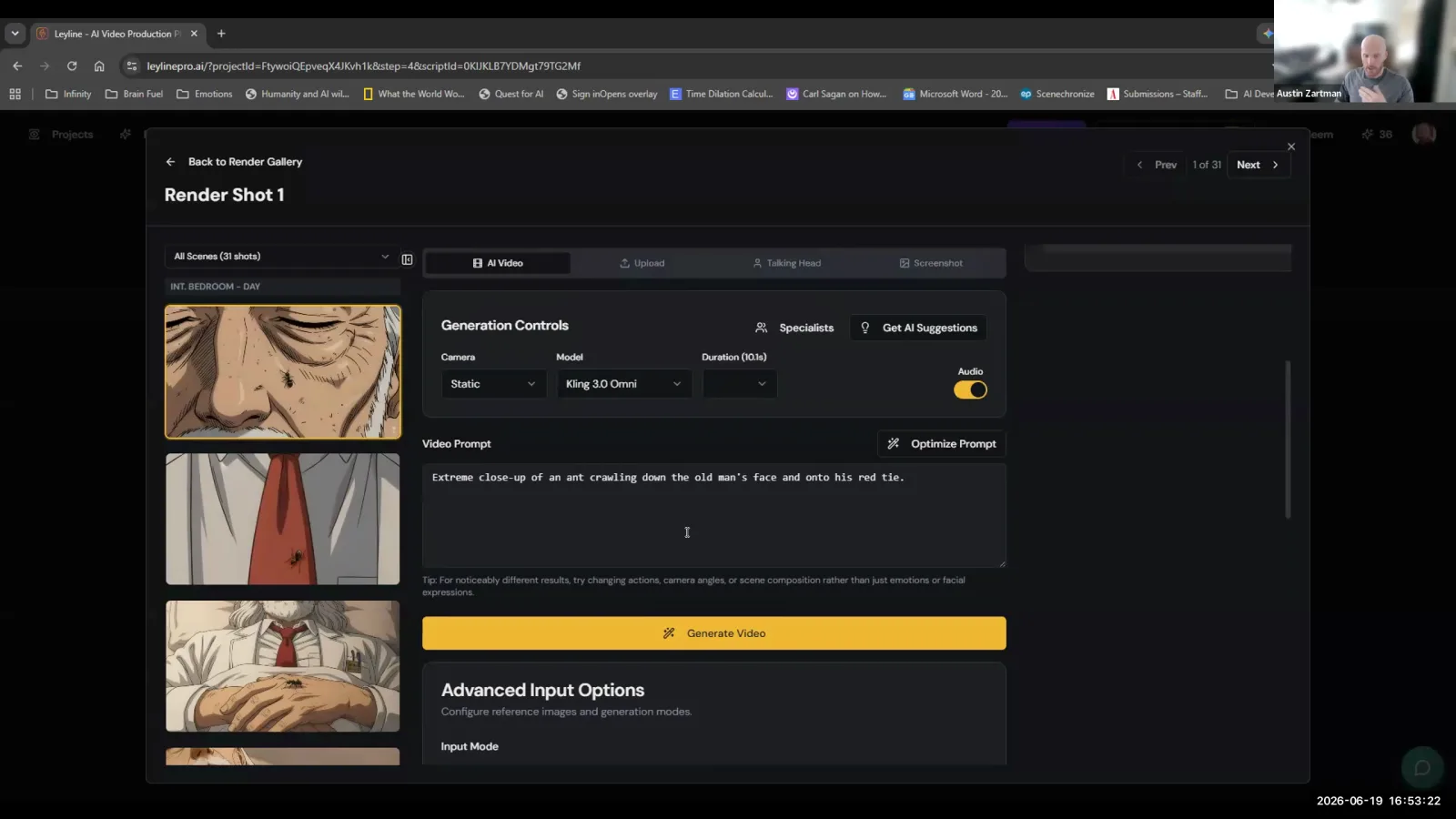
Text to video AI works by taking a written prompt and having a generative model create a video clip based on that description, though this method offers little control over the final visual style. You can bypass more complex processes and simply start with a prompt. For example, you could write, "an ant crawls down the old man's face onto his red tie," and the model will generate that scene. AI filmmaker Austin Zartman notes that while this is the most basic option, it is "not something that I would recommend" for serious projects.
The primary drawback is the lack of stylistic control. When you use only a text prompt, Zartman explains, "You can have the model take full control of the visual style, but it will almost certainly not be the style that you expected." For filmmakers, this unpredictability is a major obstacle. Narrative projects depend on visual consistency across shots, and a model inventing a new style for each clip is unworkable.
This is why many advanced AI filmmaking workflows use keyframes—still images that define the style, characters, and composition of a scene. Zartman states, "The reason why we spend so much time on the keyframes... is because doing that already communicates so much information to the video generation models that we don't have to describe in text." A keyframe provides the crucial visual context that text alone cannot, ensuring the generated video aligns with the filmmaker's vision.
Best Practices for Text to Video AI Prompts
To get the best results from text to video AI, your prompts must be simple and clear. The most effective approach is to limit each prompt to a single action and, at most, one camera movement. AI filmmaker Austin Zartman emphasizes that with video generation, the high-level note is that it "rewards simplicity and clarity."
Attempting to describe a complex sequence in a single prompt often confuses the AI model, leading to failed generations or bizarre, unusable results. For instance, instead of writing, "A woman walks across the street, looks both ways, and opens her car door," you would break it down into separate, distinct prompts. This disciplined approach dramatically increases the chances of a successful and coherent video generation.
Key practices include:
- One Action Per Prompt: Isolate a single, clear action. Zartman's specific rule of thumb is to have "one action per prompt."
- One Camera Movement (at most): Avoid combining multiple camera movements. A prompt can include a camera movement, but limit it to one.
- Use Negative Prompts: This feature allows you to specify what you don't want to see in the video. By adding terms to the negative prompt section, you can guide the model away from common errors or unwanted objects. It serves as a powerful tool for quality control, helping you steer the generation process with more precision.
Generation Time for Text to Video AI
Generating a short AI video clip from text typically takes between three to five minutes for about ten seconds of footage. This generation time highlights the resource-intensive nature of the process and is a key factor to consider in your workflow. According to Austin Zartman, this is a standard wait time you can expect when you start generating videos.
This delay means that text to video AI is not an instantaneous tool for rapid-fire experimentation. Each generation requires a significant time investment, which can slow down the creative process of iterating on shots and sequences. A filmmaker looking to produce even a one-minute scene would need to plan for a substantial amount of generation time. Zartman reinforces this time estimate, noting that even when generating a clip with dialogue, it will still "take probably like five minutes." This consistent time requirement underscores the need for patience and efficient planning when incorporating text-to-video tools into a project.
Choosing the Right Text to Video AI Models
There are multiple text to video AI models available, and users can often choose which one to use for a generation, with some being significantly more capable than others. In his masterclass, Austin Zartman points out that within the generation tools, "you have the ability to here to choose between all of these different models." He identifies one in particular, stating, "Seedance 2.0 right now is considered the best model."
Model selection is important because different models have different strengths and weaknesses. The more advanced models are capable of handling more complex instructions. For instance, some can generate dialogue and lip-sync directly from a text prompt. Zartman explains this feature: "I could say like, the old man wakes up and says, 'hello, Ruby.' And if I were to generate this video... the more capable models can include dialogue and lip sync just from the prompt." This capability represents a major step forward for narrative AI filmmaking, allowing for the integration of spoken lines without separate audio and animation steps. Choosing the right text to video AI model is therefore crucial for accessing these advanced features.
Understanding Video Quality and Resolution
For acceptable results from text to video AI, you should aim for a minimum resolution of 720p to avoid a grainy or dated appearance. Lower resolutions can significantly degrade the perceived quality of the footage, making it unsuitable for most professional or portfolio work. Austin Zartman offers a clear guideline on this topic.
"I find that 720p is kind of like the minimum video quality where you don't really notice that it's grainy at all," he says. "When you go below that, when you do 480p, it does look a little bit grainy. It looks like you're watching something from like 10 years ago." This comparison underscores the importance of selecting the right output settings. While higher resolutions like 1080p or 4K are preferable, 720p serves as a reliable baseline for producing clean, watchable content. Zartman's final advice is that "sticking with 720p and above is what you want to be at."
Frequently asked questions
Is text to video AI recommended for professional filmmaking?
Austin Zartman advises against relying solely on text to video AI if you need a specific, consistent visual style. He recommends using image keyframes to guide the AI, as this provides much more control over the final look than a text prompt alone, which often produces unpredictable styles.
How specific should my text to video AI prompts be?
Prompts should be simple and clear. According to AI filmmaker Austin Zartman, a best practice is to limit each prompt to a single action and, at most, one camera movement to ensure the AI model can interpret and generate the scene accurately and avoid errors.
Can text to video AI create dialogue?
Yes, more capable text to video AI models can generate dialogue and lip-sync directly from a text prompt. For example, you could prompt a character to say a specific line, and the model will generate the corresponding video with synchronized audio and lip movements.
How long does it take to create a video with text to video AI?
Generating a video with text to video AI is not instant. It typically takes between three to five minutes to generate a single clip that is approximately 10 seconds long. This time commitment is an important factor to consider when planning an AI filmmaking project.
What is a negative prompt in text to video AI?
A negative prompt is a feature that allows you to tell the AI model what you don't want in your video. It's a quality control tool used to refine the output by excluding unwanted elements, styles, or actions, giving you more precise control over the final result.
Keep learning
This guide is part of the AI Video Generation and Rough Cuts masterclass lesson.
Related guides:
Comments
Sign in with your Leyline account to join the conversation.