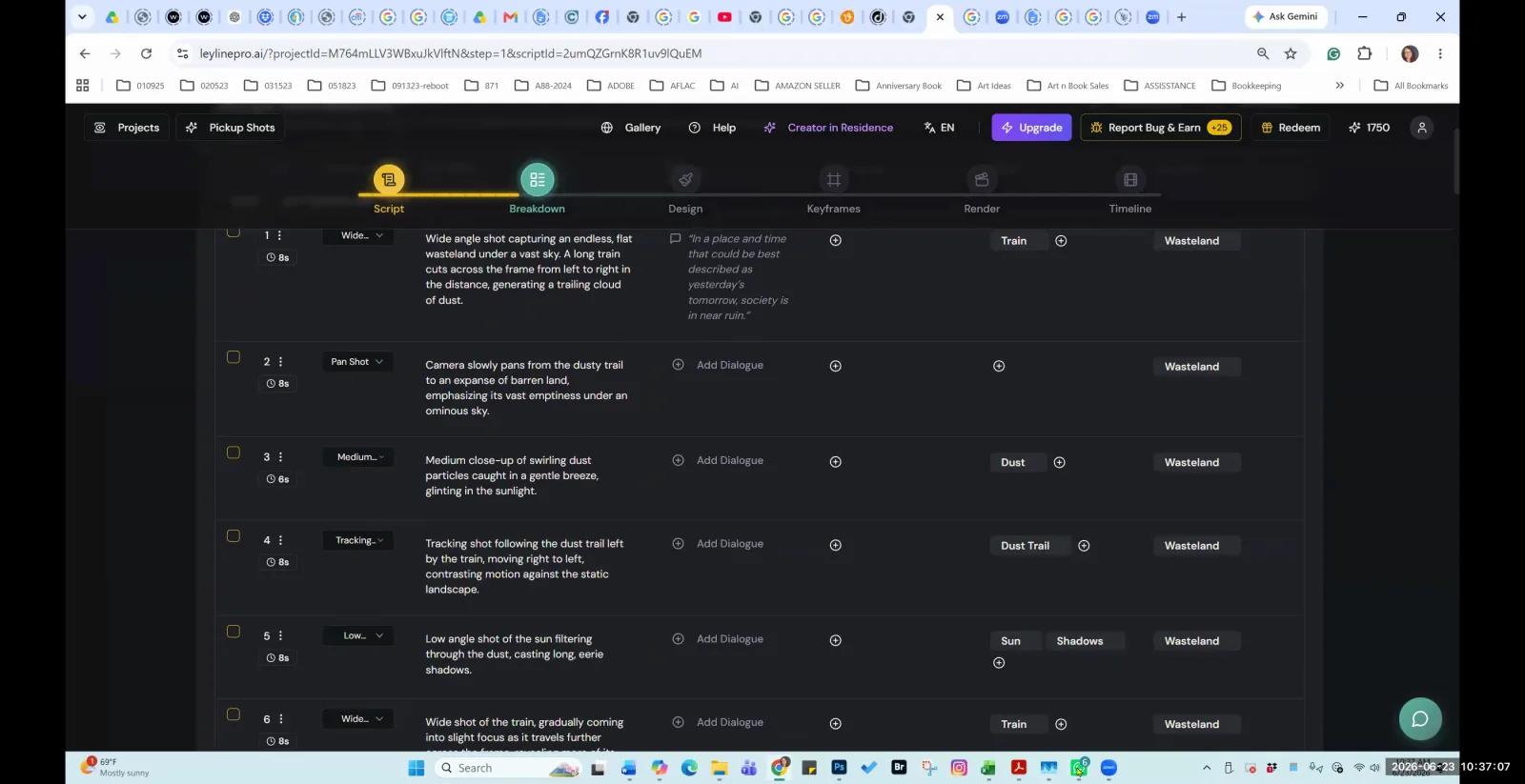
AI filmmaking software integrates artificial intelligence into the video production pipeline, from scriptwriting to asset generation and shot editing. The quality of these tools is not determined by full automation, but by a practical balance of AI-driven suggestions and essential manual controls. The best software provides features for efficiency, such as bulk generation, alongside the flexibility to override the AI when it struggles with complex creative tasks. This approach empowers filmmakers to leverage AI speed without sacrificing artistic control.
What features define the best AI filmmaking software?
The best AI filmmaking software includes features for efficient asset creation, granular shot editing, specialized project templates, and robust character management. Key functions include the ability to bulk generate assets to save time, manually adjust AI outputs for greater control, and use specific templates like a "vertical short template" for format-specific tasks. According to AI filmmaker Austin Zartman, a crucial element is the program's acknowledgment of current AI limitations, providing manual overrides for complex requests.
Effective software is built around a practical workflow. This includes:
- Shot Editing and Control: Essential tools allow for direct manipulation of the timeline. The software should offer basic but critical functions to
merge with previous shot or edit shot or delete the shot. This level of control ensures the filmmaker can refine the sequence precisely without being locked into the AI's initial output. It's the difference between a rough draft and a polished final cut. - Bulk Generation: For efficiency, a "bulk generate" feature is vital. This allows a user to
run, like, all together, so you don't have to generate one by one. This is particularly useful for creating multiple character variations, background assets, or script drafts simultaneously, significantly speeding up the pre-production and asset gathering phases of a project. - Intelligent Prompting Assistance: Good software assists the user in crafting effective prompts. A feature like
generate AI suggestionhelps create varied and effective prompts for different shots. As Zartman's session highlights, you oftenneed a different prompt for two shots, and AI-powered suggestions can help bridge the creative gap and produce more diverse visual results. - Character Management: A streamlined process for character design is a major benefit. The ability to
generate a complete character sheetautomatically, providingdifferent, uh, different views, simplifies one of the most time-consuming aspects of pre-production. Furthermore, the software should clearly define its asset import requirements, such as only supportingJPEG or PNGs at the moment to the respective character. - Specialized Templates: The software should cater to different modern formats. For instance, Austin Zartman recommends using a
vertical short template because there are functions to generate multiple scripts that's not herein other project types. This indicates that high-quality software provides unique toolsets optimized for specific outputs like vertical social media content.
How should AI software handle complex tasks?
The best AI filmmaking software should handle complex tasks by providing a manual adjustment option to override or refine the AI's output. Because AI can struggle with nuanced or intricate requests, this manual control is essential for professional results. Instructor Austin Zartman explains, "anything that is asking the AI to do more complex things is also leaving liberty to it. That's why there's a manual, uh, adjustment option in in in this program." This design philosophy acknowledges that current AI is a tool to assist, not replace, the filmmaker's judgment.
The software's interface should make it easy for the user to step in and make precise changes when the AI's interpretation doesn't align with their creative vision. This balance prevents frustration and ensures the final product meets the creator's standards, rather than being limited by the AI's current capabilities. A platform that offers this flexibility understands that filmmaking is an iterative process of refinement, something pure automation cannot yet replicate.
Why is manual control still necessary in AI filmmaking?
Manual control is still necessary in AI filmmaking because current AI technology has difficulty interpreting complex or multi-layered instructions accurately. The best software is designed with this limitation in mind, giving the user final say over the creative output. Austin Zartman notes that while attempting to automate everything would be nice, "the AI at the moment. It's really hard for it to like figure out what everything is, so it's safe" to provide manual overrides and separate complex tasks.
For example, some programs intentionally separate text and image uploads into different steps. This is a deliberate design choice because, as Zartman states, it's very easy for the program to make a mistake with images when they are combined with text in a single document. This approach prioritizes reliability and accuracy over complete, but potentially flawed, automation. It shows a mature understanding of the technology's current state, building a safer and more predictable tool for creators.
How does top AI software manage character and asset uploads?
Top AI software manages character and asset uploads by enforcing specific file formats and separating different media types to prevent errors. For character design, a key feature is the ability to automatically generate a complete character sheet, which gives the user multiple views of a character from a single prompt. When it comes to uploading custom assets, the software may restrict file types, for instance, supporting only JPEG or PNGs for character images. This specificity ensures compatibility and smooth processing.
A crucial design choice mentioned by Austin Zartman is the separation of text and image uploads. He explains this is because it's very easy for the program to make a mistake with images when they are embedded in documents with text. This methodical, separated process might seem less convenient, but it increases the reliability of the AI's interpretation and prevents asset corruption or misidentification. It is a practical solution to a known technological hurdle.
Can you use external AI tools like ChatGPT with filmmaking software?
Yes, you can and should use external AI tools like ChatGPT in your workflow, as the best AI filmmaking software allows for easy integration of externally generated content. A flexible workflow is a sign of a robust platform that understands creators use a variety of tools. During Austin Zartman's masterclass, one attendee shared their process, stating, "I've been doing everything in chat GPT and just uploading it from my file."
This demonstrates a practical and effective workflow where a filmmaker can leverage the advanced text-generation capabilities of a tool like ChatGPT for scripts, character backstories, or dialogue, and then smoothly import that content into their primary filmmaking application for visual generation and editing. This modular approach allows creators to use the best tool for each specific task, from writing to visual production, rather than being confined to a single, all-in-one ecosystem.
Frequently asked questions
What file formats does AI filmmaking software typically support? AI filmmaking software often supports common image formats for asset uploads. For example, some programs are specifically designed to only support the uploading of JPEG or PNG files for character assets, ensuring compatibility and reliable processing by the AI.
Why do some AI programs separate text and image uploads? Some programs require separate uploads for text and images because current AI has difficulty accurately parsing mixed-media documents. According to Austin Zartman, this is a safety measure, as it's "very easy for the program to make a mistake with images" when they are combined with text.
Can AI software generate a full character sheet? Yes, advanced AI filmmaking software can automatically generate a complete character sheet from a text prompt. This feature typically provides different views and angles of the character, significantly speeding up the character design and pre-production process for filmmakers.
Are there specialized templates for formats like TikTok or YouTube Shorts? Yes, effective AI filmmaking platforms often include specialized templates for different formats. Austin Zartman specifically recommends using a "vertical short template" because it contains unique functions, such as the ability to generate multiple scripts, that are not available in standard project types.
Is manual control important in AI filmmaking software? Yes, manual control is critical. Since AI can struggle with complex creative requests, the ability to manually adjust, edit, merge, or delete AI-generated shots is essential. This ensures the filmmaker retains creative authority and can refine the final product to their exact vision.
Keep learning
This guide is part of the Troubleshooting AI Script Breakdowns and Asset Management masterclass lesson.
Related guides:
Comments
Sign in with your Leyline account to join the conversation.