How to Build AI Short Film: A Practical Guide
To build AI short film projects successfully, you need a structured process that combines precise prompts with careful asset management. This method translates your creative vision into a series of inputs the AI can use to generate scenes, characters, and shots. This guide provides a specific workflow to build AI short film productions, covering script preparation, character consistency, and version control. Following this systematic approach is the most effective way to use AI tools, from initial concept to final rendered video. The goal is to guide the AI, not only command it—a key principle for anyone looking to build a compelling short film.
How to Set Up a Project to Build AI Short Film Productions
To start a new project to build AI short film content, use a template designed for the format, such as a "vertical shorts" template. AI filmmaker Austin Zartman recommends this approach because these templates include specialized functions, like the ability to generate multiple script versions, which is critical for iterative development. Starting with the right project structure streamlines every subsequent step of the generation process.
The template acts as a foundation, pre-configuring settings and preparing the system for the specific demands of short-form content. This choice is the first critical decision you make when you set out to build an AI short film. It ensures that the tools you use later for scriptwriting and scene breakdown will function as intended. Think of it as setting up a digital soundstage; the right setup prevents technical problems and allows for a more efficient creative process for the entire production. A proper setup is non-negotiable for a smooth workflow.
How to Prepare a Script to Build an AI Short Film
Prepare your script for AI by keeping it concise, as shorter scripts are easier for AI tools to break down and process accurately. A general guideline is that one page of a script translates to roughly one minute of screen time. For AI workflows, a three-page script, which equals about three minutes, is already considered quite long. Keeping the script focused and brief minimizes the potential for the AI to misinterpret scenes or generate inconsistent outputs.
As Austin Zartman notes, "a three-page script generally is three minutes. So this is quite long." This highlights the preference for brevity in the initial stages. The AI must perform a script breakdown, analyzing each scene for characters, locations, props, and actions. A longer, more complex script increases the cognitive load on the system, raising the likelihood of errors or omissions during this automated analysis. By starting with a shorter script, you create a more manageable dataset for the AI to work with, leading to a more accurate and efficient generation process. This is a fundamental principle if you want to build AI short film projects effectively and without constant errors.
Key considerations for your script include:
- Brevity: Aim for one to two pages for an initial breakdown. This is a practical limit for most current AI systems.
- Clarity: Use clear, direct language that is easy for a machine to parse. Avoid ambiguity, metaphors, or complex sentence structures.
- Focus: Each scene should have a clear purpose without excessive detail that could confuse the AI. Stick to the core actions and dialogue.
How to Create Consistent Characters to Build AI Short Film Content
You can create consistent characters by either uploading a pre-existing reference image or using the AI to generate a full character sheet from a text prompt. Once you have a character design you like, you must lock it in by promoting it to the project's "Creative Bible." This action saves the character's visual and descriptive data, ensuring it can be consistently referenced and reused across different scenes and episodes.
To generate a character from scratch, you can use prompts like "front view of a character." For more comprehensive results, Zartman suggests using the "generate a complete character sheet" function, which "will automatically give you different, uh, different views." This provides multiple angles (front, side, back) that are essential for maintaining consistency when you build AI short film projects.
Once a definitive look is established, the next step is to "promote it to the creative Bible, so you lock this character." This is a critical workflow step. It flags the character's design as the canonical version for the project, preventing the AI from generating new variations in later scenes. This process is the primary method for maintaining visual continuity for your cast throughout the entire short film. Without this step, the AI might generate slightly different versions of the character in each new shot, destroying the narrative's coherence. Mastering this is essential to build AI short film productions that feel polished and professional.
How to Organize Project Assets to Build an AI Short Film
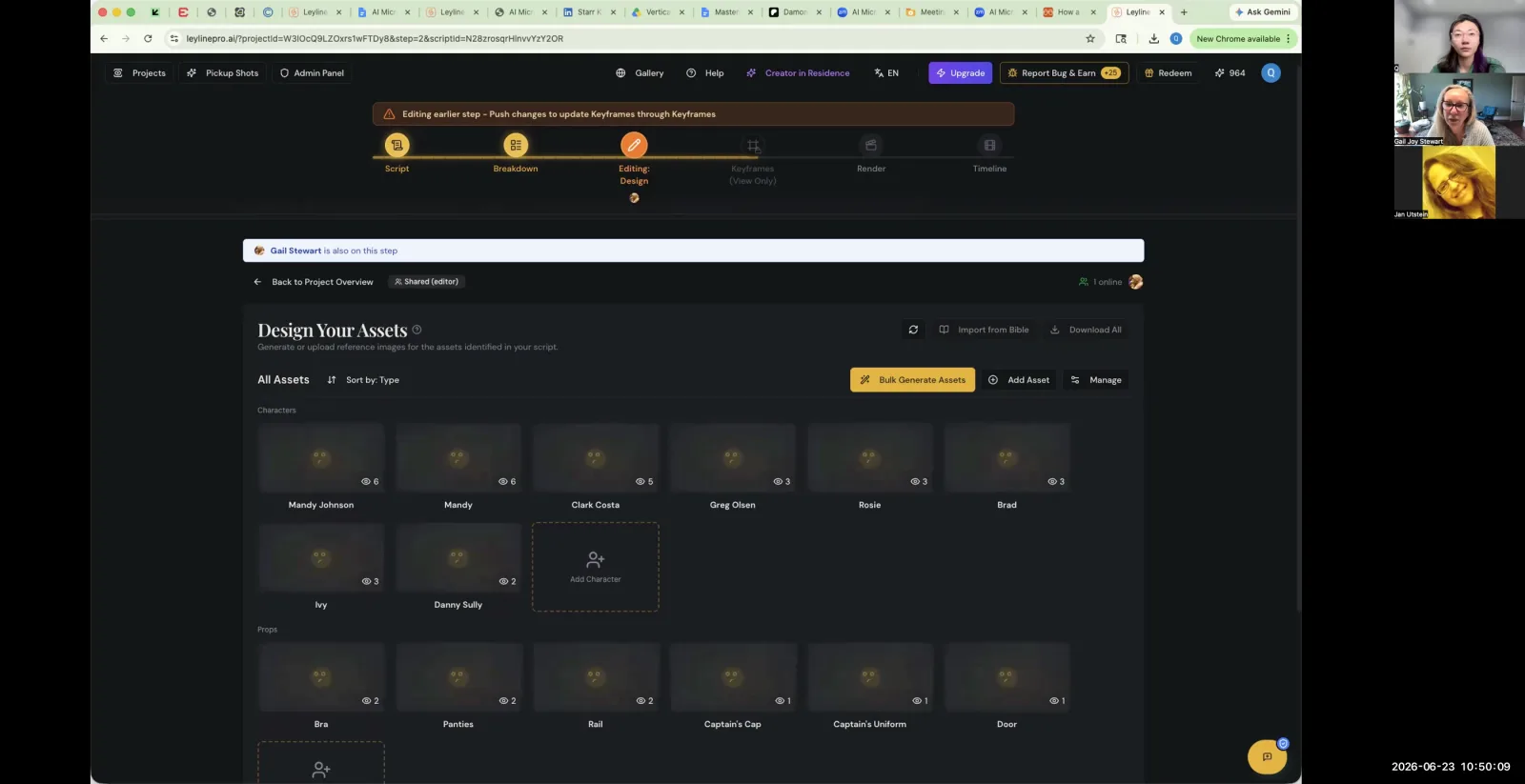
To avoid AI errors when you build AI short film projects, you must separate your text-based project guide from your visual assets. Your 'Creative Bible' should be a text-only PDF file containing all descriptions and lore. All images, such as character portraits, location references, or prop designs, must be uploaded individually under their specific cards within the project management tool.
Austin Zartman explains the reasoning behind this rule: "if you have a Bible that is like everything together, the program makes mistakes." The AI is designed to parse text from the Bible and images from the asset cards separately. Combining them confuses the system. Zartman clarifies the correct procedure: "if you separate the text and the images and the text is just where the Bible should be, and then you upload the images where the images should be, which is under each character card, then the program won't make a mistake."
This means there is no central, bulk-upload library for visuals. You must manually place each reference image in its proper context. "For now, you have to upload under each person because the program" is designed to associate each image directly with a specific element—a character, a prop, or a location. This meticulous organization is fundamental to producing an accurate and error-free result when you build an AI short film. This structured approach to asset management is a core discipline for AI filmmakers.
How to Handle Edits and Version Control to Build an AI Short Film
You can manage project versions by downloading a CSV file of your script breakdown at any stage. This file acts as a snapshot or backup of your project's structure. If you make changes you want to undo or wish to explore a different creative direction, you can revert to the previous state by re-uploading the saved CSV file. This is a crucial safety measure during the iterative process required to build AI short film projects.
This CSV backup method is a key part of the workflow. As one user in the masterclass clarified, "if for any reason, like the second rendition or the third rendition, we decide we want to go back to the first, we can re-upload that and and do that." This provides a safety net, allowing for experimentation without the risk of losing a working version of the film.
It is important to recognize the current limitations of the technology. Certain cinematic effects, like a slow zoom or pan on a static image, cannot be automated through prompts alone. For these specific shots, Zartman states, "You have to do that by hand at the moment." This involves taking the AI-generated still image into a separate video editing program to add the camera movement manually before inserting it back into the film sequence. This hybrid approach, combining AI generation with traditional post-production, is a common practice for creators who build AI short film content today.
Frequently asked questions
Can I put images in my Creative Bible file?
No, your Creative Bible must be a text-only PDF. According to AI filmmaker Austin Zartman, including images in the main Bible file causes the program to make mistakes. Visuals should be uploaded separately to their corresponding character, location, or prop cards when you build AI short film projects.
How do I go back to an earlier version of my AI film?
You can revert to an older version of your project by saving your script breakdown as a CSV file. This file acts as a backup. To restore that version, you simply re-upload the desired CSV file into the project, overwriting the current state of your AI short film.
How do I ensure my AI character looks the same in every shot?
To maintain character consistency, use the AI to generate a full character sheet and then "promote" the final design to the Creative Bible. This locks the character's appearance, ensuring the AI uses that specific reference for all future generations in the project as you build AI short film content.
What is the ideal script length for an AI short film?
For AI generation, a shorter script is better, as it is easier for the system to process accurately. A common guideline is one page per minute of film. A script of three pages is considered long for an initial AI breakdown, so aiming for 1-2 pages is a good starting point when you first build AI short film projects.
Can AI create camera movements like zooms automatically?
No, not on still images. While the AI can generate shots from different angles, specific camera movements like a slow zoom or pan on a static shot must be done manually. You have to export the still image and add the effect in a traditional video editor. This is a common manual step for the process to build AI short film productions.
Keep learning
This guide is part of the Troubleshooting AI Script Breakdowns and Asset Management masterclass lesson.
Related guides:
Comments
Sign in with your Leyline account to join the conversation.