Keyframes Explained AI Filmmaking: A Practitioner's Guide
A keyframe is a static image that serves as the foundational starting point for an animated video clip. This guide on keyframes explained AI filmmaking details how these images act as the primary visual reference for the ai model. Unlike in traditional animation where keyframes define major points of motion, in AI video generation, the keyframe is the static source. The quality, style, and consistency of these initial images directly impact the final video output. Their creation is a critical and time-intensive stage in the production workflow of the ai.
Keyframes Explained: AI Filmmaking's Starting Point
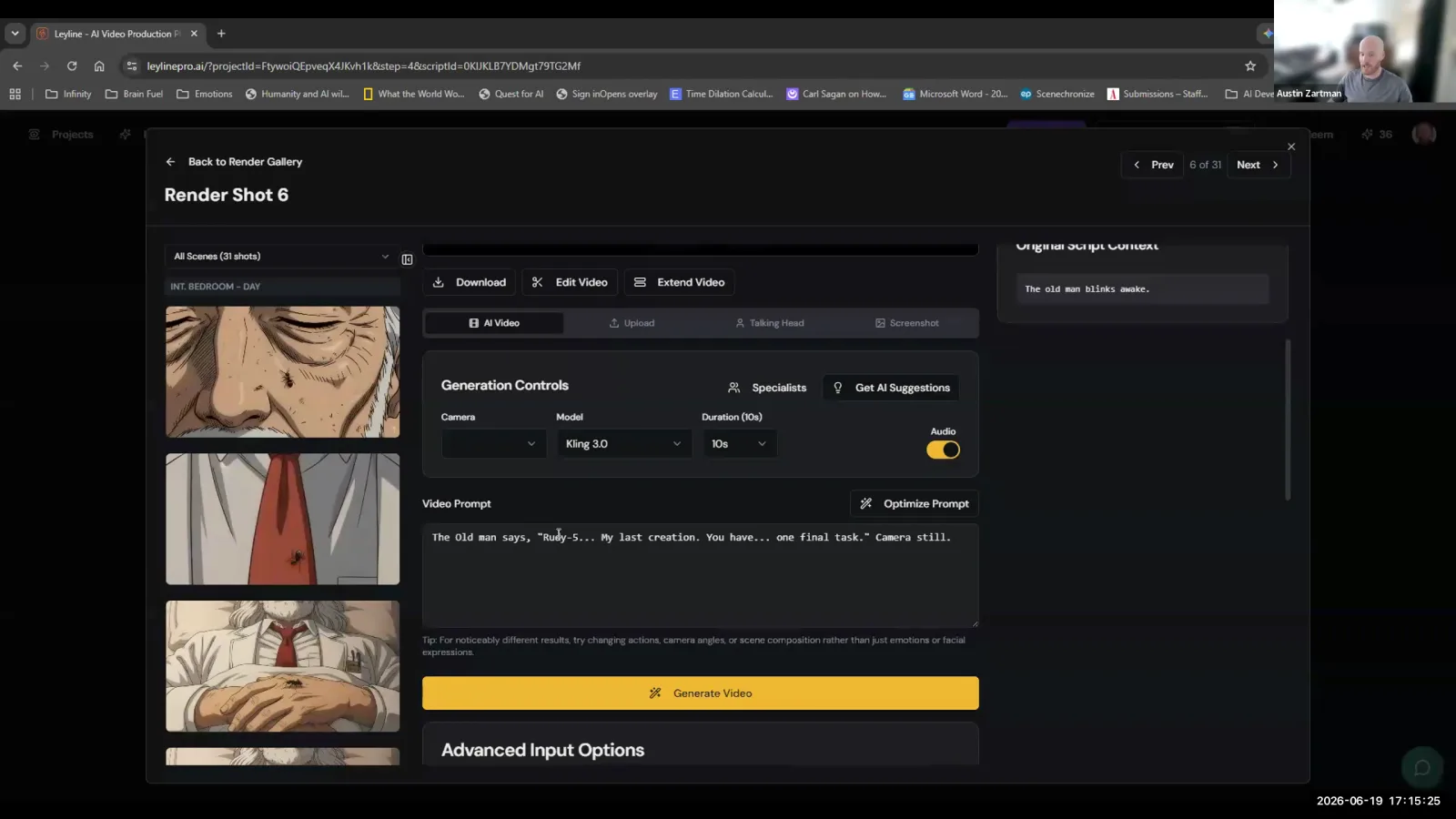
A keyframe is the starting reference image for an AI-generated video clip. AI filmmaker Austin Zartman, creator of the AI series ASHES, defines keyframes as "essentially the start frames of your video clips." Every AI video model uses a reference image to begin its generation process, and the keyframe serves this exact purpose. It is the static picture that the ai will bring to life, making it the single most important asset for controlling the visual outcome of a shot.
Zartman clarifies this by stating, "The best way to generate videos is by starting with a reference image. So, that's what our keyframes are for." He explains that nearly every video generation model allows the user to provide a start frame. The entire list of shots planned for a film is first developed as a series of these static keyframes. Each one will then serve as the initial image for its corresponding short video clip during the animation phase. This approach grounds the unpredictable nature of AI generation in a solid, pre-approved visual foundation, giving the filmmaker a significant degree of control before any motion is even created.
Why is keyframe consistency so important?
Keyframe consistency is important because it saves significant time and money during the video generation stage, which is far more resource-intensive. According to Austin Zartman, the video generation phase is "significantly more expensive in terms of the credits that it's going to use, and it's significantly more time consuming." By spending the necessary time to ensure all keyframes are visually consistent and match the desired style, filmmakers dramatically increase the probability of getting usable video clips on the first try.
This front-loading of work achieves two main goals:
- It establishes a coherent visual language. Zartman emphasizes that the most time-consuming part of the process is generating keyframes, stating, "it's worth it to go slow and to... make sure that there's consistency between these." This careful work ensures that characters, lighting, and environments look the same from shot to shot, a crucial step in AI filmmaking.
- It provides the ai with a powerful visual guide. Consistent keyframes reduce the need for complex text prompting. Zartman explains, "The reason why we spend so much time on the keyframes and getting them to be consistent and in the style that we want is because doing that already communicates so much information to the video generation models that we don't have to describe in text." A well-crafted keyframe contains implicit information about composition, color grading, character design, and mood. This allows the ai to focus on generating motion that honors the established look, rather than trying to interpret a style from a text prompt alone, which can often lead to unexpected and unusable results.
What is the primary purpose of creating keyframes?
The primary purpose of creating keyframes is to visually map out the entire story of a film before committing to the animation process. This allows the filmmaker to solidify the narrative and aesthetic direction with static images, which are faster and cheaper to generate and iterate on than full video clips. The completed set of keyframes should effectively tell the story on its own, like a detailed storyboard or comic book. This is the foundation of the keyframes explained AI filmmaking workflow.
Austin Zartman states that "the goal of finishing all these keyframes is to be able to tell the visual story of your episode, and getting it ready to animate these shots into individual clips." This pre-visualization step is not only about planning; it's a crucial part of the production pipeline. Once the keyframes are approved and consistent, the creative heavy lifting for the film's visual identity is largely complete. The subsequent step, animation, becomes a more technical process of bringing those carefully constructed moments to life. This separation of concerns—visual development first, animation second—is a core principle for an efficient AI filmmaking workflow. It ensures that the expensive rendering phase is used to execute a clear, pre-defined vision.
How do keyframes fit into the AI filmmaking workflow?
Keyframes are the final output of the image generation stage and the primary input for the video rendering stage. Understanding this handoff is central to the topic of keyframes explained AI filmmaking. After a filmmaker has generated, refined, and sequenced all the necessary static keyframes for their project, they transition them into the next phase of production where they will be animated. This workflow creates a clear division between static image creation and motion generation.
Zartman describes this handoff clearly: "So, once you've generated all of the keyframes, you'll push the changes to the render stage." He continues, "The render stage is where we will start to turn those static keyframes into moving shots." This workflow structure is designed for efficiency. It prevents filmmakers from wasting resources on animating shots that are not visually consistent or narratively correct. By finalizing the entire visual sequence as static images first, the filmmaker can review the story's flow and aesthetic cohesion at a low cost. Only when this static sequence is locked does the process move to the render stage, where each keyframe becomes the starting point for its respective video clip.
What is an end frame and how does it relate to a keyframe?
An end frame is an optional static image that defines the final frame of an AI-generated video clip, just as a keyframe defines the starting frame. When both a start frame (the keyframe) and an end frame are provided to a video generation model, the ai's task is to create the motion that occurs between these two defined points. This gives the filmmaker more precise control over the clip's trajectory.
Austin Zartman explains the concept: "You have the option, in most models to generate the clip without an end frame. An end frame is essentially the last frame in a clip. And if you include an end frame, the model will simply generate everything that happens between that first frame and that final frame." Using an end frame is particularly useful for specific actions, such as a character turning to face a specific direction or an object moving to a precise location. However, it's not always necessary. For shots where the motion is more ambient or less directed, generating with only a start keyframe is often sufficient, giving the ai more freedom to interpret the movement.
Frequently asked questions
How much time should I spend on keyframes?
You should spend the majority of your production time on keyframes. AI filmmaker Austin Zartman states that keyframe generation "is going to be again, like what takes you the most amount of time." He advises filmmakers to go slow and be meticulous to ensure consistency, which saves time and resources later.
Do keyframes replace text prompts in AI video generation?
Keyframes do not entirely replace text prompts, but they significantly reduce reliance on them. A strong, consistent keyframe visually communicates style, composition, and character details, meaning the text prompt can be more focused on describing the desired motion rather than the entire scene's aesthetic.
What happens after all the keyframes are finished?
Once all keyframes are generated and finalized for consistency, they are moved to the "render stage." In this stage, each static keyframe is used as the starting image for an AI model to generate a short, animated video clip, effectively bringing the static storyboard to life.
Are AI filmmaking keyframes the same as in traditional animation?
No, they serve a different function. In traditional animation, keyframes define the start and end points of a smooth transition. In AI filmmaking, a keyframe is typically just the single starting image for a video clip, providing the ai model with a complete visual reference from which to generate motion.
Why not only generate video directly from text?
Generating video directly from text often produces inconsistent and unpredictable results, especially for a narrative film. By first creating keyframes, you establish visual consistency for characters, lighting, and style. This ensures the final video clips are coherent and align with your creative vision, a common challenge in AI filmmaking that keyframes help solve.
Keep learning
This guide is part of the AI Video Generation and Rough Cuts masterclass lesson.
Related guides:
Comments
Sign in with your Leyline account to join the conversation.