The AI Microdrama Workflow and Monetization Landscape
Cohort 1, Session 6 — taught by Austin Zartman, creator of the AI short-film series ASHES.
You make a film with AI by following a six-step production workflow: concept development, creating a series bible, generating key frame images, animating those images into video clips, and finishing with sound design and color grading. This process focuses on creating short, vertical microdramas by prompting for discrete actions and using editing tools to assemble the final product, rather than generating entire scenes at once.
What you will learn
- Understand the six core stages of AI microdrama production: concept, writing, image generation, video generation, editing, and sound design.
- Learn about different distribution and monetization models, including independent platforms, aggregators, and major platforms like TikTok.
- Discover what types of AI-generated content are currently trending and successful.
- Gain practical troubleshooting skills for common issues in image/video generation and editing.
- Develop a strategy for releasing and promoting a new series.
Create an AI Microdrama Episode from Start to Finish
This workflow covers the complete six-stage production process for creating a single episode of an AI microdrama, from the initial idea to the final export.
Step 1. Begin with concept development by creating a 'Series Bible' that outlines your logline, characters, world, and episode ideas.
Step 2. Write the episode script, incorporating the 'hook, turn, and cliff' structure to engage viewers in a vertical format.
Step 3. Move to image generation to create the key frames for your scenes, focusing on maintaining visual consistency.
Step 4. Use your key frames to generate video clips, prompting the AI with simple, discrete actions to avoid errors.
Step 5. Import your generated clips into an editing program like CapCut to assemble the episode. Trim clips, add camera moves, and reframe shots to enhance the story.
Step 6. Complete the episode with sound design, adding voiceover, music, and sound effects to create an immersive atmosphere.
Generate Better Prompts with ChatGPT
Use a large language model like ChatGPT to refine your ideas into detailed, effective prompts for generating specific images and video clips for your story.
Step 1. Open a chat with an AI like ChatGPT and describe the scene or action you want to create in plain language.
Step 2. Upload your visual references, such as character designs or key frames, to give the AI context.
Step 3. Ask the AI to write a detailed, concise prompt for an AI video generator based on your description and images.
Step 4. Copy the AI-written prompt and paste it into the prompt field of your image or video generation tool.
Add Consistent Voiceover in an Editor
Learn to replace inconsistent AI-generated audio by recording a new voiceover track and syncing it to your video clips in a standard editing program.
Step 1. Generate the desired line of dialogue as an audio file using a text-to-speech tool like 11 Labs or the voiceover feature in your platform.
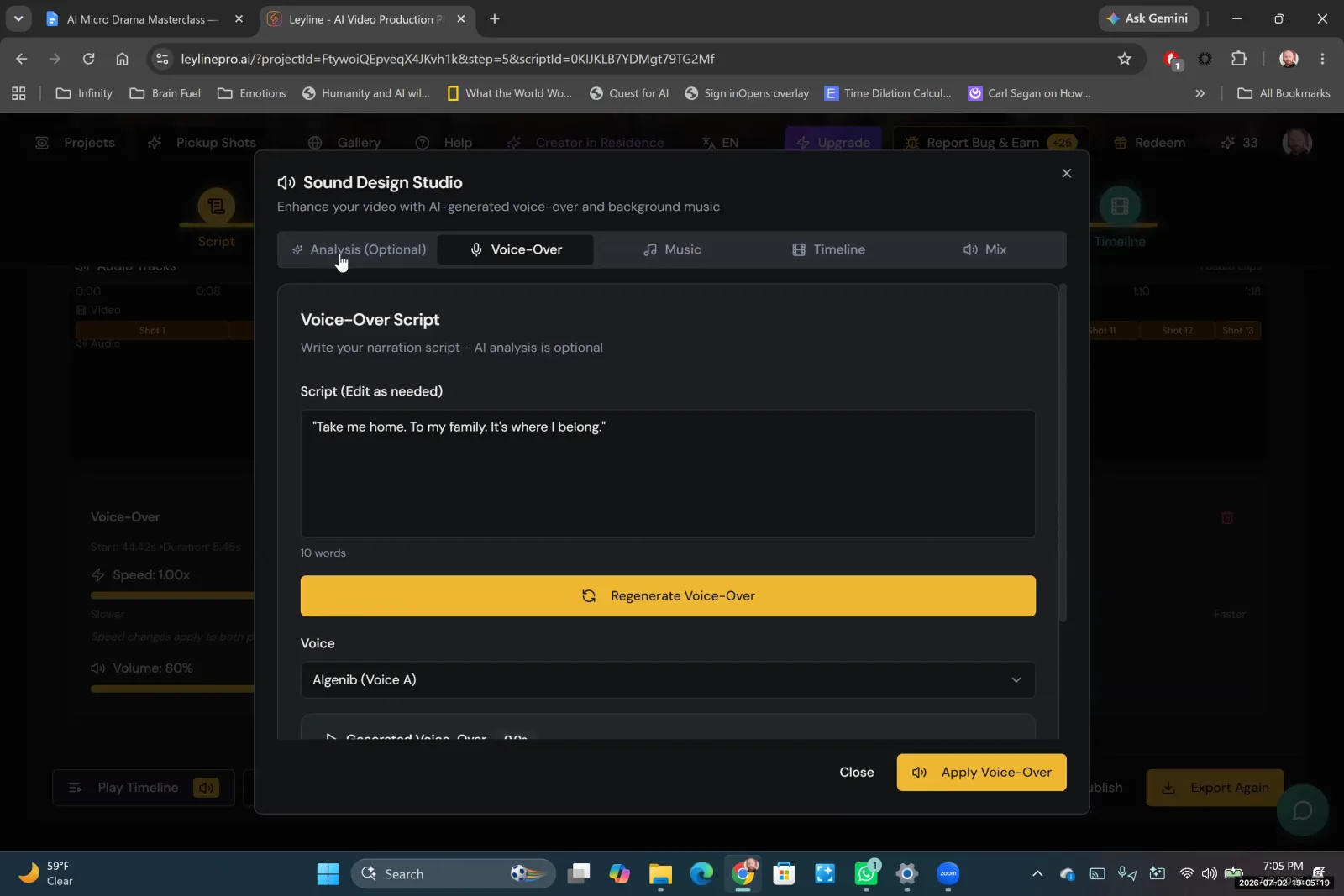
Enter your script into the platform's voice-over tool to generate the audio.
Step 2. Download the generated audio file.
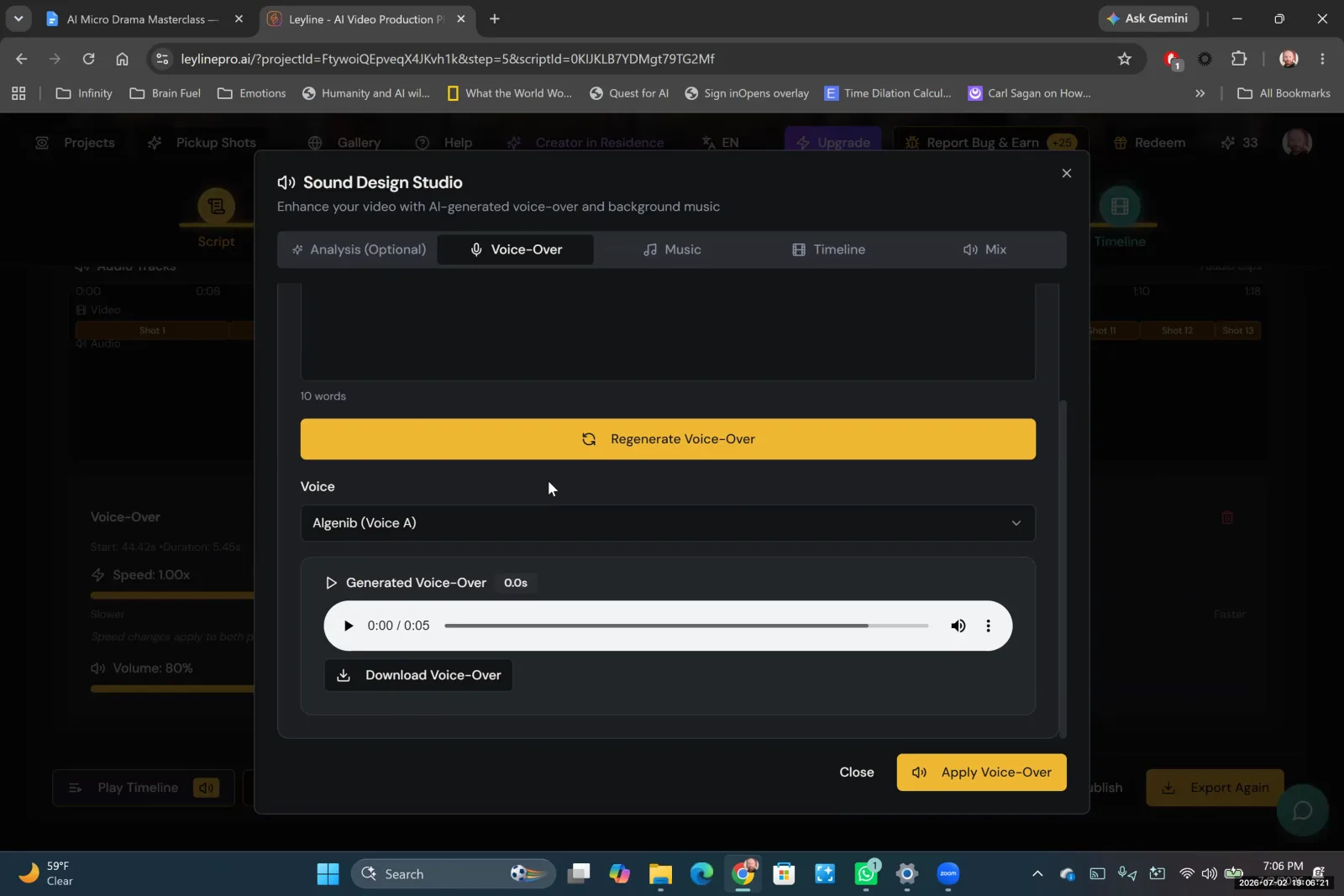
After generating the voice-over in the Sound Design Studio, download the audio file to your computer.
Step 3. Import the audio file into your editing software, such as CapCut, and place it on the timeline.
Step 4. Align the audio track with the corresponding video clip, matching the dialogue to the character's lip movements.
Key terms
Concept Development. The first of six major stages in the AI workflow, where the core ideas for a series are established in a Series Bible, including loglines, characters, world-building, and episode concepts.
Series Bible. A single source of truth for your series that contains your loglines, characters, world, and episode ideas. It's a helpful reference document, especially deep into a series.
Hook, Turn, and Cliff. A narrative structure for vertical storytelling microdramas designed to create compelling one-to-two-minute stories. It consists of a hook to grab attention, a turn or twist in the story, and a cliffhanger ending to keep viewers invested.
Image Generation. The process of creating still images (key frames) using AI models, noted as one of the most frustrating, time-consuming, and expensive parts of the production process.
Key Frames. The still images generated with AI that are then used as the basis to generate video clips.
Discrete Actions. Simple, complete actions that are easier for an AI video model to generate successfully. In contrast, half-actions or complex sequences are more likely to cause the model to break down.
80% Rule. A principle where an AI-generated clip that is 80% of the way to being perfect can be finalized and fixed using an editing program, saving time and resources on regeneration.
Sound Design. The process of adding music, sound effects, voiceover, and environmental cues to a video to create immersion, atmosphere, and emotion.
Color Grading. An advanced post-production technique to adjust and match the colors across different clips, which can reduce the need for perfect color consistency during the image generation stage.
Vertical Storytelling. A format of storytelling created specifically for vertical screens, like on mobile phones.
Paywall. A feature on a distribution platform that allows a creator to lock certain episodes (e.g., after the fifth one) and require viewers to pay to continue watching.
Aggregator. A company or entity that bundles content from multiple independent creators to achieve greater traffic and better deals on large distribution platforms like TikTok and YouTube.
UGC (User Generated Content). A model where platforms allow users to create and upload their own content. Successful UGC series can sometimes be brought into the company's official production fold with a full team and resources.
Binge Watch Model. A release strategy where all episodes of a series are dropped at once, allowing the audience to watch them in a single sitting. This is considered the primary model for microdramas.
Negative Prompt. An instruction given to an AI model specifying what elements to exclude from the generated output, used to control for unwanted details or artifacts.
Start and End Frames. A video generation technique that uses both a starting key frame and a final key frame to guide the AI, which can help control the transformation and motion within the clip.
POV Shot. A camera perspective that shows what a character is seeing, as if from their own eyes.
Common mistakes to avoid
- Asking an AI model to perform too many actions or camera movements in a single prompt, which increases the likelihood of errors.
- Forgetting to specify a static camera, leading to unwanted and inconsistent camera movements generated by the AI.
- Neglecting sound design, which is as crucial as visuals for creating an immersive and emotional experience.
- Focusing on monetization from the very beginning of the creative process, which can compromise the quality of the story.
- Trying to achieve a perfect video clip directly from the AI generator instead of using editing tools to fix minor imperfections (the '80% rule').
- Attempting to show every second of an action, rather than cutting between key moments and allowing the audience to infer the connecting action.
- Using character names in prompts without providing a corresponding visual reference, as the AI model has no memory of characters between prompts.
- Releasing episodes on an inconsistent schedule, which makes it difficult to build and retain an audience.
- Getting stuck on one difficult shot for days instead of simplifying the action or finding a creative workaround through editing.
Frequently asked questions
What is the complete workflow for making an AI-generated video series?
The workflow has six stages: develop the concept and series bible, generate key frame images from your script, animate the images into video clips, and then assemble them. The final steps are to add professional sound design and perform color grading in an editor to complete the episode.
How can I monetize an AI microdrama series?
Monetization can be achieved by distributing your series through aggregator platforms that place content behind a paywall. These platforms often use a binge-watch model, so having a complete season ready is beneficial. Focus on creating a quality story first before pursuing monetization strategies with these platforms.
What is the 'hook, turn, cliff' story structure for short videos?
The 'hook, turn, cliff' structure is a scripting model for vertical storytelling. It begins with a strong hook to grab attention, introduces a 'turn' or twist in the middle to maintain interest, and ends on a cliffhanger to encourage viewers to watch the next episode of the series.
What are the most common problems in AI video generation and how to fix them?
Common issues include unwanted camera movement and errors from complex prompts. Fix these by specifying a static camera and prompting for single, discrete actions. Also, use the '80% rule': accept imperfect clips and fix minor flaws in an editor rather than trying for a perfect initial generation.
How can I create consistent characters and scenes in AI video?
AI models lack memory between prompts, so you must provide a visual reference for your characters in each new prompt instead of only using their names. For scenes, use negative prompts to remove unwanted elements and specify camera details like POV shots to maintain a consistent look.
In the instructor’s words
“Image generation... is one of the most frustrating and time-consuming and expensive parts of the process. It takes up 50% of the time that I spend making these projects.”
“Music is a shortcut for getting an audience to know how to feel about what's happening on screen.”
“Because you know the different steps and have at least attempted it, you are ahead of 90% of people in this space. Truly.”
This tutorial was produced from the Leyline Masterclass recording (Cohort 1, Session 6, 2026-07-02). Screenshots are captured directly from the session.